Raysync Large File Transfer: How to Choose File Transfer Protocol?
February 2, 2023In the process of file transfer, TCP and UDP are transport layer protocols, and their communication mechanisms are different from the application scenarios. The version V5.0.3.8 of Raysync supports the setting of transfer protocol in 4. In order to better answer the question of how users choose file transfer protocol, the following contents make an easy-to-understand short answer to file transfer protocol:
- Automatically select UDP/TCP: it will automatically switch to the TCP mode when the transfer latency is less than the value you configured.
- Only UDP
- Only TCP
- Default: The UDP mode will be used in priority, it'll automatically switch to TCP mode when the process of transfer is interrupted.
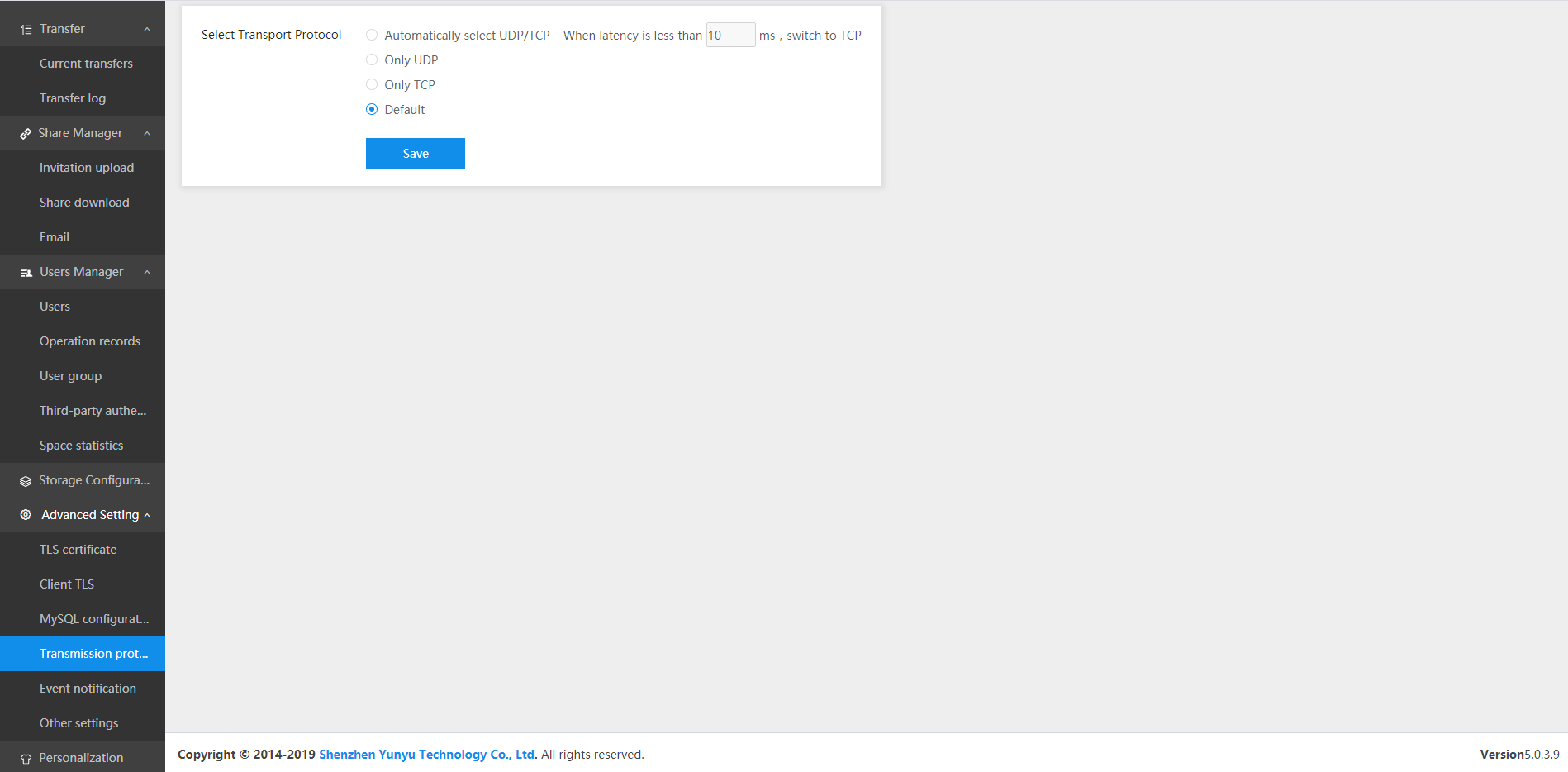
Why are there four transfer protocols? First of all, we should understand the meanings and differences between these transfer protocols:
The basic difference between TCP and UDP:
TCP refers to the Transmission Control Protocol, and UDP means the User Datagram Protocol. Both of them are the protocol of the transport layer, but they have different mechanisms.
- Message mode: TCP designed for the connection-oriented streaming mode, while UDP for connectionless datagram mode.
- TCP provides reliable services, and UDP may lose packets.
- TCP has the strict requirement of system resources, while UDP not.
- TCP transfer efficiency is slow, UDP has good real-time performance, and its work efficiency is higher than TCP.
- Each TCP connection can only be point-to-point, while UDP supports one-to-one, one-to-many, many-to-one and many interactive communication.
The scenarios of TCP and UDP:
In conclusion: TCP is a kind of reliable transfer method but the transfer speed is relatively slow. While UDP is relatively unreliable but has ultra high speed. Therefore, when choosing a specific file transfer protocol, it should be decided according to the requirements of communication data.
If the real-time investigation of communication data is far more important than the integrity of communication data, TCP protocol (such as file transfer, important status update, etc.) is preferred; On the contrary, UDP protocol (such as video transfer, real-time communication, etc.) is used.
The four file transfer protocols supported by Raysync are designed to facilitate users to configure flexibly according to actual transfer requirements. It is not limited to a certain transfer protocol, and is suitable for file transfer requirements of all walks of life. The ultimate purpose of file transfer software provided by Raysync is to help more enterprises realize high-speed data transfer and create value for enterprises.
You might also like
Industry news
June 26, 2024Confused by the File Transfer Protocol (FTP)? Get it explained here!

Industry news
February 28, 2025Struggling with cross-platform file transfers? Learn how to use Rsync, or explore faster, easier alternatives. We cover the challenges and solutions for seamless data movement between Windows and Linux systems.

Industry news
April 17, 2025Looking for the best way to transfer large files over Internet in 2025? Explore top methods for individuals and businesses, including cloud storage, file transfer services, and P2P tools.