Raysync - Modern powerful file transfer management platform
January 12, 2021As an enterprise-level tool-based software for accelerating large file transfer, Raysync not only performs well in file transfer acceleration, but also makes great efforts in file transfer management, especially in the aspects of file transfer control, security, convenience and ease of use.
The large file transfer solution provided by Raysync can meet the following requirements:
All the platform materials of the enterprise can be collected in one place, and the documents can be searched and accessed quickly;
Multi-mode transmission, supporting point-to-point, multi-point mutual transmission, data cloud transmission, one-to-many data distribution and other modes;
Raysync supports document intelligent synchronization, realizes automatic archiving operation, and reduces the time consumption of archiving and search;
Raysync supports point-to-point transmission, end-to-end transmission between users directly, and file transmission is completed in one step, saving time and space!
Global security monitoring and management, real-time monitoring of online transmission logs, and visual, controllable and traceable core business data;
Support local storage and three-party cloud object storage, with its own configuration and flexible switching;
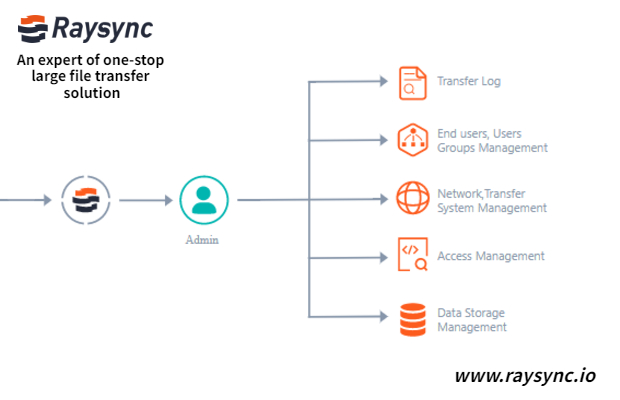
The technical research of Raysync on file transfer management service answers the problem that large file transfer software can solve: how to use all functions of enterprise content management solution without changing the IT infrastructure of the enterprise itself.
As a one-stop solution provider for large file transmission, Raysync has provided high-performance, safe and stable large file transmission and transmission management services for 2W+ enterprises in IT, finance, film and television, biological genes, manufacturing and many other fields.
You might also like
Raysync News
April 12, 2024Many compressed files are transferred to a file server. Users are unable to view or preview them. The ability to unzip files online on the server solves this problem and significantly improves the customer experience in a variety of ways.

Raysync News
June 17, 2022This article details several file sync methods for Window 11, how to choose the most effective file sync method? Click to learn more!

Raysync News
June 1, 2022Automatic file transfer can help enterprises reduce support overhead and error rates, and improve efficiency. Here are 6 best automatic file transfer solutions that can help your business.