From Command Line to Natural Language: How AI Is Transforming Enterprise File Transfer
June 5, 2026

TL;DR — Key Takeaways
- FTP/SCP bandwidth utilization collapses to 30–50% in cross-border environments; modern UDP acceleration achieves 95%+
- McKinsey's November 2025 State of AI report: 88% of enterprises now use AI regularly in at least one function; 62% are deploying or experimenting with AI agents
- AI-native file transfer replaces command-line operations with natural language — "upload this folder to the Singapore server" is a complete instruction
- Raysync's UDP acceleration delivers transfer speeds up to 100x faster than FTP, sustaining high throughput even under 20% packet loss conditions
- The managed file transfer (MFT) market reached $2.45B in 2025 and is projected to hit $7.18B by 2035 — enterprises are actively investing to fix this infrastructure layer
Why Traditional File Transfer Is Your Biggest Hidden Bottleneck
Your IT team just spent two hours troubleshooting a failed cross-border transfer. The 500GB video file for tomorrow's production deadline is stuck at 23%. The engineer is buried in log files. The director wants updates. This is Tuesday.
This is daily life for enterprises still relying on FTP and SCP — protocols designed in the era of floppy disks, now forced to carry petabytes of AI training data, 4K footage, and mission-critical assets across continents. Traditional file transfer hasn't just aged poorly. It has become the single largest friction point in digital operations that nobody talks about.
The core problem is TCP itself. FTP was standardized in 1971. SCP arrived in the 1990s. Both are built on TCP, and TCP's congestion control — the mechanism that makes transfers reliable — also destroys their performance under real-world conditions. Every packet loss event triggers a slowdown. In cross-continental transfers where round-trip times exceed 100ms and packet loss regularly hits 1–5%, TCP backs off aggressively. Bandwidth utilization collapses to 30–50% in the best case; under worse conditions, transfers stall entirely.
The operational layer compounds the technical problem: standard FTP/SCP requires memorizing command syntax, manually setting parameters, and reading through cryptic error logs when things fail — which is often.
| Pain Point | Real-World Impact |
|---|---|
| TCP congestion under packet loss | Bandwidth drops to 30–50% on cross-border connections |
| Fault recovery | 10–30 minutes to diagnose via log files |
| Manual configuration | Non-technical staff cannot initiate or manage transfers |
| No intelligent retry | Failed transfers require a full restart from byte zero |
Supporting data: cross-border data transactions are growing at approximately 29–30% annually (Precedence Research, 2025). The global MFT market was valued at $2.45B in 2025 and is projected to reach $7.18B by 2035 at an 11.35% CAGR — a clear signal that enterprises are actively investing to fix infrastructure built for a different era.
AI Has Entered Every Workflow — File Transfer Is the Missing Link
McKinsey's November 2025 State of AI report surveyed nearly 2,000 organizations across 105 countries. The findings are unambiguous: 88% of enterprises now use AI regularly in at least one business function, up from 78% twelve months prior. More striking, 62% are at some stage of deploying AI agents — autonomous systems capable of planning and executing multi-step workflows without human intervention (23% scaling, 39% experimenting).
The sectors driving this adoption are exactly those that transfer the most data. Technology companies report ~94% AI adoption. Telecom operators: 97% AI engagement, with 48% already deploying agentic systems. Media, life sciences, manufacturing — all accelerating.
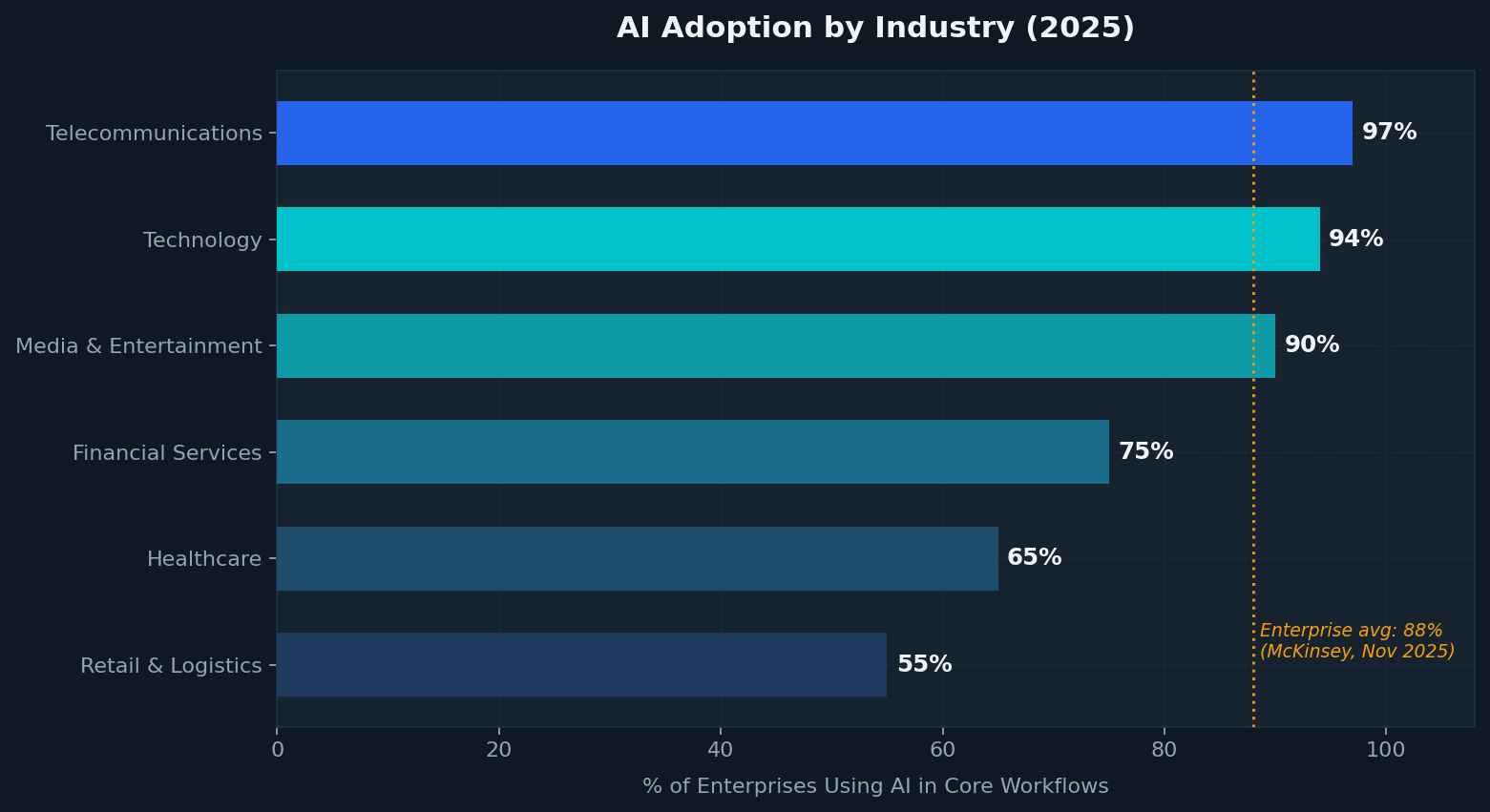
Figure 1: AI adoption rates by industry sector (2025). Tech/Media/Telecom exceed 90%. Enterprise average: 88% (McKinsey, Nov 2025). Financial Services, Healthcare, and Retail estimates from Coherent Solutions / Netguru 2025 surveys.
The implication is direct: if your AI workflows can't move data autonomously, the "autonomous" label is misleading. An AI agent that analyzes footage but requires a human to manually transfer it via command line isn't an AI workflow. It's a human workflow with an expensive step bolted on the front.
File transfer is the connective tissue of enterprise AI. In 2025, that tissue is being upgraded.
What AI-Powered File Transfer Actually Looks Like: Raysync Transfer Skill
Raysync's Transfer Skill is a high-speed transfer capability built to integrate directly into any AI agent or automated workflow. The design philosophy: if you can describe the transfer in plain language, the system executes it. The underlying engineering is considerably more sophisticated.
Natural Language Commands: The End of the CLI
Traditional file transfer is a command-line discipline. You need to know the syntax, remember flags, and correctly specify every parameter — source path, destination, authentication method, port, protocol variant. One typo breaks the operation. Non-technical users are locked out entirely.
AI-native transfer inverts this. Natural language interaction (NLI) lets any user trigger complex transfer operations through conversational commands:
"Upload the footage from D: drive to the Singapore production server"
"Download the latest version of the design files to my desktop"
"Share this folder so the London team can upload directly"
The AI agent parses intent, builds the transfer command, authenticates, and executes — typically in under 10 seconds. Error handling, path verification, and retry logic are automatic. The transfer either succeeds or reports precisely why it didn't.
UDP Acceleration: Built for Real-World Networks
Raysync's proprietary UDP transfer protocol is purpose-built to solve TCP's fundamental weakness under high-latency, high-packet-loss conditions. Where TCP backs off when it detects congestion, Raysync's UDP layer manages congestion at the application layer, maintaining throughput across degraded network conditions.
Independent benchmarks published by Raysync (2025) show:
- 95%+ bandwidth utilization on standard enterprise networks
- 60–70% of theoretical maximum throughput maintained even at packet loss rates that collapse TCP transfers
- Transfer speeds up to 100x faster than FTP for large-file, cross-border scenarios
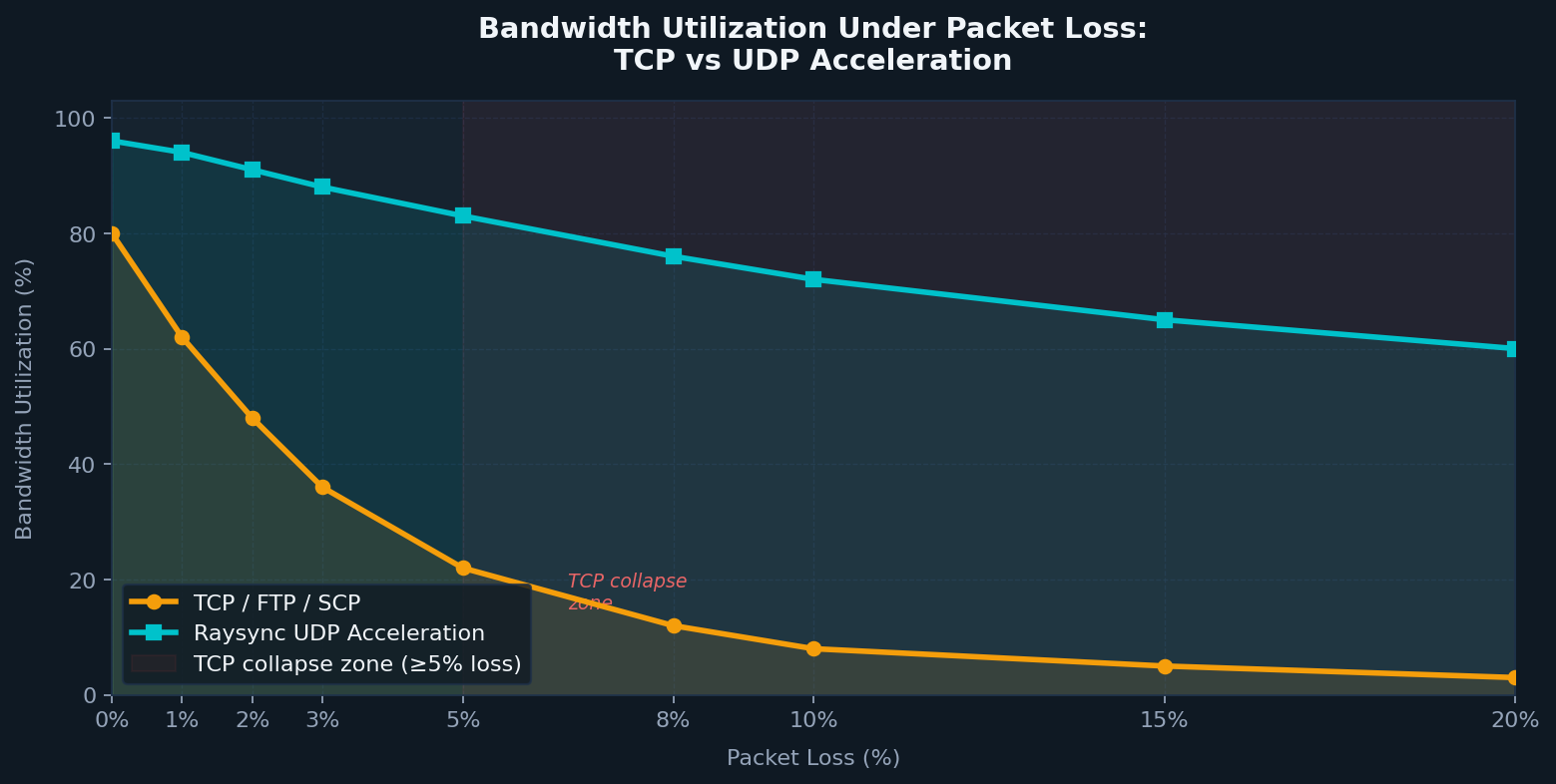
Figure 2: Bandwidth utilization as a function of network packet loss. TCP-based protocols (FTP/SCP) degrade rapidly above 3% packet loss and effectively stall above 5–8%. UDP acceleration maintains productive throughput well into adverse conditions. Based on Raysync benchmark data and TCP congestion control behavior documented in network engineering literature.
For a 100GB cross-border transfer — routine in media production or AI dataset distribution — the practical difference is 8–12 hours via FTP versus approximately 30 minutes via UDP acceleration.
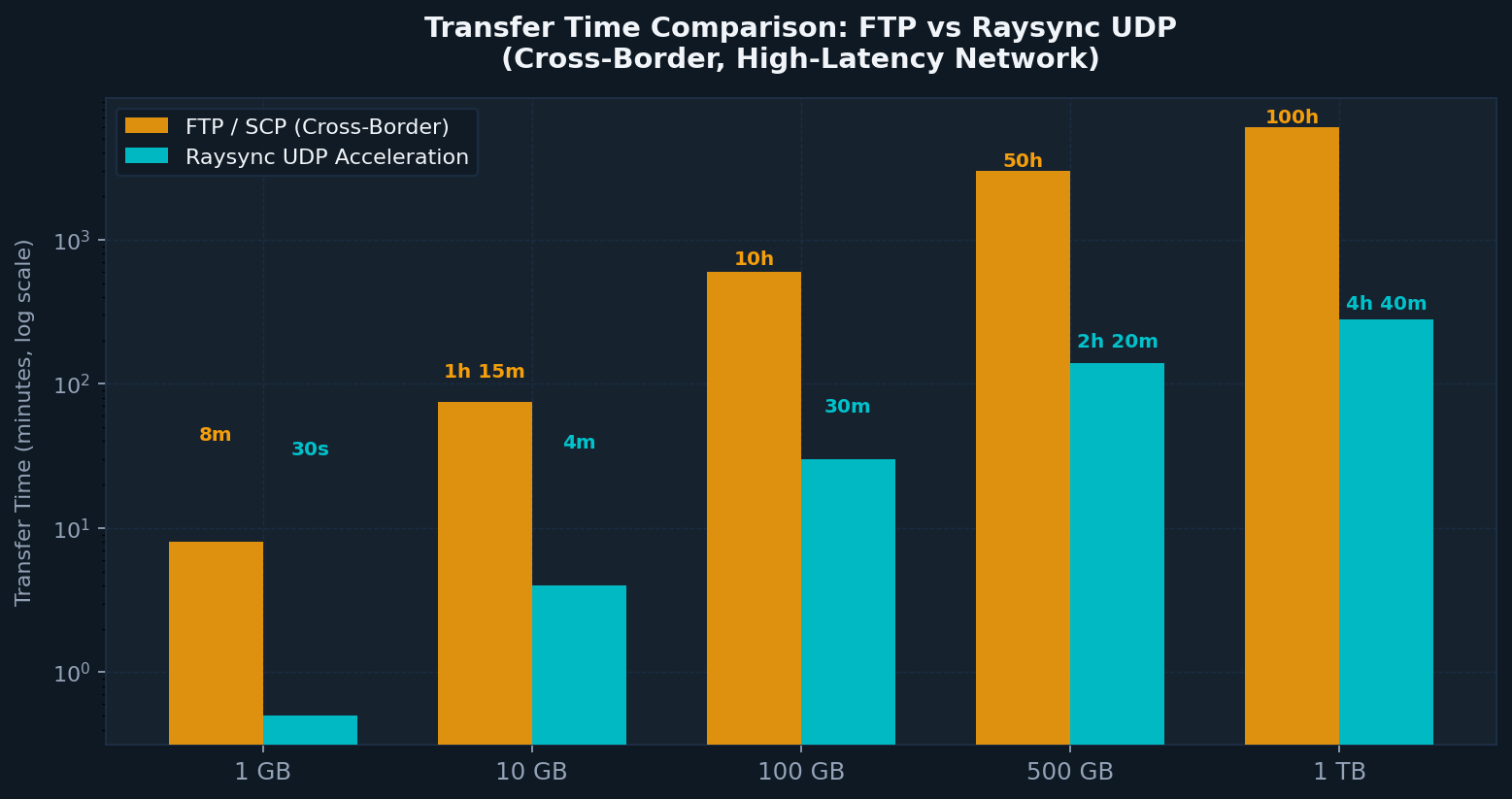
Figure 3: Estimated transfer times for various file sizes over a cross-border, high-latency network connection. Log scale used due to magnitude of difference. FTP estimates based on 30–40% effective bandwidth utilization; Raysync estimates based on 95% utilization. Actual performance varies by network conditions.
End-to-End Intelligence: Auto-Config, Resumable, Self-Healing
Speed alone doesn't solve enterprise transfer. Raysync's AI layer handles the full transfer lifecycle:
- Auto-configuration — Parses source/destination paths, validates endpoints, selects optimal protocol mode
- Integrity verification — Cryptographic checksum validation at transfer completion
- Resumable transfers — Automatic checkpoint and restart from the failure point, not from byte zero
- Self-healing — Fault diagnosis and retry within seconds, versus 10–30 minutes for manual log-based troubleshooting
Traditional vs. AI-Driven Transfer: Side by Side
| Dimension | Traditional FTP/SCP | Raysync AI-Driven Transfer | Improvement |
|---|---|---|---|
| Bandwidth Utilization | 30–50% | 95%+ | ~3x |
| 100GB Cross-Border Transfer | 8–12 hours | ~30 minutes | 10–15x |
| Setup / Operation Time | 30+ minutes (commands + params) | 10 seconds (natural language) | ~99% reduction |
| Fault Localization | 10–30 minutes (log review) | ~3 seconds (AI auto-diagnosis) | ~95% reduction |
| Non-Technical User Access | None (requires CLI knowledge) | Full | — |
| O&M Labor Cost | High (dedicated transfer ops) | Low (automated) | Up to 70% reduction |
| Encryption | Varies (often unencrypted by default) | TLS + AES-256 (default) | — |
Business Impact: Beyond Raw Throughput
Speed metrics are compelling on a benchmark chart. The business case goes further.
Cost efficiency. When bandwidth utilization rises from 40% to 95%, you are effectively tripling the productive output of existing network infrastructure — without buying more bandwidth. Operations that previously required dedicated monitoring staff shift to fully automated workflows. Raysync estimates O&M workload reductions of up to 80% for enterprises that replace manual transfer pipelines.
Globalization velocity. For enterprises with distributed teams across time zones, synchronous access to shared assets isn't a convenience — it's a competitive requirement. Cross-border collaboration cycles that previously spanned days compress to hours. Real-time asset synchronization makes 24/7 distributed workflows operationally viable.
Security and compliance without the trade-off. AI-native transfer does not exchange speed for security. Raysync implements TLS transport encryption with AES-256 data encryption end-to-end, combined with role-based permission isolation and full audit trails. Supported compliance frameworks include GDPR, HIPAA, and China's Multi-Level Protection Scheme 2.0 (MLPS 2.0) — directly addressing the cross-border regulatory complexity that blocks many enterprises from automating international data pipelines.
AI pipeline enablement (the long-term case). As enterprises scale AI workloads — model training, inference serving, dataset distribution, output delivery — data movement becomes a first-class infrastructure concern. When any AI agent can initiate, monitor, and complete transfers autonomously, the entire data pipeline compresses from days to minutes. File transfer stops being a bottleneck and becomes an invisible, reliable layer.
Frequently Asked Questions
What is AI-powered enterprise file transfer?
AI-powered enterprise file transfer uses artificial intelligence and modern transport protocols — typically UDP-based acceleration — to automate, accelerate, and simplify data movement between enterprise systems. Rather than requiring manual command-line configuration, users and automated agents trigger transfers via natural language or API calls, with the system handling routing, optimization, error recovery, and cryptographic verification automatically.
How much faster is UDP-based transfer compared to FTP or SCP?
For large file transfers (100GB+) in cross-border or high-latency environments, UDP-based acceleration can deliver 10–100x faster throughput than FTP or SCP. The performance gap widens as packet loss increases — where TCP-based transfers may stall entirely at 5–8% packet loss, optimized UDP implementations maintain 60–70% of maximum theoretical throughput (Raysync benchmarks, 2025).
Is AI file transfer secure enough for regulated industries?
Yes, when implemented correctly. Enterprise-grade solutions combine TLS transport encryption with AES-256 data encryption, role-based access controls, permission isolation, and full audit logging. Raysync's architecture is designed to meet GDPR, HIPAA, and MLPS 2.0 requirements — suitable for healthcare, financial services, and cross-border operations subject to data sovereignty regulations.
Can non-technical staff use AI-native file transfer?
That's the primary UX advantage. Natural language interfaces eliminate the need for CLI knowledge entirely. A business user can say "share the campaign assets folder with the New York team for upload" and the system executes without IT involvement. This reduces dependency on dedicated transfer operators and accelerates cross-functional workflows.
What AI agent frameworks does Raysync Transfer Skill integrate with?
Raysync Transfer Skill is designed for compatibility with any AI agent framework. It automatically adapts to Windows, Linux, and macOS environments and supports API-based integration, enabling deployment within enterprise automation platforms, custom AI pipelines, and multi-agent orchestration systems.
How does AI-native transfer handle failures and interruptions?
Raysync's AI layer monitors transfers in real time. When an interruption occurs — network drop, server timeout, or similar — it automatically checkpoints the transfer state and resumes from the failure point, not from the beginning, within seconds. The system also auto-diagnoses error causes and surfaces them in plain language rather than raw log output.
Which industries see the highest ROI from AI-powered file transfer?
The highest-impact use cases cluster in data-intensive sectors: media and entertainment (4K/8K video workflows, VFX pipelines), life sciences (genomic data, clinical trial datasets), manufacturing (CAD/BIM synchronization), technology (AI model and dataset distribution), and any enterprise with active cross-border operations where transfer latency directly affects project delivery timelines.
The Infrastructure Layer That AI Workflows Have Been Missing
From command line to natural language is not a UX upgrade. It's an architectural shift in how enterprises think about data movement. When file transfer becomes a capability any AI agent can invoke — rather than a manual operation requiring technical expertise — data pipelines close their most persistent gap.
The protocols that carried enterprise data through the FTP era have reached their operational ceiling. The MFT market is growing at 11.35% CAGR precisely because organizations have recognized this. The question for IT and data infrastructure teams is no longer whether to modernize transfer infrastructure, but how quickly that modernization compounds across AI workflows, global operations, and compliance requirements.
Raysync Transfer Skill provides that infrastructure layer: high-speed, AI-native, encrypted by default, and ready to integrate with the agent frameworks enterprises are already deploying.
Ready to see it in your environment? Request a proof-of-concept deployment at raysync.io — bring your own network conditions and file sizes.
Sources
- The State of AI in 2025: Agents, Innovation, and Transformation — McKinsey & Company, November 2025
- Managed File Transfer Market Size to Hit USD 7.18 Billion by 2035 — Precedence Research, 2025
- Enterprise File Sync and Share Market Size, Growth Report 2034 — Global Market Insights, 2025
- Raysync vs FileZilla: Overcoming Network Instability in Global File Transfers — Raysync, 2025
- How Latency & Packet Loss Hurt Large File Transfers — Raysync, 2025
- 2025 AI Adoption Across Industries — Coherent Solutions, 2025
- AI Adoption Statistics in 2026 — Netguru, 2026
You might also like

Industry news
September 24, 2025Raysync made a strong impact at IBC 2025 in Amsterdam, showcasing next-gen file transfer and synchronization solutions. From booth connections to a main stage pitch, discover how Raysync is shaping the future of media workflows.
Industry news
August 16, 2024Explore the ins and outs of FileZilla Pro Enterprise Server, from what it is to how to download it. Also discover top FileZilla alternatives like Raysync.
![[2022] Only 1 Minute 50 Seconds to Transfer 100,000 Files Cross-border](http://images.ctfassets.net/bg6mjhdcqk2h/NSovzRp4KyMkiyfS7BRVS/aaa2d9b3f6b1d688f7ab6af66ccac523/1.png)
Industry news
April 7, 2022Intelligent compression, breakpoint resume, automatic error retransmission, and other mechanisms ensure stable and reliable transfer in an ultra-remote and weak network environment.