File Transfer Governance: How Raysync Makes Enterprise File Flow Controllable and Manageable
June 25, 2026
Enterprise file transfer has quietly become mission-critical infrastructure. It now underpins business workflows, cross-team and cross-regional collaboration, partner delivery, and large-scale data movement. Yet most organizations still treat it as a simple matter of “upload” and “download” — optimizing for raw speed while leaving the bigger questions of control, visibility, and security unanswered.
The pressure is only growing. According to IDC's Global DataSphere, the volume of data created and replicated worldwide is on track to reach roughly 181 zettabytes in 2025 — more than five times the 33 zettabytes created in 2018, and growing at around 23% per year in recent years. As file volumes and transfer scenarios multiply, IT managers face a set of increasingly urgent questions:
-
Who is transferring files, and what exactly is being sent?
-
What is the current transfer speed, and is it crowding out critical business bandwidth?
-
Are there any abnormal tasks or high-risk transfers in flight?
-
Have files actually reached their destination?
-
Can transfers be paused, throttled, or adjusted in real time?
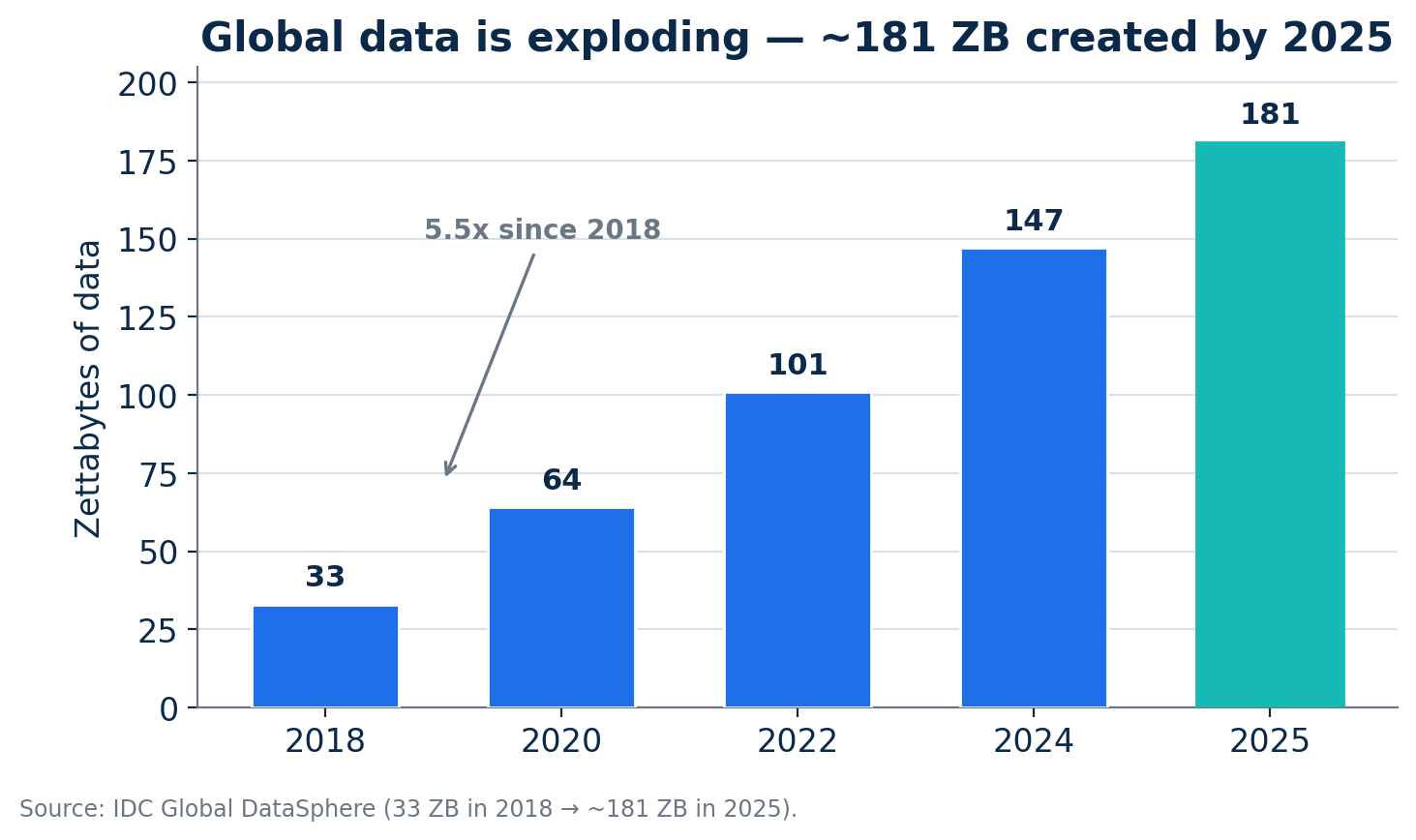
Figure 1 — Global data creation has grown more than five-fold since 2018, intensifying the need for governed file transfer. Source: IDC Global DataSphere.
When file transfer focuses solely on speed without unified governance, enterprises drift into a dangerous state: bandwidth becomes uncontrollable, tasks are invisible, risks are untraceable, and anomalies are unmanageable. For regulated industries — finance, government, healthcare, manufacturing, and research — auditable and traceable file flows are no longer optional; they are a core component of IT governance.
|
In short Raysync addresses enterprise-grade needs with a visualized transfer governance framework spanning bandwidth throttling, transfer policies, task monitoring, and real-time management — enabling full-process control, management, and traceability of every file flow. |
What is visualized file transfer governance?
Visualized file transfer governance is the practice of managing enterprise file movement as a controlled, observable system rather than a collection of isolated uploads and downloads. It combines four capabilities into one platform: bandwidth control (how much network capacity transfers may use), transfer policy (who can transfer what, and how), real-time monitoring (live visibility into every task), and intervention (the ability to pause, throttle, or stop tasks mid-flight). The result is file flow that is visible, controllable, and auditable end to end.
|
Why it matters now The managed file transfer (MFT) market is projected to grow from roughly $2.4 billion in 2025 to about $3.6 billion by 2030 (a 10.2% CAGR), reflecting how seriously enterprises are taking governed, secure file movement. |
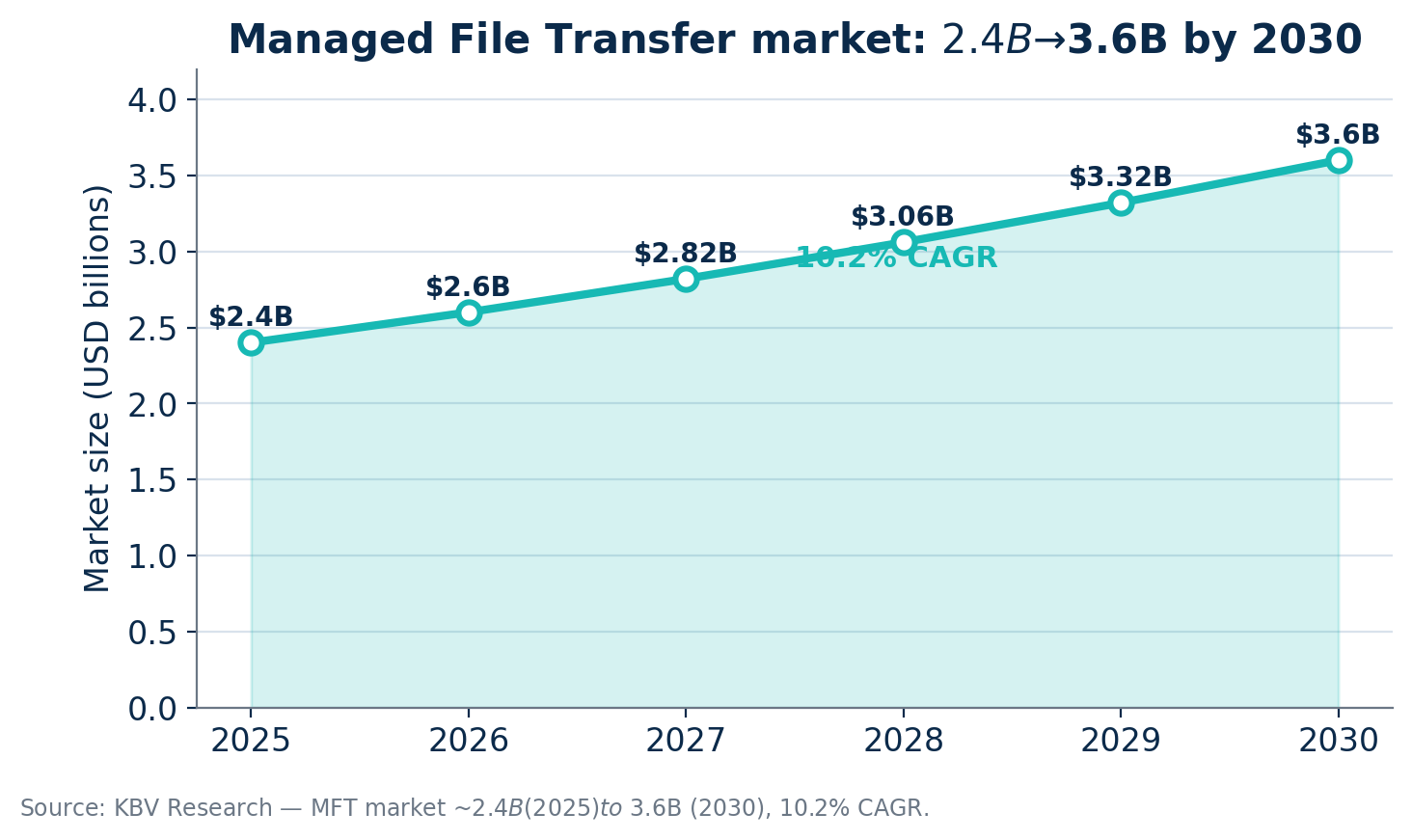
Figure 2 — Managed File Transfer market growth, 2025–2030. Source: KBV Research market estimates.
Raysync visualized transfer governance: six core capabilities
Raysync turns the principles above into concrete, configurable controls. Below are the six capabilities that make file flow visible, controllable, and granular.
1. Global bandwidth throttling
Raysync supports server-side global bandwidth throttling, letting enterprises set overall upload and download speed limits based on available network resources. This prevents transfer tasks from consuming bandwidth without restriction. For organizations running multiple business systems in parallel, global throttling protects core network resources while maintaining transfer efficiency.
2. Time-based bandwidth throttling
Network usage has clear time-based rhythms: daytime is peak hours for office work and business access, while nights and weekends are better suited for large-scale synchronization, backup, and distribution. Raysync lets administrators set bandwidth policies for different time slots, for example:
-
Limit large-file transfer speeds during working hours;
-
Relax limits during lunch breaks and off-peak periods;
-
Allocate more bandwidth at night for synchronization and backup;
-
Run large-scale data migration tasks on weekends.
This policy-based approach enables dynamic scheduling of network resources without manual coordination.
3. Transfer type toggle
Enterprises can decide which transfer methods are available based on business units, usage scenarios, or security policies — enabling Web or client-based high-speed transfer for employees, restricting certain methods for sensitive departments, or applying stricter policies to specific scenarios. This strikes a finer balance between efficiency and security.
4. File format whitelist / blacklist
Not all file types are suitable for free transfer. Some pose security risks, trigger compliance constraints, or conflict with business policy. Raysync's transfer-format whitelist/blacklist management lets enterprises control behavior at the file-type level:
-
Block high-risk executable files from being transferred;
-
Restrict outbound transfers of sensitive formats;
-
Allow only specified business formats and file sizes;
-
Align transfers with security policy to regulate employee behavior.
Through file-format policies, enterprises reduce non-compliant transfers and improve overall file-flow security at the source.
5. Real-time transfer monitoring
Raysync aggregates information across transfer types — regular tasks, Web tasks, peer-to-peer (P2P) tasks, and sync tasks — and displays key task status in real time. This shifts enterprises from a reactive model (“we only find out after users report issues”) to proactive management (“real-time visibility from the admin side”).
6. Pause during transfer and task management
When a task is abnormally consuming bandwidth, transferring non-compliant content, or when business needs require temporarily releasing network resources, Raysync supports pausing in-flight tasks. For sync tasks, administrators can enable or disable workflows on demand. File transfers are no longer “uncontrollable after initiation” — they support in-process intervention.
How Raysync achieves controllable, high-speed transfer
Unified management of multiple task types
Enterprise file transfer typically spans several modes: regular uploads/downloads, Web transfers, P2P transfers, and sync tasks. Traditional tools often manage only one type, leading to governance fragmentation. Raysync unifies these into a single platform, so administrators view and control every file flow from one console — reducing complexity and improving consistency.
Real-time data collection and status aggregation
Raysync collects live data on speed, progress, account, IP, and file offset during transfers, letting administrators assess task status and network usage from actual metrics. Compared with the traditional “wait until completion” model, real-time monitoring enables far faster issue detection and resolution.
Policy-based bandwidth management
Raysync goes beyond simple throttling to support multi-dimensional policies — global and time-based — so enterprises allocate network resources around real business scenarios, ensuring both critical-business stability and efficient file transfer.
Governance and speed in one platform
Many products solve only for transfer performance and ignore governance; others offer policy controls but lack high-speed transfer. Raysync integrates high-speed transfer, task management, bandwidth control, real-time monitoring, and security policies into a single platform. Its acceleration is built on a UDP-based transfer protocol designed to maintain throughput where traditional TCP-based tools (FTP/HTTP) degrade — namely over long distances and lossy networks. Raysync reports bandwidth utilization above 96% and speeds up to 100× faster than FTP under such conditions.
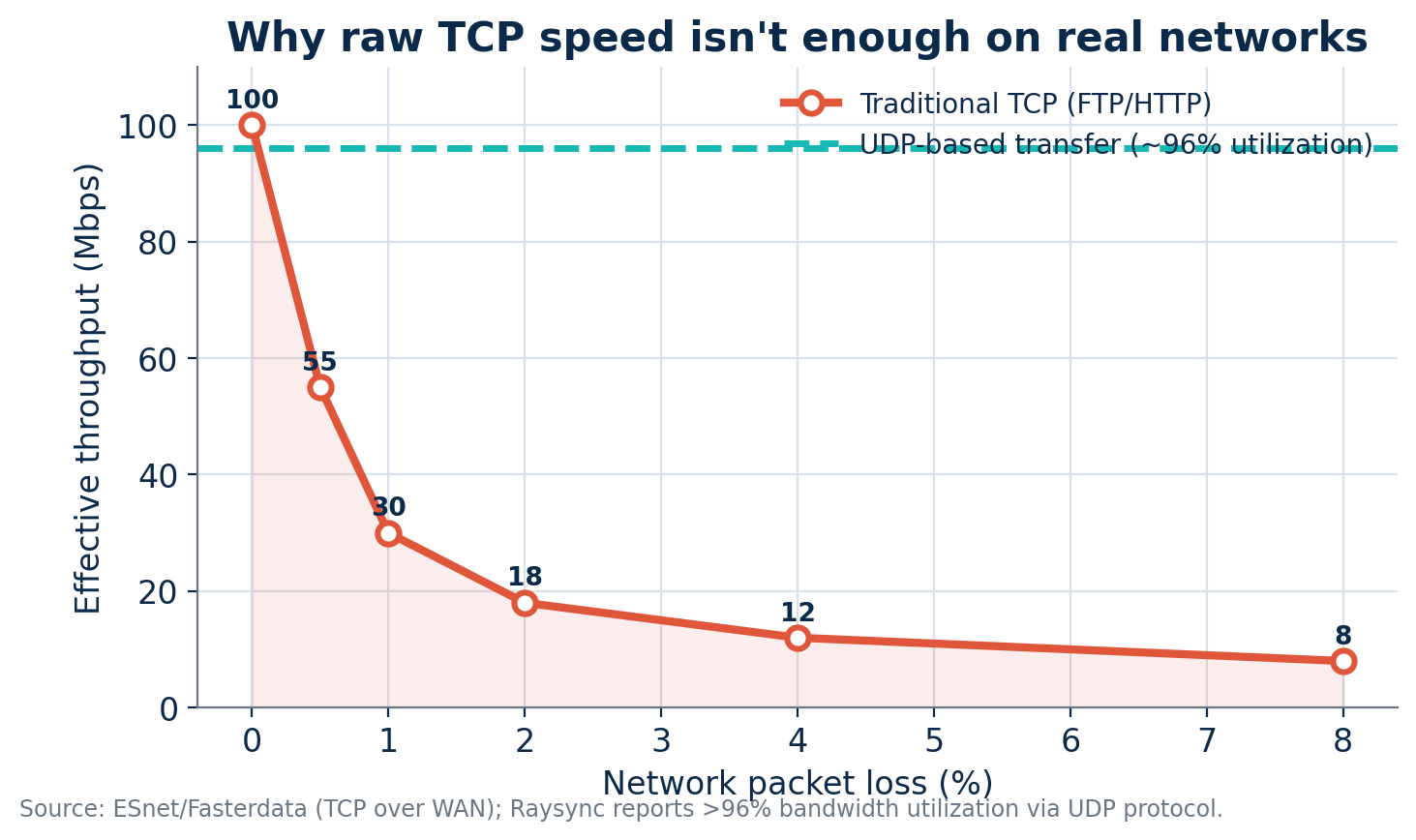
Figure 3 — Traditional TCP throughput collapses as packet loss rises, while UDP-based transfer sustains high utilization. Sources: ESnet/Fasterdata (TCP over WAN); Raysync (>96% utilization).
Practical application: media & entertainment asset distribution
Film, advertising, and gaming teams routinely move TB-scale assets, project files, and rendering outputs. When multiple project teams transfer simultaneously, bandwidth contention becomes a serious problem.
With Raysync, enterprises centrally monitor asset uploads, downloads, and sync tasks and allocate bandwidth across time slots — for example, capping non-urgent transfers during the day and running batch distribution and sync jobs at night. Project managers track delivery status through task progress, cutting communication overhead and eliminating guesswork about whether files arrived.
Customer value: from “fast transfer” to “well-managed transfer”
The value of visualized transfer governance goes beyond individual features — it represents an upgrade in the file transfer management model itself.
-
Improved network resource utilization. Global and time-based throttling let enterprises allocate bandwidth by business priority, reducing waste and contention.
-
Reduced business interruption risk. When large-file transfers no longer consume bandwidth uncontrollably, core systems run more stably with less impact on office and production workloads.
-
Enhanced IT management efficiency. Administrators view task status, speed, progress, and source directly — no more relying on user reports or per-machine troubleshooting.
-
Strengthened security and compliance. File-format control, transfer-type management, and full task visibility improve audit readiness and risk prevention.
-
Optimized collaboration experience. Teams gain a stable, predictable experience — what's transferring, where it's going, and how far along it is are all clearly visible.
The stakes are high. According to IBM's Cost of a Data Breach Report 2025, the global average breach cost was $4.44 million, while the U.S. average hit an all-time high of $10.22 million. Governing how files move — and who can move them — is a direct lever on that risk.
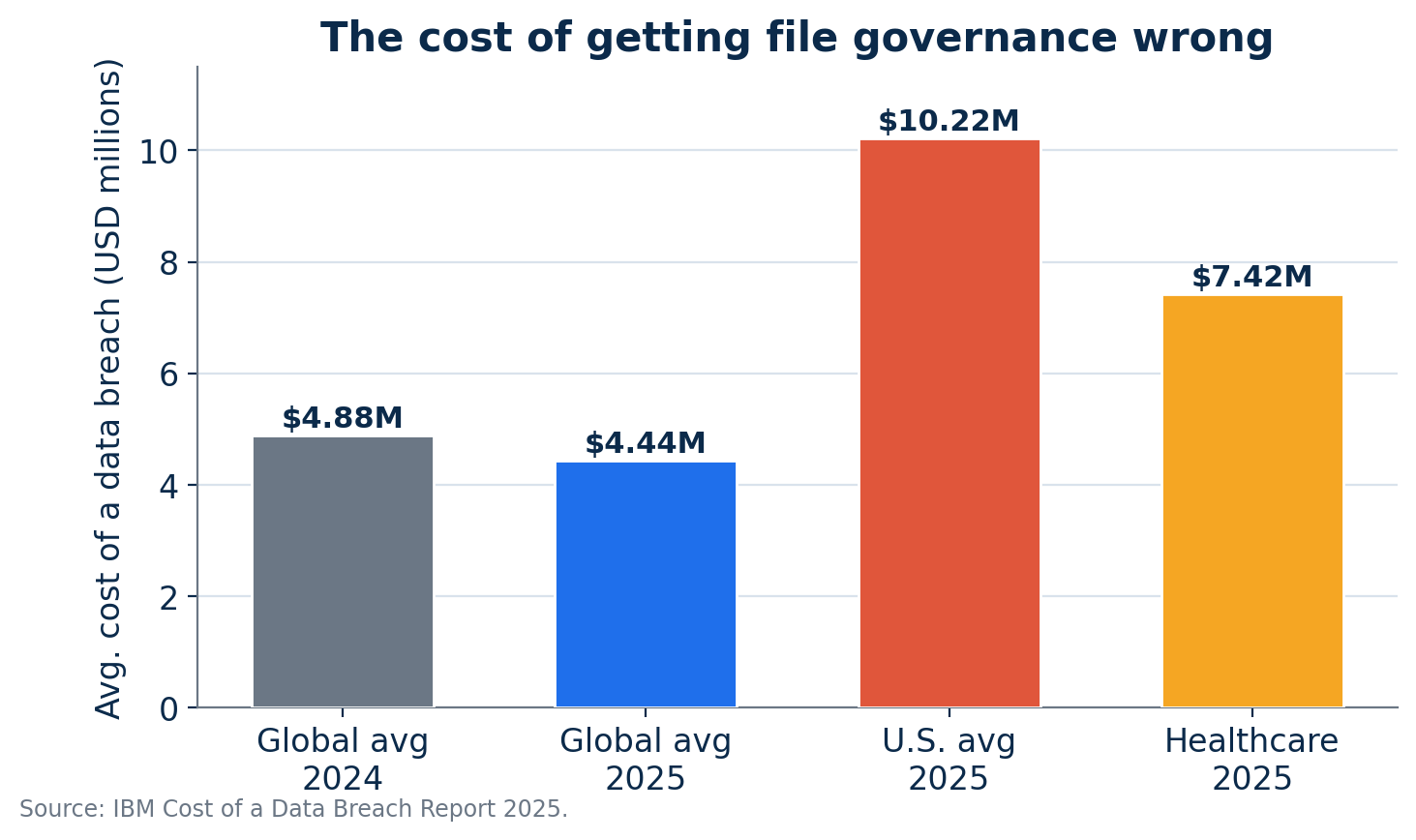
Figure 4 — Average cost of a data breach, 2024–2025. Source: IBM Cost of a Data Breach Report 2025.
Bottom line
For IT decision-makers, Raysync helps build a more orderly, efficient, and secure file transfer system. For business units, it means a more stable transfer experience and smoother collaboration. Raysync makes file transfer not only fast, but also controllable and manageable.
Frequently asked questions
What is file transfer governance?
File transfer governance is the practice of managing enterprise file movement as a controlled, observable system — combining bandwidth control, transfer policy, real-time monitoring, and the ability to intervene mid-transfer so file flow is visible, controllable, and auditable.
How is managed file transfer (MFT) different from FTP?
FTP simply moves files over a TCP connection with little visibility or control. Managed file transfer adds governance: policy-based access, monitoring, security controls, auditing, and often accelerated protocols. MFT tools like Raysync also use UDP-based acceleration to sustain throughput where FTP degrades on long-distance or lossy networks.
Why does bandwidth throttling matter for file transfer?
Without throttling, a single large transfer can saturate the network and starve critical business systems. Global and time-based throttling let IT allocate bandwidth by priority and business rhythm — protecting core systems during the day while using off-peak hours for backups and synchronization.
Can administrators stop a transfer that is already running?
Yes. Raysync supports pausing in-flight tasks and enabling or disabling sync workflows on demand, so transfers are no longer uncontrollable once started.
Which industries benefit most from visualized transfer governance?
Any data-intensive or regulated sector — finance, government, healthcare, manufacturing, research, and media & entertainment — where auditable, traceable, and bandwidth-aware file movement is essential.
Sources
• IDC Global DataSphere (data growth to ~181 ZB by 2025) — https://www.networkworld.com/article/966746/idc-expect-175-zettabytes-of-data-worldwide-by-2025.html
• KBV Research / market estimates — MFT market $2.4B (2025) to $3.6B (2030), 10.2% CAGR — https://www.kbvresearch.com/managed-file-transfer-market/
• IBM Cost of a Data Breach Report 2025 — https://www.ibm.com/reports/data-breach
• ESnet / Fasterdata — TCP behavior over WAN (packet loss & throughput) — https://fasterdata.es.net/network-tuning/tcp-issues-explained/
• Raysync — UDP transfer protocol & performance claims — https://www.raysync.io/news/raysync-helps-to-solve-the-file-transfer-difficulties-via-udp-transfer-protocol/
You might also like
![Why Rsync Is Slow? 6 Reasons for You [100% Work]](http://images.ctfassets.net/iz0mtfla8bmk/vEZgYKAbmYDsK4rlR1ndp/ffd5ba63a5ea12ed66e0938ef82ce719/rsync-is-slow.png)
Industry news
February 7, 2025Is your rsync transfer painfully slow? Discover the top 6 reasons behind slow rsync speeds and proven solutions to fix them. Get your transfers moving quickly again!

Industry news
May 21, 2024Learn about the essentials of managed file transfer protocol, including their types, functionalities, and benefits.
![Top 5 FTP SaaS Solutions [Individual / Business]](http://images.ctfassets.net/iz0mtfla8bmk/4y0JMTNs8kAmi8I770y7Da/7bcc0be7cd0e11c4317099297f1aafb5/ftp-saas.png)
Industry news
December 12, 2024Explore the top 5 FTP SaaS solutions tailored for individuals and businesses. Learn about the features and pricing models of FTP SaaS, and how they simplify file transfers.