Large File Transfer Tools Compared: The Enterprise Buyer's Guide (2026)
April 25, 2026
A data-driven comparison of WeTransfer, Google Drive, Raysync, MASV, and IBM Aspera — covering speed, security, protocol technology, and total cost of ownership.
When file sizes cross the gigabyte threshold — and increasingly the terabyte threshold — the tool you choose to move that data has direct consequences for productivity, security, and operating costs. A media studio waiting hours for a 4K project to upload, or a multinational manufacturer stalled by a failed cross-border transfer, is not experiencing a minor inconvenience. It is experiencing a measurable business disruption.
This guide cuts through the marketing noise with a fact-based comparison to help you select the right solution for your organisation.
Why Email Cannot Scale for Large File Transfer
Most enterprise email platforms cap attachment sizes at 10–25 MB. Microsoft 365 and Google Workspace both enforce a 25 MB attachment limit per message. Beyond causing delivery failures, routing large files through email infrastructure consumes mail server resources, delays queue processing, and creates unstructured data that bypasses proper access controls and audit trails.
The practical result: any organisation regularly transferring files larger than a few hundred megabytes requires a purpose-built file transfer solution — one engineered for speed, reliability, and security at scale.
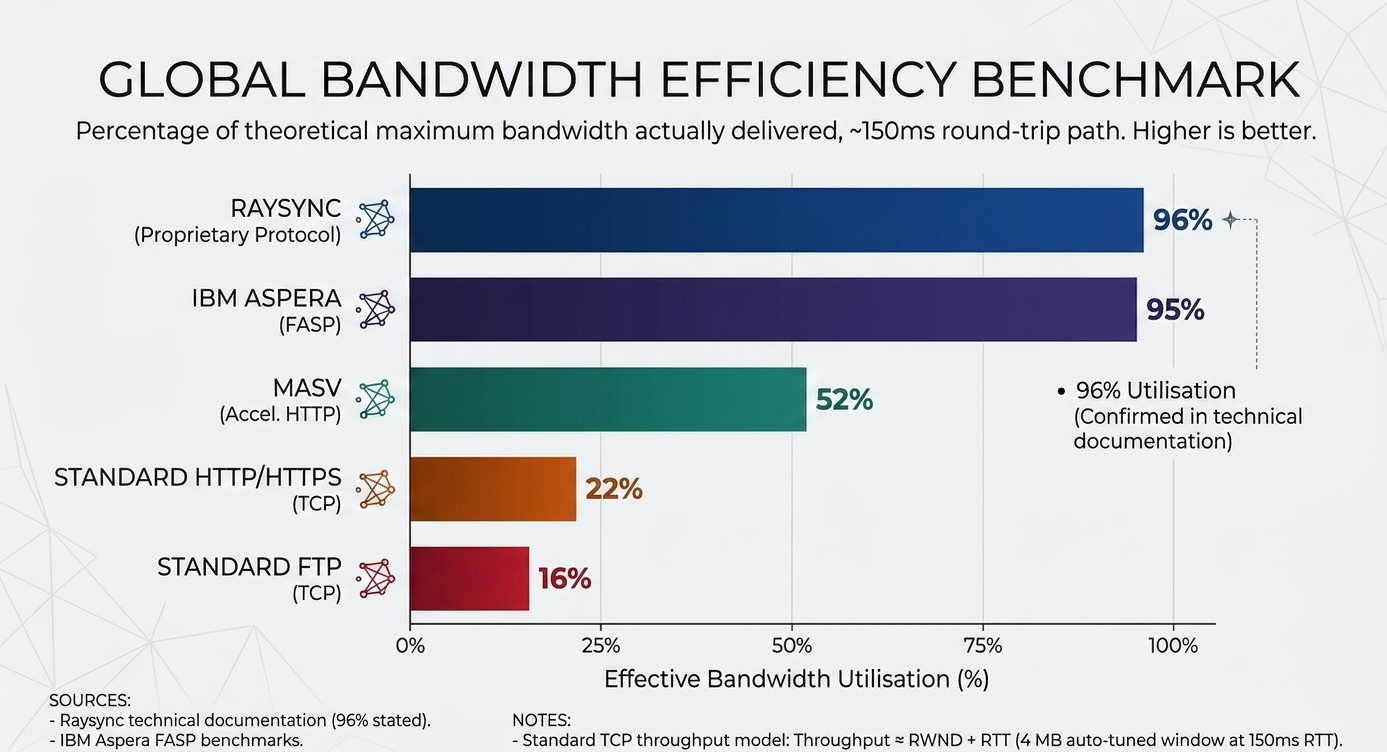
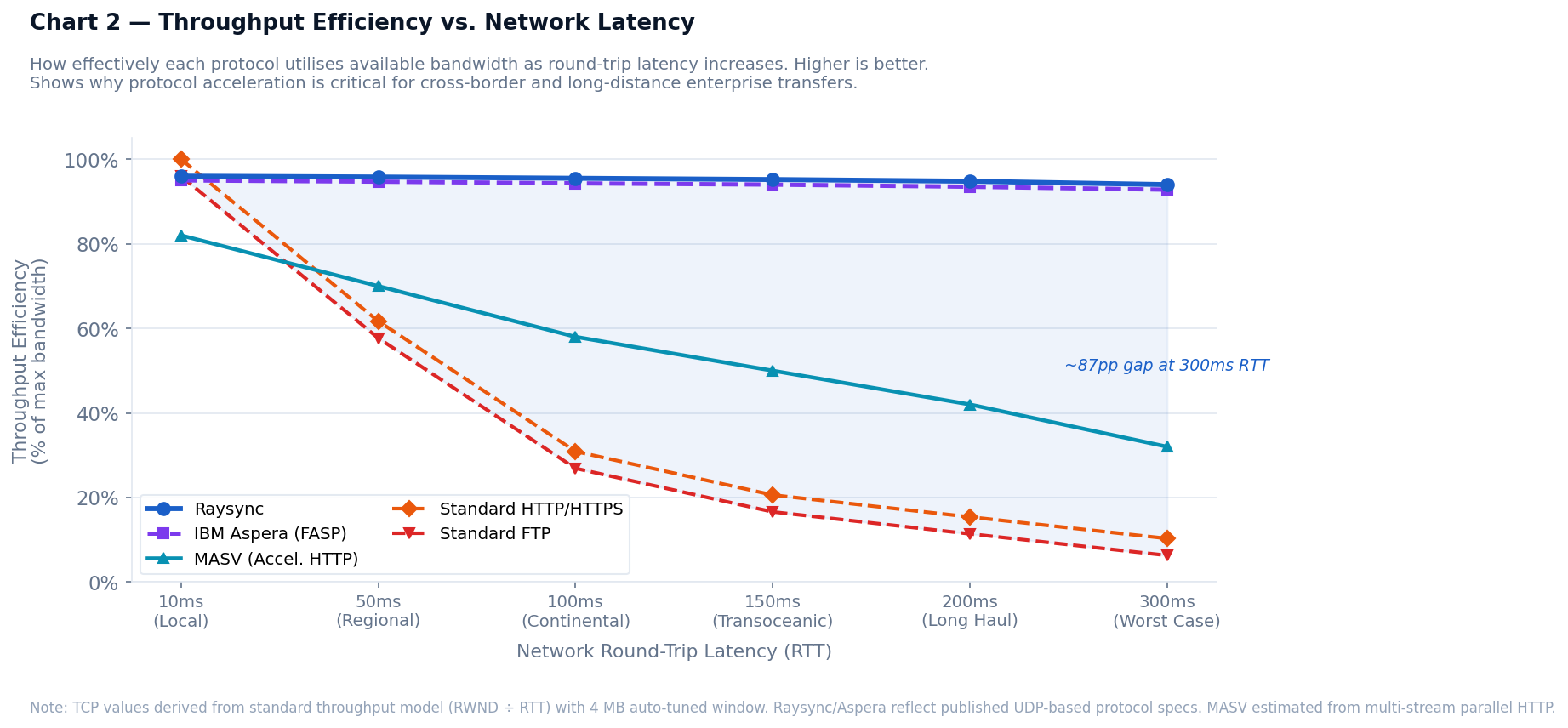
Key Insight: Standard TCP-based protocols (FTP, HTTP) can lose up to 90% of available bandwidth efficiency on transoceanic network paths due to latency and packet loss. Protocol-accelerated tools like Raysync and IBM Aspera are specifically engineered to recover this lost throughput.
The 5 Leading Large File Transfer Tools: At a Glance
| Tool | Max File Size | Protocol | Best For | Security | Pricing |
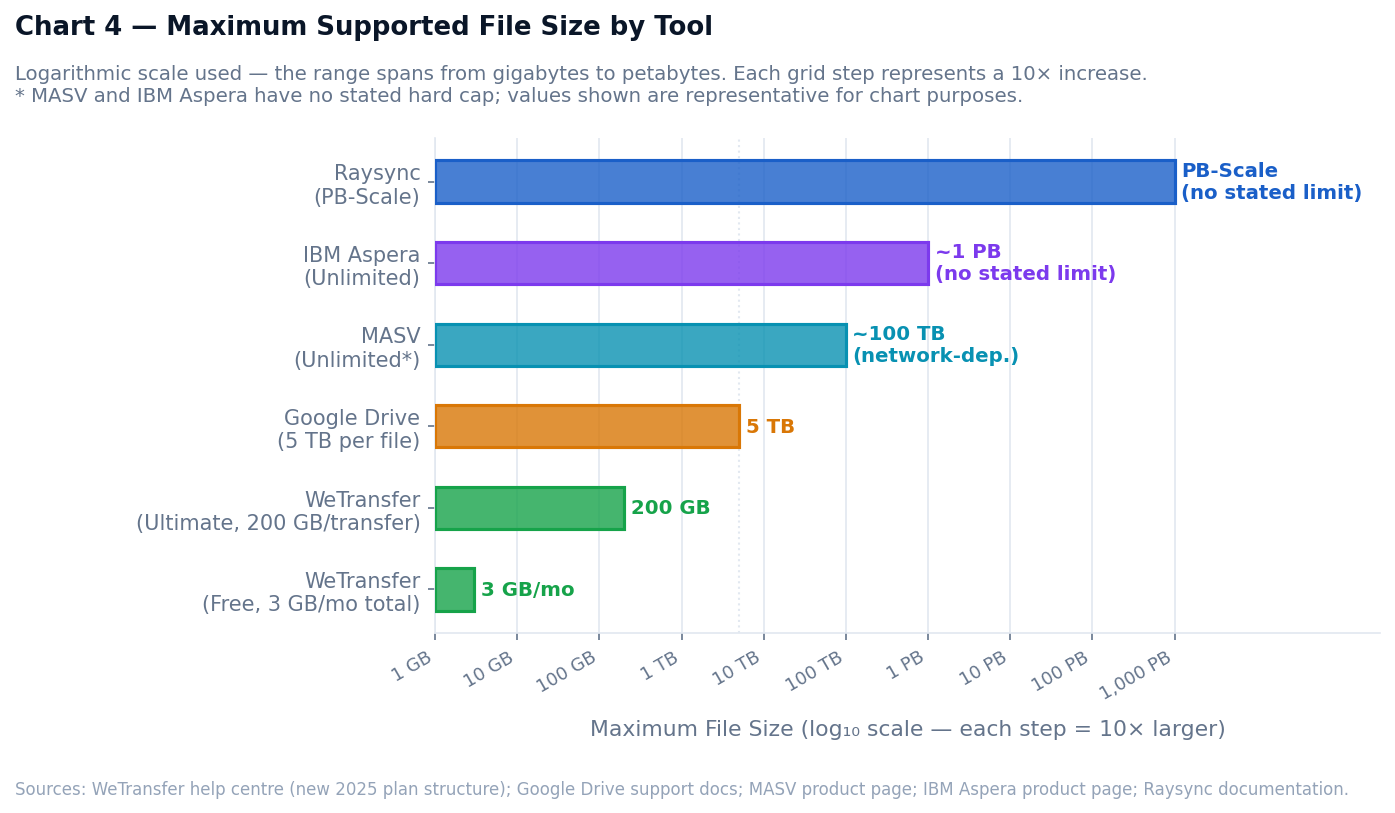
| Raysync | PB-scale | Proprietary high-speed (UDP-based) | Enterprise cross-border & bulk transfer | AES-256, RBAC, audit logs | Enterprise licence |
| WeTransfer | 3 GB/mo (Free) · 200 GB/transfer (Ultimate) | HTTP | Quick one-time sharing | Basic (paid plans only) | Freemium |
| Google Drive | 5 TB per file | HTTP | Cloud collaboration | Google Workspace standards | Freemium / Workspace |
| MASV | Unlimited* | Accelerated HTTP | Media & entertainment | SOC 2 Type II, ISO 27001:2022, TPN Gold Shield | Pay-as-you-go ($0.25/GB) |
| IBM Aspera | Unlimited | FASP (proprietary) | Large-scale enterprise | Enterprise-grade | From $250.20/TB/year |
*MASV practical maximum is network-infrastructure dependent.
Detailed Tool Profiles
1. WeTransfer — Best for Simple, One-Time Sharing
WeTransfer is a browser-based file sharing service designed for frictionless simplicity. Following its acquisition by Bending Spoons in July 2024, WeTransfer restructured its plans significantly. The current Free plan allows 3 GB total per rolling 30-day period (up to 10 transfers), with files expiring after 3 days. Paid tiers are Starter ($6.99/month, 300 GB total per month) and Ultimate ($25/month, up to 200 GB per single transfer, 1 TB storage).
Key features:
-
Zero setup required — upload, generate a link, share in seconds
-
Clean interface accessible to all skill levels
-
No recipient account required on the free tier
-
Password protection and link expiration controls on paid plans
Limitations:
-
Free tier lacks password protection and encryption at rest
-
No resumable transfers — a failed upload must restart from scratch
-
No audit logging or compliance reporting
-
File size caps and monthly transfer quotas make it unsuitable for bulk enterprise workflows
Best for: Freelancers, designers, and small teams sharing creative assets with clients occasionally. Not appropriate for enterprise-scale, regulated, or cross-border data movement.
2. Google Drive — Best for Cloud-Native Collaboration
Google Drive functions primarily as cloud storage and collaborative document management rather than a purpose-built file transfer platform. It supports individual files up to 5 TB and integrates natively with Google Docs, Sheets, and Slides for real-time co-editing. Note that there is a 750 GB per-user daily upload cap, which can be a constraint for large-scale sync workflows.
Key features:
-
Real-time co-editing across the Google Workspace suite
-
Granular sharing permissions (viewer, commenter, editor)
-
15 GB free storage; unlimited pooled storage on enterprise Workspace plans
-
Native integrations with the broader Google ecosystem
Limitations:
-
Transfer speeds rely on standard HTTP with no protocol acceleration
-
Not designed for high-volume or automated transfer pipelines
-
Syncing very large files can be unreliable on congested or high-latency networks
-
No cross-border transfer optimisation
Best for: Teams already operating within Google Workspace who need to store, share, and collaboratively edit documents. Not a managed file transfer solution for enterprise data pipelines.
3. Raysync — Best for Enterprise High-Speed & Cross-Border Transfer
Raysync is an enterprise-grade managed file transfer and data acceleration platform built for organisations that move large volumes of data — frequently, rapidly, and across long distances. Unlike general-purpose cloud storage tools, Raysync is engineered around transfer performance and data security as primary design objectives.
Protocol Technology
Raysync's proprietary high-speed transfer protocol is built on UDP and is the foundation of its performance advantage. Standard TCP-based protocols — including FTP and HTTP — suffer significant throughput degradation over long-distance, high-latency network paths. Packet loss and network jitter cause TCP's congestion control to throttle its transmission window, resulting in speeds far below theoretical bandwidth capacity.
Raysync's protocol is specifically engineered to overcome these constraints, achieving over 96% bandwidth utilisation even under adverse network conditions — verified in Raysync's technical documentation. On a transoceanic link where standard FTP might deliver a fraction of available throughput, Raysync sustains transfer speeds up to 100× faster than FTP, recovering nearly the full capacity of the available link regardless of geographic distance or network latency.
Core Capabilities
-
PB-scale data transfer without architectural constraints
-
Resumable transfers with automatic error retransmission — interrupted transfers pick up from the point of failure
-
AES-256 encryption in transit and at rest
-
Upload/download, directory synchronisation, peer-to-peer transfer, and file sharing in a unified platform
-
Detailed audit logs and compliance-ready reporting
-
Role-based access control (RBAC) and permission management
-
API-based integration for automated data pipelines
-
Supports bandwidth licences up to 10 Gbps, with transfer capability under 100 Gbps bandwidth
Limitations: Raysync is an enterprise solution with corresponding implementation requirements. It is not the right fit for individuals or teams with occasional, small-file sharing needs.
Best for: Media and entertainment studios, multinational manufacturers, financial services firms, scientific research institutions, and any enterprise requiring high-frequency, high-volume, or cross-border transfer of sensitive or mission-critical data.
4. MASV — Best for Media & Entertainment Workflows
MASV is a SaaS-based managed file transfer platform built specifically for the media and entertainment industry. It enables studios, broadcasters, and content creators to send and receive large files — including high-resolution video, RAW camera footage, and Digital Cinema Packages (DCPs) — through a browser interface or desktop client.
Key features:
-
SOC 2 Type II, ISO 27001:2022, and TPN Gold Shield certified — critical for studio and broadcaster compliance
-
Multi-factor authentication and end-to-end encryption
-
Pay-as-you-go pricing at $0.25/GB with no minimum commitment
-
Native integrations with AWS S3, Google Cloud, and Azure
Limitations:
-
At $0.25/GB, costs scale linearly and can become substantial at high continuous transfer volumes — a fixed enterprise licence like Raysync typically becomes more cost-effective at scale
-
Effective maximum file size depends on network infrastructure
-
Primarily positioned for media use cases — less feature-rich for manufacturing, financial, or scientific data transfer scenarios
Best for: Post-production houses, broadcast networks, content distribution companies, and media asset management workflows requiring certified security compliance.
5. IBM Aspera — Best for Regulated Large-Scale Enterprises
IBM Aspera is one of the longest-established enterprise file transfer acceleration platforms, built around IBM's proprietary FASP (Fast, Adaptive, and Secure Protocol). Like Raysync, Aspera bypasses the inefficiencies of TCP to deliver high-speed transfers over long-distance connections, with IBM claiming speeds up to 100× faster than FTP/HTTP.
Key features:
-
FASP protocol delivers consistent high throughput independent of network distance or packet loss
-
Deep integration with IBM cloud, storage, and analytics infrastructure
-
Supports continuous, automated data pipeline workflows
-
Enterprise support and SLA-backed uptime
-
Usage-based pricing from $250.20/TB/year, with costs scaling with transfer volume
Limitations:
-
Costs can escalate significantly during high-volume transfer periods
-
Requires specialised technical resources for deployment, configuration, and maintenance
-
Carries additional overhead for organisations outside the IBM technology stack
-
Can be cost-prohibitive for mid-market organisations compared to alternatives
Best for: Large enterprises in media, genomics, life sciences, and financial services with existing IBM infrastructure investments and the technical resources to manage an enterprise-grade deployment.
How to Choose the Right Tool: A 5-Step Decision Framework
Selecting the right large file transfer solution requires matching platform capabilities to your actual operational requirements.
Step 1 — Define your file size and transfer frequency
- Occasional transfers under a few gigabytes: WeTransfer or Google Drive are sufficient. Daily transfers in the hundreds of gigabytes or above require a purpose-built platform. Raysync and IBM Aspera are engineered for this tier.
Step 2 — Assess your network environment
- For transfers within a single region on a reliable local network, HTTP-based tools perform adequately. For cross-border, intercontinental, or consistently high-latency paths, protocol-accelerated solutions are not optional — they are essential. At 200ms RTT, standard FTP can lose over 85% of available bandwidth efficiency.
Step 3 — Identify your security and compliance requirements
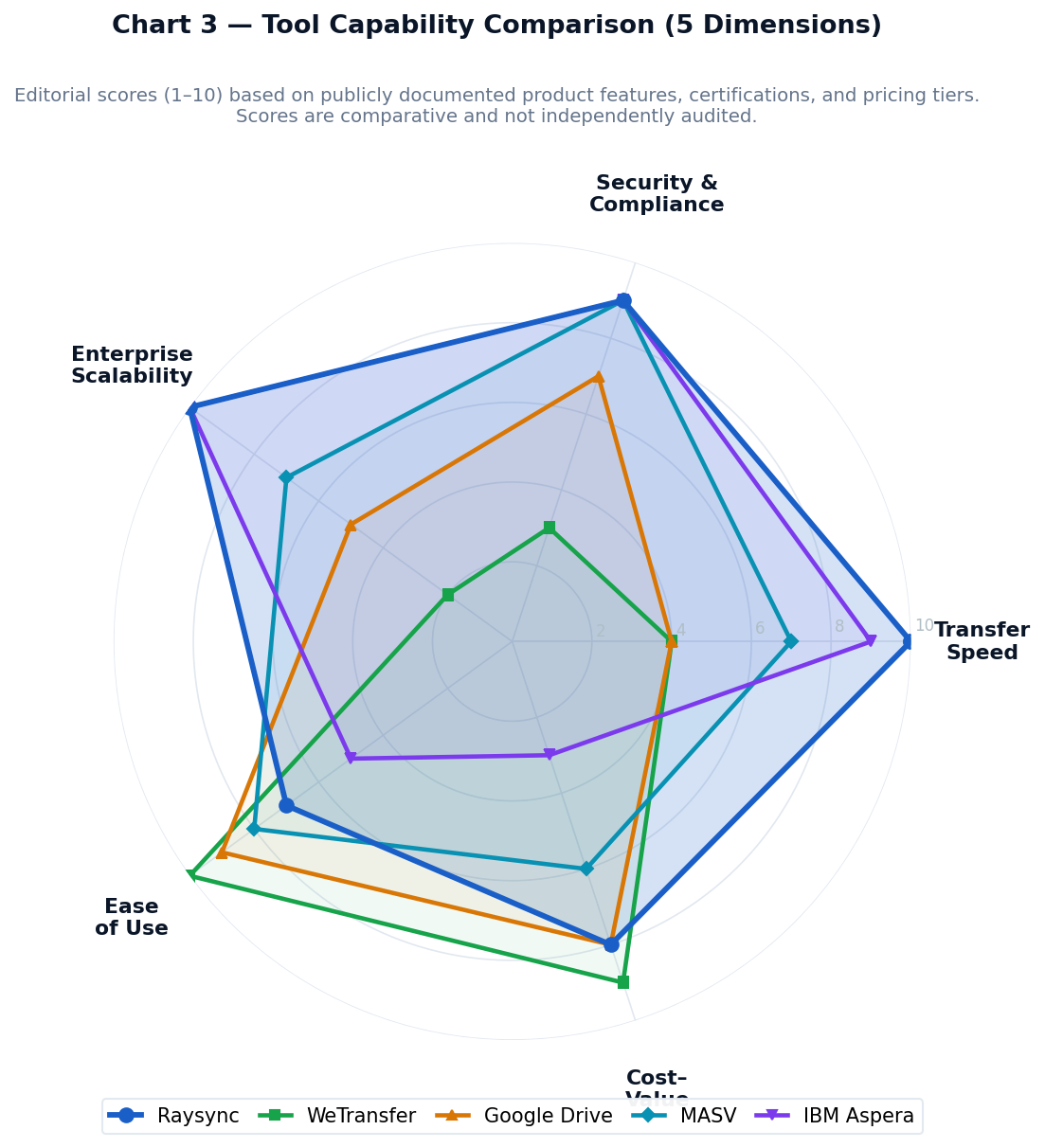
- If your organisation handles PII, intellectual property, financial data, or regulated content, you require AES-256 encryption, role-based access control, audit logging, and a certified compliance posture. Raysync and MASV are the primary options meeting enterprise compliance requirements.
Step 4 — Calculate total cost of ownership, not just licence price
- Evaluate the full picture: licensing or per-GB fees, implementation effort, technical support requirements, and the operational cost of transfer failures or delays. For high-volume workflows, pay-as-you-go models like MASV ($0.25/GB) can become substantially more expensive than a fixed enterprise licence at scale.
Step 5 — Evaluate integration and automation requirements
- Does the solution integrate with your existing storage infrastructure, cloud platforms, or automation pipelines? Enterprise tools like Raysync support API-based integration and directory synchronisation for fully automated data workflows — a requirement for any organisation running continuous data pipelines.
Conclusion
The large file transfer market spans a wide spectrum — from browser-based tools suited for occasional sharing to enterprise-grade acceleration platforms built for continuous, high-volume, mission-critical data movement. The right choice is determined by file volumes, network environment, security requirements, and operational scale.
For organisations where data transfer speed, security, and reliability are competitive necessities — not afterthoughts — the difference between a standard HTTP-based tool and a protocol-accelerated enterprise platform is not incremental. At transoceanic distances, it can mean the difference between a fraction of your link's capacity and utilising nearly all of it.
For teams with occasional, lightweight sharing needs, WeTransfer and Google Drive deliver simplicity and accessibility. For enterprises operating at the intersection of high data volume, geographic distribution, and security compliance, Raysync delivers the protocol performance, feature depth, and compliance infrastructure that consumer tools fundamentally cannot replicate.
Ready to see how Raysync performs in your environment? Contact the Raysync team for a free technical consultation or product demonstration tailored to your specific network topology and use case.
You might also like
Industry news
December 6, 2024Learn how to effortlessly set up a Chrome FTP server. This step-by-step guide will walk you through the entire process.
Industry news
May 21, 2024This article will reveal the best managed file transfer open-source tools. You will get to know about the top 3 MFT server open-source solutions to improve your file transfer security.
Industry news
February 28, 2025Master server-to-server file transfers with our comprehensive Rsync tutorial. Learn how to securely and efficiently rsync between two servers today!