Enterprise File Sync and Share, Reimagined: One Platform for Upload, Sync, and P2P
July 28, 2026
Enterprise file collaboration stopped being about "sending a file" a long time ago. Yet most organizations still run it on a patchwork: a cloud drive for sharing, FTP for server transfers, scripts for directory sync, chat tools for one-off large files, and separate accounts for every external partner. Each tool solves one slice of the problem — and together they create a slower, riskier, harder-to-govern mess.
Enterprise file sync and share (EFSS) is the software category built to fix exactly that: it lets teams store, sync, share, and control files across users, sites, and regions from one governed system instead of a dozen disconnected ones. The problem is that most EFSS products optimize for collaboration and cloud storage — while quietly falling over on the thing enterprises actually struggle with: moving large files, fast, across long-distance networks.
Raysync closes that gap. It unifies file upload/download, automated synchronization, peer-to-peer (P2P) transfer, web collaboration, and centralized transfer management into a single enterprise file sync and share platform — pairing a high-speed transfer engine with the permissions, auditing, and monitoring that IT teams need to keep file flow secure and traceable.
.png)
The enterprise file sync and share market is projected to nearly quadruple by 2030 — a signal of how central governed file collaboration has become. Source: Grand View Research (2024).
TL;DR — Key Takeaways
- Enterprise file sync and share (EFSS) unifies storing, syncing, sharing, and controlling files across users and sites in one governed platform, replacing a fragmented stack of point tools.
- Tool sprawl — FTP, cloud drives, scripts, chat, VPN shares — multiplies accounts, permissions, and blind spots, and makes file flow impossible to track consistently.
- The EFSS market is growing ~24% a year, reaching an estimated $38.5 billion by 2030, as enterprises consolidate file collaboration onto managed platforms.
- Traditional TCP/SFTP throughput collapses under latency and packet loss; UDP-based acceleration holds high utilization where standard transfers fall to single digits.
- Raysync combines upload, automated sync, and P2P in one EFSS platform with unified accounts, policies, logging, and monitoring.
- The Raysync Enterprise plan adds AES-256 encryption, checkpoint resume, role-based access control, audit logs, and secure sharing links — with a free trial available on the Raysync website.
What is enterprise file sync and share (EFSS)?
Enterprise file sync and share (EFSS) is a category of software that lets organizations store, synchronize, share, and govern files across users, devices, sites, and regions from a single centrally managed platform. Unlike consumer file-sharing apps, an EFSS platform is built for administrative control: permissions, encryption, audit trails, and policy enforcement at enterprise scale.
The category exists because file collaboration became mission-critical. From R&D drawing distribution and media asset delivery to headquarters-to-branch synchronization, supplier file exchange, and remote-team collaboration, files are now among the most frequent and business-critical data carriers an enterprise moves. When file flow is slow or ungoverned, project delivery, team productivity, and customer response times all suffer.
Modern EFSS also overlaps with two adjacent categories worth understanding: managed file transfer (MFT) — which focuses on automation, scheduling, and compliance — and enterprise large file transfer — which focuses on raw speed for GB- and TB-scale files. The strongest platforms, Raysync included, borrow from all three. (Internal links above are placeholders — please confirm the correct pillar URLs before publishing.)
Why do traditional file collaboration stacks break down?
Traditional enterprise file collaboration breaks down because no single tool covers the full workflow, so teams stitch together several — and the seams are where speed, security, and visibility leak. Here are the five failure points that push enterprises toward a unified EFSS platform.
1. Multiple tools coexist, and the workflow fragments
Most enterprises run several tools at once: FTP/SFTP for server-to-server transfer, cloud drives for department sharing, email or chat for ad-hoc external delivery, scripts for scheduled sync, VPN or shared directories for internal access, and third-party tools for large files. Each solves part of the problem, but they never form one system. Users hop between interfaces, IT maintains multiple sets of accounts, permissions, logs, and policies, and file flow becomes impossible to track end to end.
2. Large-file transfer is slow, and delivery slips
Manufacturing, media, research, healthcare, design, and gaming teams routinely move GB- to TB-level files. Traditional FTP, HTTP, and cloud-drive tools struggle in cross-region, high-latency, weak-network conditions — slow speeds, high failure rates, and weak resume support. Slow transfer isn't just a technical annoyance; it directly stretches project delivery cycles and customer response times.
3. Sync depends on manual work or brittle scripts
Headquarters-branch sync, project-directory sync, and backup sync often rely on manual uploads or custom scripts. The result is predictable: missed or duplicate transfers, version drift, silent sync failures, high script-maintenance cost, and painful troubleshooting. As data volume and sync frequency grow, these methods can't meet enterprise-grade stability requirements.
4. External collaboration is hard to control
Enterprises constantly exchange files with clients, suppliers, agents, and partners. Sending them by email attachment, public cloud link, or chat introduces uncontrollable permissions, unclear file destinations, and incomplete records. In finance, government, healthcare, and manufacturing, external delivery must be efficient and controllable, auditable, and traceable.
5. Central-server pressure and rigid transfer paths
Some files only need to travel from sender to receiver — they don't need long-term storage on a central server. Forcing every file to upload to a server and then download again adds storage pressure, relay cost, and path length. Enterprises need a more direct, peer-to-peer option for the right scenarios.
Stat callout: The global EFSS market was valued at roughly $11.0 billion in 2024 and is projected to reach $38.5 billion by 2030 — a 24.3% CAGR — as organizations consolidate fragmented file collaboration onto governed platforms. (Grand View Research, 2024)
How does an integrated EFSS platform unify upload, sync, and P2P?
An integrated EFSS platform unifies file collaboration by handling three distinct transfer patterns — standard upload/download, automated synchronization, and P2P transfer — inside one architecture with shared accounts, permissions, and monitoring. Instead of one tool per pattern, teams get one platform for all three. Here's how Raysync covers each.
Standard upload/download: daily transfers and large-file delivery
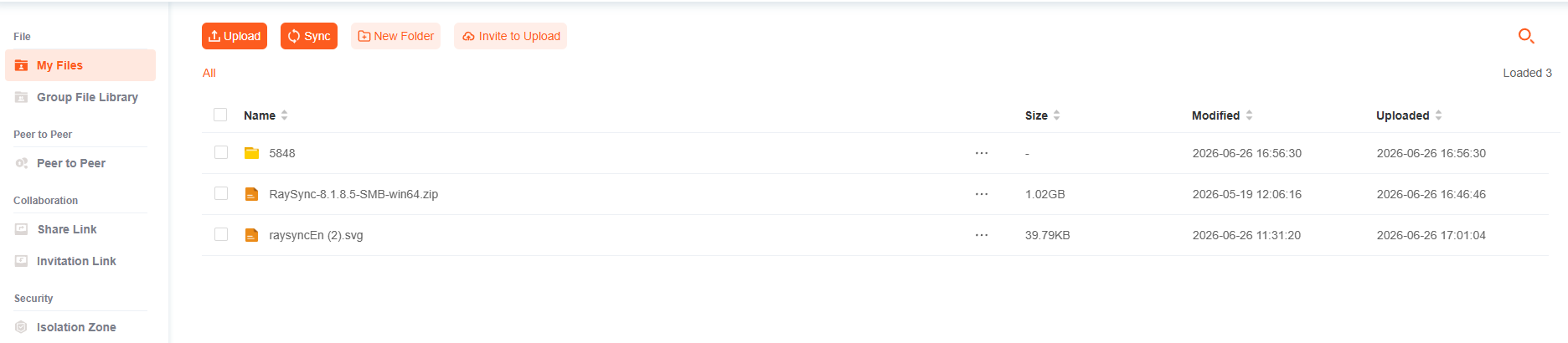
Raysync supports upload and download via web or client for daily file exchange, project submissions, client delivery, and cross-department sharing. For large files and large directories, it combines high-speed transfer protocols, chunked transfer, multi-channel parallelism, and resumable transfer to lift both throughput and success rates — cutting the lag, failures, and duplicate transfers common with traditional tools.
Sync tasks: directory-level automated synchronization
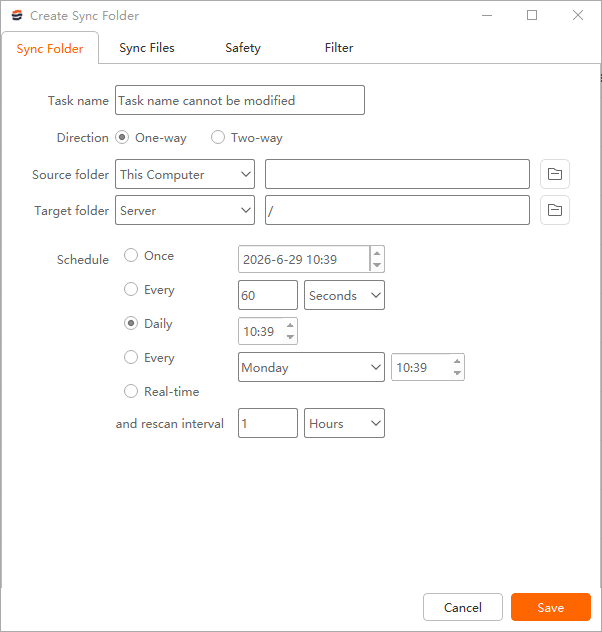
For recurring file flow, Raysync provides sync tasks supporting one-way sync, two-way sync, and multiple scheduling strategies: scheduled daily sync, periodic sync, one-time sync, weekly scheduling, file-overwrite policies, sync-and-delete options, source-directory auto-cleanup, and regex-based filtering. This turns sync from a fragile, script-driven chore into a configurable, monitorable, platform-managed task.
P2P transfer: faster ad-hoc and external delivery
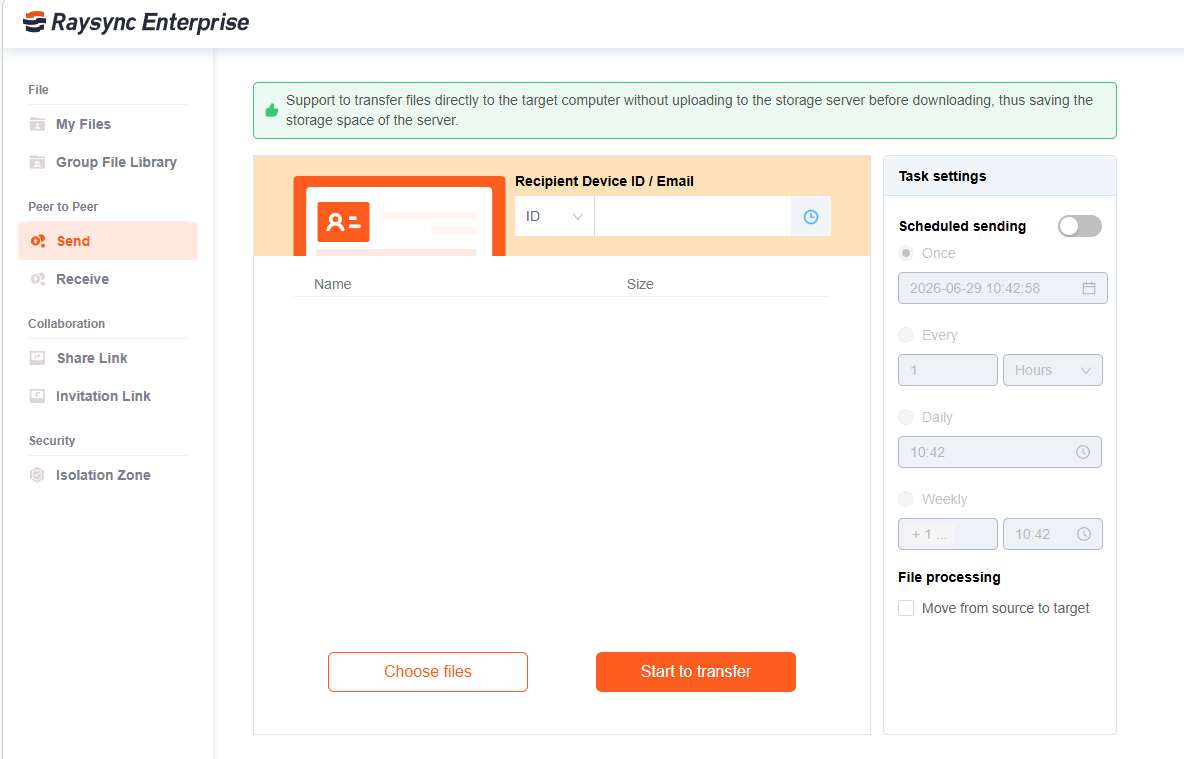
Raysync supports P2P peer-to-peer transfer, where data doesn't have to be stored on the server — the server mainly handles signaling or relay. STUN-based NAT traversal improves direct-connection success rates, while offline queuing lets recipients receive files automatically once they come online. P2P suits enterprise-to-supplier large-file delivery, cross-team ad-hoc handoffs, point-to-point sensitive delivery, remote-work collaboration, and temporary transfers that don't need long-term server storage.
What makes Raysync's file sync and share different?
Raysync's file sync and share is built for the network conditions that break ordinary EFSS tools: long distances, high latency, and packet loss. Its differentiator is a high-speed transfer engine wrapped in enterprise governance, rather than storage-first collaboration bolted onto slow underlying transfer.
A proprietary high-speed transfer protocol
Raysync's engineering team built its transfer engine around UDP-based WAN acceleration for large-file, complex-network scenarios — with chunked upload/download, multi-connection parallelism, compression, and resumable transfer. This matters because TCP-based protocols (the foundation of FTP and SFTP) throttle themselves under latency and loss: each round trip waits on acknowledgments, and even well-tuned TCP rarely exceeds ~20% utilization on long-haul links. Under packet loss, throughput can collapse to single digits, while UDP-based acceleration sustains a large share of the link.
.png)
Over a high-latency WAN, TCP/SFTP throughput falls off a cliff as packet loss rises, while UDP-based acceleration holds.
One platform for three task types, less fragmentation
By unifying standard upload/download, automated sync, and P2P into one EFSS platform, Raysync collapses the management overhead of running several tools. That means unified accounts and permissions, a single transfer entry point, unified task management, unified policy configuration, unified logging and auditing, and unified operations and monitoring. Business users move faster; IT governs from one place.
Automated sync that keeps data consistent
For multi-site collaboration, branch backhaul, and project-material sync, Raysync executes sync tasks automatically against business rules — reducing the uncertainty of manual work. Teams configure direction, timing, overwrite rules, deletion policies, and filtering to keep data consistent across organizations and locations.
P2P that eases server pressure
Where long-term central storage isn't needed, P2P transfer trims server relay and storage load, lowers cost, and shortens the transfer path — valuable for high-volume temporary delivery, external collaboration, and point-to-point large-file transmission.
Visibility and enterprise governance
File collaboration needs visibility, not just speed. Raysync surfaces task status, progress, speed, and results so IT and business teams can see file flow in real time and diagnose anomalies fast — cutting communication and troubleshooting cost. On top of that sit permission controls, transfer policies, task management, and secure transmission, making Raysync better suited than email, chat, or public cloud links to host important internal and external file collaboration.
How does Raysync EFSS compare to FTP, cloud drives, and point tools?
Raysync compares favorably to single-purpose tools because it integrates their strengths instead of forcing you to choose one. FTP handles basic transfer; cloud drives (Box, Dropbox, Egnyte) handle shared storage and collaboration; standalone sync tools (such as Resilio or GoodSync) handle directory sync; specialized acceleration tools (Aspera, Signiant) handle large-file speed. Raysync brings these patterns together under one governed EFSS platform.
| Capability | Traditional FTP/SFTP | Cloud drives (Box, Dropbox, Egnyte) | Standalone sync tools | Generic P2P tools | Raysync |
|---|---|---|---|---|---|
| Large-file transfer performance | Weak on poor networks | Moderate | Varies | Depends on direct connection | Optimized UDP acceleration |
| Upload / download | Supported | Supported | Typically weak | Supported | Supported |
| Automated sync | Requires scripts | Partial | Supported | Not supported | One-way/two-way, multi-policy scheduling |
| P2P support | No | No | No | Yes | Yes, integrated into the platform |
| Web collaboration | Weak | Strong | Weak | Weak | Supported |
| Enterprise governance | Weak | Moderate | Single-scenario | Weak | Unified permissions, tasks, policies, monitoring |
| Multi-scenario coverage | Transfer only | Storage-focused | Sync-focused | P2P-focused | Upload + sync + P2P |
| Operations management | Fragmented | Platform, limited transfer | Single scenario | Hard to unify | Centralized, visualized, manageable |
The pattern is clear: most products solve one problem well. Raysync's advantage is integrating multiple file collaboration modes into a single unified EFSS platform — with a high-speed engine and enterprise governance underneath — so it serves business departments and IT management at the same time.
The Raysync Enterprise plan: a governed EFSS platform for global teams
For organizations that need file sync and share to be fast and auditable, the Raysync Enterprise plan is the recommended platform. It's an enterprise large-file-transfer and enterprise file sync-and-share (EFSS) platform that brings the capabilities above into one governed environment:
- Proprietary UDP-based WAN acceleration and peer-to-peer transfer for speed across long distances and weak networks.
- AES-256 encryption in transit and at rest, plus checkpoint resume and transfer verification for reliable, secure delivery.
- Scheduled or event-triggered one-way and two-way sync for hands-off directory synchronization.
- Centralized administration with role-based access control (RBAC) and audit logs, plus secure sharing links for controllable external collaboration.
- REST API, SDK, CLI, and enterprise identity integrations to fit existing workflows.
- AI-agent integration for natural-language remote file operations.
Raysync Enterprise is TPN certified, a DPP member, and HIPAA and ISO 27001 certified — credentials that matter for media, healthcare, and regulated global enterprises. As an international, Singapore-headquartered brand, Raysync is built for multinational deployments and cross-border workflows across the US, EU, UK, APAC, and the Middle East, framed around global compliance standards such as GDPR, HIPAA, SOC 2, and ISO 27001.
Pricing is customized to deployment. Free trial is available — the fastest way to benchmark integrated upload, sync, and P2P against your current stack.
Frequently asked questions
What does EFSS stand for?
EFSS stands for enterprise file sync and share — a category of software that lets organizations store, synchronize, share, and govern files across users, devices, and sites from one centrally managed platform, with enterprise-grade permissions, encryption, and audit trails.
How is EFSS different from a consumer cloud drive?
EFSS is built for administrative control at scale, while consumer cloud drives optimize for individual convenience. An EFSS platform adds role-based permissions, audit logging, policy enforcement, secure external sharing, and — in Raysync's case — high-speed transfer and automated sync that consumer tools don't provide.
Can one platform really handle upload, sync, and P2P?
Yes. An integrated EFSS platform like Raysync handles standard upload/download, automated directory synchronization, and peer-to-peer transfer within one architecture, sharing accounts, permissions, policies, and monitoring across all three so teams don't juggle separate tools.
Why is UDP-based transfer faster than FTP or SFTP over long distances?
UDP-based acceleration is faster over long distances because it doesn't stall waiting for per-packet acknowledgments the way TCP (which underpins FTP and SFTP) does. On high-latency or lossy links, TCP throughput can drop sharply, while UDP-based acceleration sustains a much larger share of available bandwidth.
Is Raysync secure enough for regulated industries?
Raysync Enterprise supports AES-256 encryption in transit and at rest, role-based access control, audit logs, and transfer verification, and holds TPN, HIPAA, and ISO 27001 certifications plus DPP membership — designed to meet the controllability and traceability requirements of finance, government, healthcare, and media.
How do I try Raysync?
A free trial of the Raysync Enterprise plan can be requested through the Raysync website. Enterprise pricing is customized to your deployment, so the trial is the best way to validate performance and governance against your own workflows.
Conclusion: consolidate file collaboration onto one EFSS platform
Fragmented file collaboration is a tax enterprises pay every day — in slow large-file delivery, brittle sync scripts, ungoverned external sharing, and IT teams stretched across too many tools. As the enterprise file sync and share market races toward an estimated $38.5 billion by 2030, the direction of travel is clear: consolidation onto governed platforms that are fast and controllable.
Raysync answers that shift by putting upload, automated sync, and P2P on one enterprise file sync and share platform — a high-speed transfer engine underneath, unified permissions, auditing, and monitoring on top. The result is file flow that's not just faster, but more secure, more consistent, and easier to manage across regions and partners.
If your teams are stitching file collaboration together from a cloud drive, an FTP server, a pile of sync scripts, and a chat app, the next step is simple: start a free trial of the Raysync Enterprise plan and benchmark one governed platform against your current stack. One platform for upload, sync, and P2P — that's how enterprise file sync and share should work.
Sources
- Grand View Research — Enterprise File Synchronization & Sharing Market Report, 2030 (2024): EFSS market ~$11.0B (2024) → $38.5B (2030), 24.3% CAGR. https://www.grandviewresearch.com/industry-analysis/enterprise-file-synchronization-sharing-market-report
- Mordor Intelligence — Enterprise File Synchronization and Sharing Market (2025): corroborating market sizing (~$15.2B in 2025, ~24.4% CAGR). https://www.mordorintelligence.com/industry-reports/enterprise-file-synchronization-and-sharing-market
- MarketsandMarkets — Enterprise File Synchronization and Sharing (EFSS) Market (2026): alternative sizing/forecast. https://www.marketsandmarkets.com/Market-Reports/enterprise-file-sharing-and-synchronization-market-149308334.html
- Netskope — Network Latency vs Throughput vs Packet Loss (network performance fundamentals): TCP degradation under latency/loss. https://www.netskope.com/blog/network-performance-and-user-experience-network-latency-vs-throughput-vs-packet-loss
- GoAnywhere (Fortra) — Use UDP for accurate accelerated file-transfer testing: TCP vs UDP behavior under loss. https://www.goanywhere.com/blog/iperf-test-udp-accurate-results-accelerated-file-transfers
- Mathis, Semke, Mahdavi, Ott — The Macroscopic Behavior of the TCP Congestion Avoidance Algorithm (throughput ∝ 1/√loss), foundational reference for TCP-under-loss modeling used in the throughput chart.
- Raysync — How Latency & Packet Loss Hurt Large File Transfers (vendor technical background). https://www.raysync.io/news/how-to-overcome-latency-and-packet-loss/
You might also like

Industry news
May 9, 2025Understand TCP Slow Start and how it improves network efficiency. Learn how and why it’s essential, and discover Raysync for faster transfers.
![Full Tutorial: Big Size File Transfer [From GB to PB]](http://images.ctfassets.net/iz0mtfla8bmk/25KrDLysNp8VWIrAvZyIB/68a84ebc15c5dd426135a5ad3a0ea333/big-size-file-transfer.png)
Industry news
April 10, 2025Learn the best big-size file transfer methods from GB to PB. Discover free and paid tools to send big-size files quickly and securely.
Industry news
November 6, 2024Elevate your file transfer experience and discover user-friendly web-based FTP client solutions for seamless file transfers!