Work in the browser
Preview common media and office file types before deciding what to download or share.
Enterprise File Sync and Share
One governed place to store, sync, share, preview, and audit business files.
Give employees a simple file portal and give IT the identity, policy, link controls, and evidence required to keep sharing accountable.
Trusted by enterprises worldwide







The working definition
EFSS is not another consumer drive. It is the governed layer between employees, external recipients, enterprise identity, and the storage you already operate.
Definition
EFSS sits between consumer file-sharing tools and transfer automation. People choose what to share; the organization controls who can open it, where it goes, and how long it stays available.
Choose managed file transfer software for recurring system-to-system workflows. Choose EFSS when a person decides what to send, to whom, and for how long.
| Dimension | Generic sharing | EFSS (Raysync) | Managed File Transfer |
|---|---|---|---|
| IT control | Minimal, per user | Central, per role | Central, per task |
| Access policy | Link settings only | Roles, file type and size rules | Task and endpoint rules |
| Identity integration | Consumer accounts | AD, OpenLDAP, Okta, OneLogin, Google Workspace | Same directory sources, applied to task operators |
| Activity visibility | Sparse | Portal, sharing, and transfer logs | Transfer history and operation logs |
| External sharing | Ad hoc links | Controlled links with password, expiry, download limit | Sanctioned partner endpoints, not link sharing |
| Synchronization | Device sync | Keeps team and office locations consistent | Scheduled and event-driven sync jobs |
| Typical owner | Individual | IT and business teams | IT, operations, security |
The portal
Everything an employee does with a governed file happens in one browser-based portal: same place, same permissions, same log.
Preview common media and office file types before deciding what to download or share.
Upload, download, copy, sync, and delete within the permissions the role already carries.
Give customers and suppliers an inbound route without exposing the wider source tree.
Present an approved branded portal and share experience to external recipients.
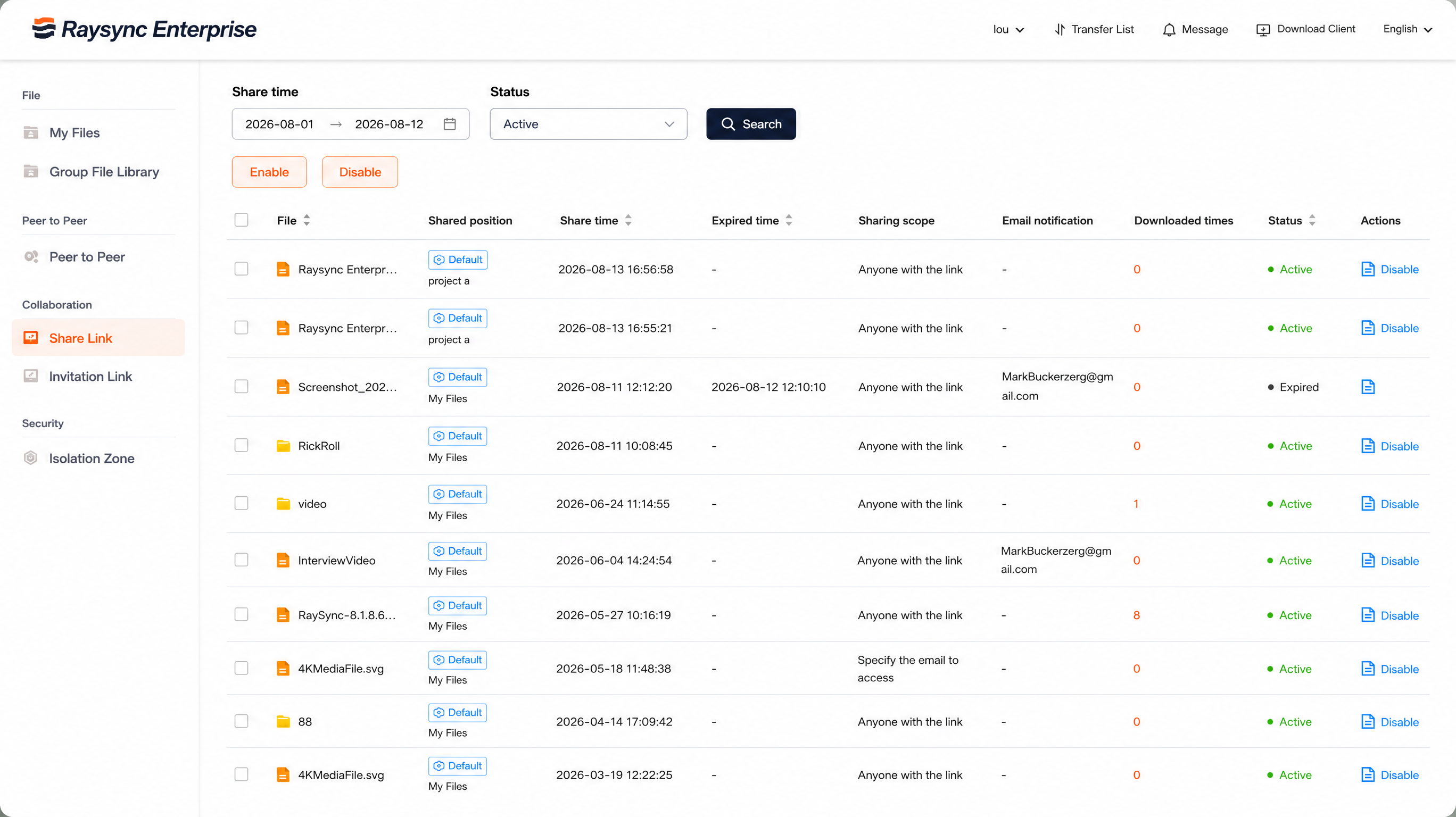
External sharing
Send files outside the organization without surrendering control after the message leaves your inbox.
Choose preview only or preview and download.
Anyone with the link, your organization, or named email addresses.
Add a password and a clear date after which access ends.
Cap total downloads and revoke the link immediately when needed.
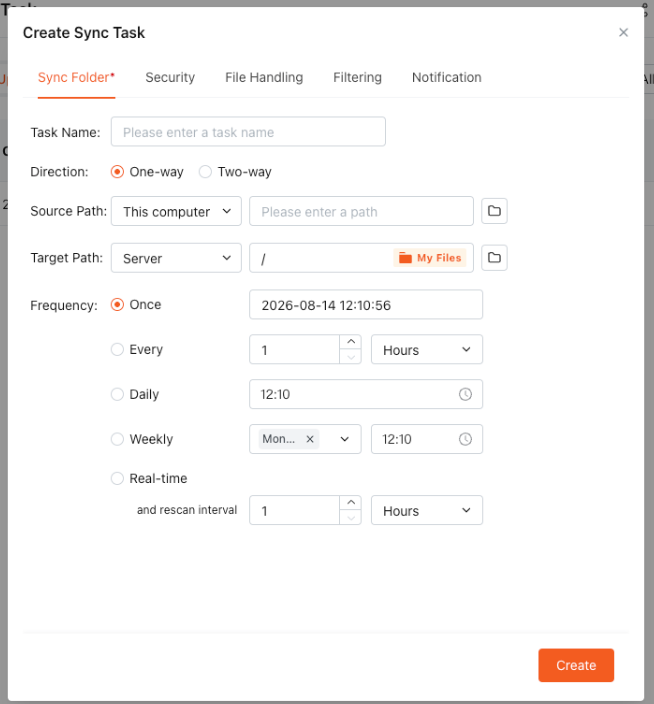
Team sync
Keep chosen locations consistent so teams avoid duplicate copies and outdated versions.
Configure a task once, on an interval, daily, weekly, or in real-time mode with a chosen rescan interval. Real-time mode still rescans on that interval, so changes do not propagate instantly.
Evidence
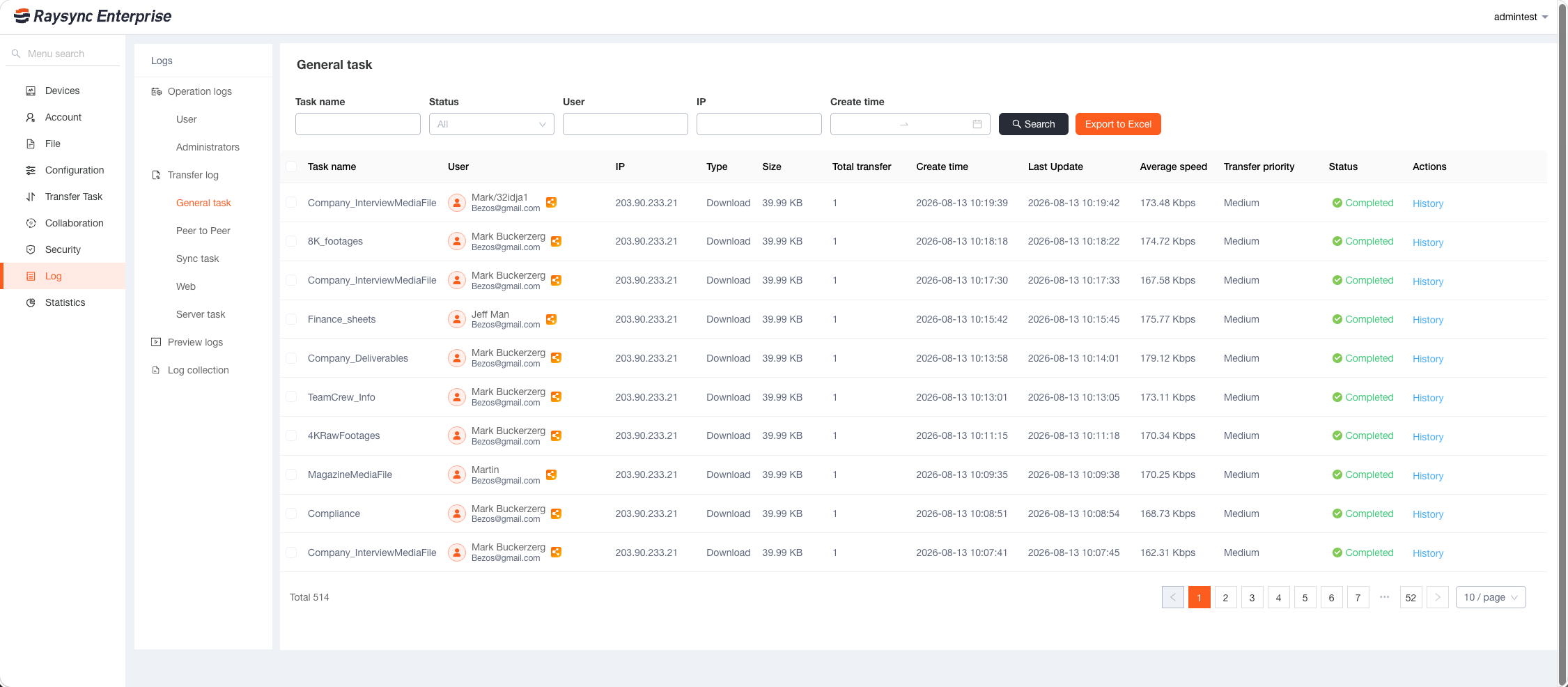
The gap auditors find is often not a missing control. It is the inability to prove the control applied to a specific file on a specific day.
Users, groups, and role assignments decide who may share, preview, download, and administer.
File type and size restrictions, authentication, antivirus scanning, and link controls apply before access.
Transfer, operation, preview, upload, download, sync, and sharing logs remain searchable by user and file.
Infrastructure
Different participants reach the same governed platform through the surface appropriate to their role.
Applications
A sanctioned sharing path should be easier for users and more accountable for IT.
Recipients get a controlled link, not an account. Every send remains attributable.
Distributed teams work against consistent governed storage instead of copied folders.
Reviewers receive scoped rights without access to the whole source tree.
Make the sanctioned portal faster and clearer than shadow sharing.
Give suppliers a controlled inbound route instead of an email attachment.
FAQ
EFSS software lets an organization synchronize files between locations and share them with internal users and external partners under central IT control. Access is tied to identity, permissions are set by role, and portal, sharing, and transfer activity is written to logs administrators can review.
Ordinary tools optimize for convenience. EFSS keeps sharing inside a governed system where administrators define roles, connect identity providers, restrict file types and sizes, control links, and review activity logs.
Not instantly. Frequency is configured on the sync task: once, on an interval, daily, weekly, or real-time with a chosen rescan interval. Real-time mode still rescans on that interval.
Yes. Internal users create a share link and recipients open it in a browser. The link can include a password, expiry date, download limit, and a scope restricted to named email addresses.
Sharing scope decides that. A link can be open to anyone who has it, restricted to your organization, or limited to specific email addresses. Preview and download permission is configured separately.
No. Raysync governs files, access, links, previews, and history. Teams keep their editing tools, while Raysync becomes the controlled place those files live and leave from.
Next step
Run a trial against your own directory and storage, with your real sharing rules.
By continuing to use this site, you agree to the use of cookies.