
Enterprise Peer-to-Peer File Transfer, Upgraded: Visual, Flexible, and Easier to Manage
August 24, 2026Most enterprise peer-to-peer file transfer still ends the same way: someone clicks send, and then nobody knows anything. Did it land? In which folder? Is it still running, or did it fail at 78%? The sender pings the receiver on chat. The receiver checks a downloads folder. Twenty minutes disappear into a handoff that should have taken twenty seconds.
That gap between sending a file and knowing what happened to it is the real cost of direct file transfer at work — and it gets worse the more distributed the team is. Remote offices, contract post-production houses, field engineers, suppliers across three time zones: every one of them turns a one-click transfer into a thread of confirmation messages.
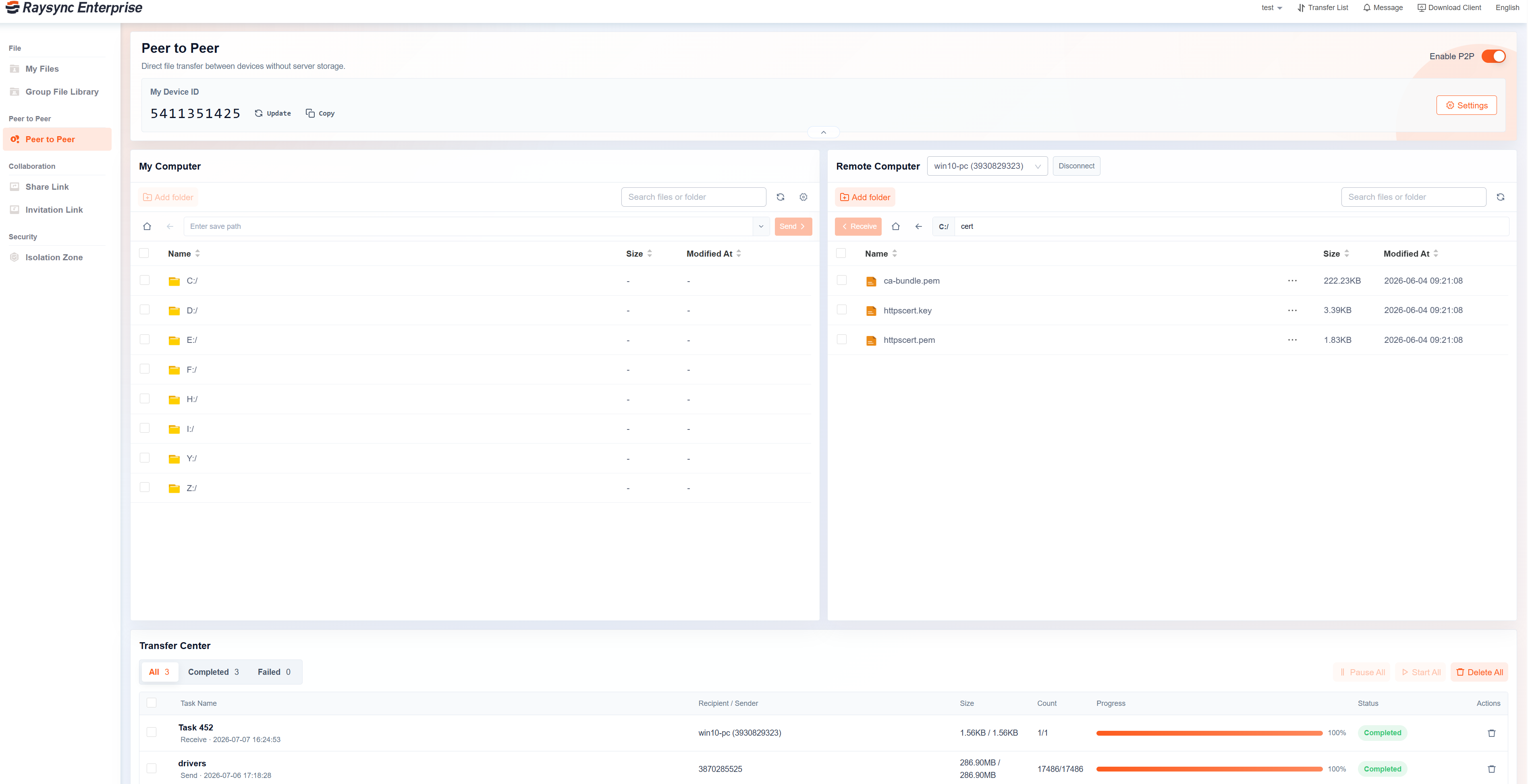
The latest Raysync P2P upgrade attacks that gap directly. It is not a speed release. It is a visibility release: browse both machines' file lists side by side, drag files between them, manage authorized remote directories, and watch progress from the web Transfer Center without opening a client. Direct file collaboration stops being blind delivery and becomes a workspace.
.png)
The P2P file transfer software market is on track to nearly triple by 2035 as enterprises adopt direct transfer for scenarios where central storage adds cost without adding value. Source: Business Research Insights (August 2026).
TL;DR — Key Takeaways
-
Peer-to-peer file transfer moves a file directly from one authorized device to another, with no intermediate upload to a central server — cutting the data that crosses the network roughly in half compared with a relayed transfer.
-
The failure mode of traditional enterprise P2P is not speed, it is blindness: no view of the remote directory, no confirmation of the destination, no live status.
-
Raysync's upgraded P2P adds four things: dual local/remote file lists, drag-and-drop transfer, permission-based remote file management, and P2P progress inside the web Transfer Center.
-
Every remote operation is gated by explicit authorization from the remote device — P2P convenience without the ungoverned free-for-all that gave consumer P2P its reputation.
-
Knowledge workers lose just under four hours a week — about 9% of working time — reorienting after switching between applications (Harvard Business Review, 2022). Checking transfer status in a second tool is exactly that tax.
-
The Raysync Enterprise plan pairs P2P with UDP-based WAN acceleration, AES-256 encryption in transit and at rest, checkpoint resume, role-based access control, and audit logs. A free trial is available through the Raysync website.
What is peer-to-peer file transfer in an enterprise context?
Peer-to-peer file transfer is a method of moving files directly between two authorized endpoints — a laptop and a workstation, a branch server and a head-office machine — without first uploading the payload to a central server that both sides then access. The two devices negotiate a connection and the data travels one hop instead of two.
That is the whole technical story. The enterprise story is different, and it is where most P2P tools fall down.
Consumer P2P earned a bad name for a reason: open networks, no identity, no permissions, no audit trail. Enterprise peer-to-peer file transfer inverts every one of those properties. Endpoints are known and authenticated. Directory access is explicitly granted by the remote device, not assumed. Transfers are encrypted, resumable, and logged. The "peer-to-peer" part describes the data path — not the governance model.
Why it matters: the categories overlap but solve different problems. EFSS and cloud drives optimise for shared, persistent storage. Managed file transfer (MFT) optimises for automation, scheduling, and compliance. Enterprise large file transfer optimises for raw throughput on long-distance networks. P2P optimises for the direct handoff — the file that needs to get from this machine to that machine and does not need to live on a server afterwards.
Why does traditional peer-to-peer file transfer break down at work?
Because a send button answers only one question — "did I click it?" — and enterprise handoffs raise at least six more:
-
Which remote directory will the file be saved to?
-
Can the sender see the receiver's folder structure at all?
-
Has the file actually arrived, or is it queued?
-
Did the transfer complete, fail, or get cancelled?
-
Does the receiver have to manually move the file somewhere useful?
-
Can the sender help organize files on the remote side, or is that always someone else's job?
None of these are exotic. They come up on every single handoff. And because the tool cannot answer them, people answer them by hand — "where should I send it?", "did you get it?", "check the project folder?", "is it the right version?" That is not collaboration. That is a status meeting conducted one message at a time.
.png)
Illustrative workflow comparison: when the sender can see the destination directory and the live progress, the confirmation loop and the receiver's cleanup work disappear entirely.
The second cost is quieter. Checking whether a transfer finished usually means leaving the web portal, opening a desktop client or plugin, finding the task, and switching back. Harvard Business Review's study of 137 users across three Fortune 500 companies found workers toggle between applications around 1,200 times a day, losing just under four hours a week — roughly 9% of their working time — simply reorienting after each switch. A transfer status check is a small toggle. Multiplied across a distributed team and a few hundred handoffs a week, it is not small at all.
Stat callout: ~1,200 daily application switches per worker → just under 4 hours a week lost to reorientation → ~9% of annual working time. (Harvard Business Review, August 2022)
What changed in the Raysync peer-to-peer file transfer upgrade?
Four changes, each aimed at a specific question the old workflow could not answer. peer to peer transfer interface
1. Local and remote file lists in one workspace
The upgrade puts My Computer and Remote Computer side by side in the same P2P view. The sender browses the authorized remote directory before sending, picks the destination folder, and confirms the file in the remote list afterwards.
This is the change that removes the most friction, because it turns a guess into a selection. Instead of "I'll send it and you tell me where it went," the sender chooses \Projects\Q3\Renders\ and the file arrives there. For project collaboration, customer delivery, remote device operation, and supplier file exchange, that single capability eliminates most of the confirmation traffic.
2. Drag-and-drop transfer between machines
Files and folders now move by dragging:
-
Drag from My Computer → Remote Computer to send.
-
Drag from Remote Computer → My Computer to fetch.
-
Drag whole folders, not just individual files.
The point is not that dragging is faster than clicking a button — it is that it matches a mental model every user already has. Moving a file between two machines now feels like moving a file between two folders. For non-technical business users, that collapses the learning curve to zero. For heavy users, it removes a repeated multi-click sequence from dozens of daily operations.
3. Permission-based remote file management
This is the biggest functional expansion. Where the remote device grants authorization, the sender can do more than deposit files. They can:
|
Operation |
What it enables |
|
Fetch files from the remote device |
Retrieve work from an office workstation while travelling |
|
Create folders remotely |
Set up a clean project structure before the files land |
|
Rename files and folders |
Enforce naming conventions at the destination |
|
Delete files |
Clear superseded versions without a round trip |
|
Browse remote directories |
Verify what is actually on the far machine |
A project manager can send files into a specified project folder and tidy the directory while they are there. A support engineer can work on an authorized remote device without walking a user through every step by phone. A remote employee can pull a file from their office machine at 11pm without waking anyone up.
Every one of these operations is gated. The remote device must explicitly enable the capability before another user can perform it — permissions are opt-in, not default-on. Raysync's engineering team treats this as the non-negotiable condition of remote file management: convenience that a device owner did not grant is not convenience, it is exposure.
4. P2P progress inside the web Transfer Center
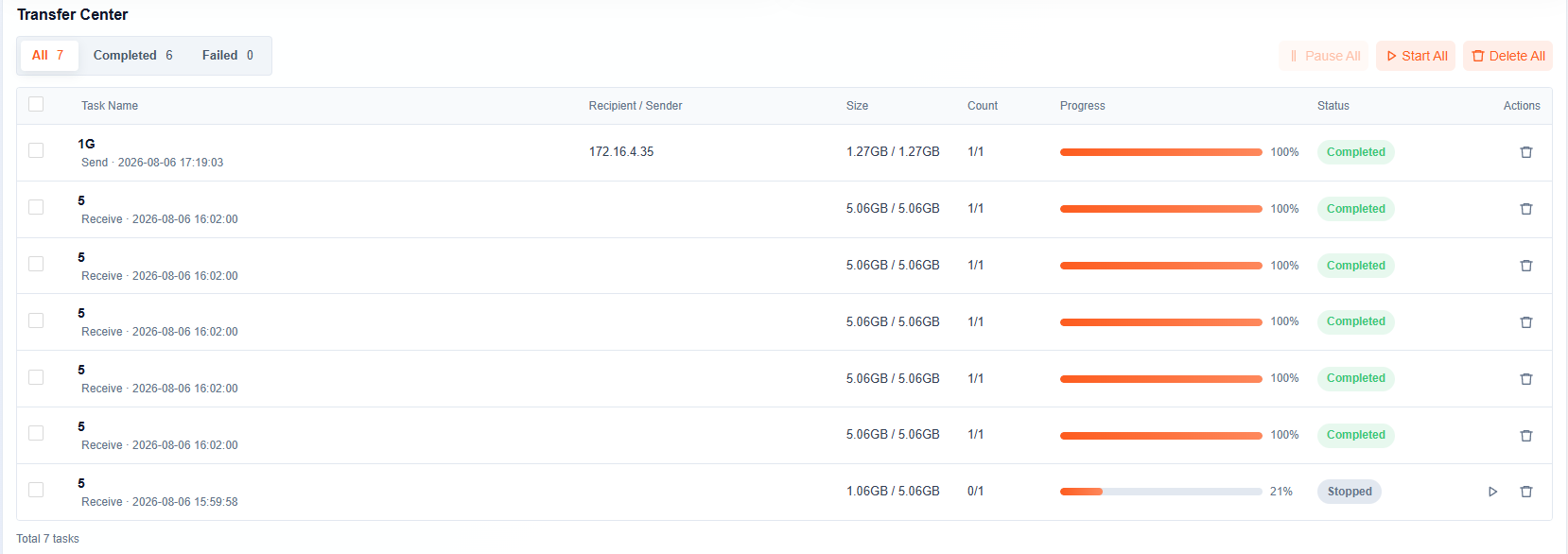
P2P transfer progress and results now appear directly in the web Transfer Center. Users see live progress, task status, whether a task completed, failed, was cancelled, or is waiting on the receiver, plus transfer history and task feedback — without switching to the desktop client or plugin.
This is the fix for the toggle tax described above. The status check happens where the user already is.
How does direct peer-to-peer transfer compare with a server relay?
A relayed transfer moves the payload twice: sender → server, then server → receiver. A direct peer-to-peer transfer moves it once. For a 500 GB folder handoff, the arithmetic is unambiguous.
.png)
A relayed handoff pushes 1,000 GB across the network and leaves a 500 GB copy on the server. A direct peer-to-peer file transfer pushes 500 GB and leaves nothing behind.
That does not make relay wrong. It makes it the wrong default. Files that many people need over months belong in shared, governed storage. Files that one person needs from one machine, once, do not — and forcing them through a central server adds egress cost, storage pressure, retention obligations, and a longer path.
The honest framing: use central storage for files with an audience, and peer-to-peer file transfer for files with a recipient. A platform that offers only one of the two makes users work around it.
Where does enterprise P2P fit alongside cloud drives, FTP, and MFT?
|
Peer-to-peer transfer |
Cloud drive / EFSS |
FTP / SFTP |
Managed file transfer |
|
|
Data path |
Direct, one hop |
Via provider storage |
Via a server you run |
Via a managed server |
|
Best for |
One-off direct handoffs, remote device access |
Shared, persistent, collaborative files |
Scripted server-to-server jobs |
Automated, audited, recurring flows |
|
Server storage used |
None |
Full copy retained |
Full copy retained |
Full copy retained |
|
Long-distance performance |
Depends on the transfer engine |
Often throttled |
Poor on high-latency links |
Varies by product |
|
Typical visibility |
Historically poor |
Good |
Poor |
Excellent |
|
Governance |
Depends on the product |
Strong |
Weak |
Strong |
The row that matters is the last one. "Depends on the product" is exactly why enterprise buyers have been cautious about P2P — and exactly what a permission model, encryption, and audit logging are for. Resilio built a business on P2P sync; Aspera, Signiant, MASV, and FileCatalyst built theirs on accelerated point-to-point delivery. The differentiator now is whether the direct path comes with the visibility and controls an IT team can actually sign off on.
In practice, most enterprises need more than one of these paths, which is why P2P works best as a mode inside a broader enterprise large file transfer platform rather than as a standalone tool. The same accelerated transfer engine, the same identity model, the same audit trail — applied to whichever route the file actually needs.
What does this look like in real enterprise workflows?
Remote post-production handoff. A designer in London finishes a 240 GB render pass and needs it on a colleague's workstation in Singapore. Previously: send, then message, then wait, then message again. Now: browse the remote \Renders\Approved\ directory, drag the folder in, watch it complete in the web Transfer Center. No confirmation thread.
Retrieving a file from an office machine. An engineer on-site at a customer needs a configuration file from their desk workstation. With permission enabled on that device, they browse its file list and fetch the file directly — no VPN share, no calling a colleague, no uploading anything to a cloud drive first.
Supplier file exchange. A manufacturer sends revised CAD packages to a contract supplier and needs them in the supplier's versioned folder structure, not a generic inbox. The sender selects the destination directory, drops the files in, and the naming convention survives the handoff.
Support engineering on an authorized device. A support engineer troubleshooting a customer's on-premise deployment creates a folder, pushes a patched binary into it, and removes the superseded version — all within the permissions the customer explicitly granted, all recorded.
Upgrade highlights at a glance
|
Capability |
Previous experience |
Upgraded Raysync P2P |
|
Remote directory visibility |
Not visible to the sender |
Remote file list browsable in-app |
|
Destination confirmation |
Manual chat/email confirmation |
Destination folder selected visually before sending |
|
Transfer operation |
Select file → click send |
Drag and drop, files or whole folders |
|
Remote file access |
Sending only |
Fetch from remote device with permission |
|
Remote file management |
Not supported |
Create, rename, delete with permission |
|
Progress checking |
Switch to client or plugin |
Live in the web Transfer Center |
|
Overall model |
Transfer function |
Visual, interactive, manageable workspace |
Why this upgrade matters for enterprises
It reads like an interface release. Its effects are operational.
Fewer communication gaps. Visible remote directories and visible results remove the confirmation loop between sender and receiver — the single largest hidden cost in day-to-day file handoffs.
Higher operational efficiency. Drag-and-drop and dual file lists cut clicks out of an action people perform dozens of times a day.
Deeper remote collaboration. Authorized remote file management extends P2P from delivery into genuine cross-device work.
Transparent transfer status. Status lives in the web Transfer Center, so checking it costs one glance rather than one context switch.
Control through permissions. Remote operations require explicit authorization from the device owner, letting enterprises trade convenience against exposure deliberately rather than by accident.
Better adoption among business users. A P2P interface that behaves like a file explorer gets used by people who would never open a transfer client — which is where most of the productivity actually is.
How the Raysync Enterprise plan supports peer-to-peer file transfer at scale
A visible P2P workspace solves the handoff. Enterprises also need the transfer underneath it to be fast, secure, and auditable — especially when the two peers sit on opposite sides of a high-latency link.
The Raysync Enterprise plan is the tier built for that. It is an enterprise large file transfer and EFSS platform combining:
-
Proprietary UDP-based WAN acceleration with intelligent UDP/TCP switching — the mechanism that keeps throughput high on long-distance paths where single-flow TCP collapses under latency and packet loss
-
Peer-to-peer transfer alongside upload/download, sync, and web collaboration
-
AES-256 encryption in transit and at rest, TLS transmission with support for custom TLS and client certificates
-
Checkpoint resume and transfer verification, so a dropped 500 GB job restarts where it stopped
-
Scheduled or event-triggered one-way and two-way sync
-
Centralized administration with role-based access control and audit logs
-
Secure sharing links, plus REST API, SDK, CLI, and enterprise identity integrations
-
AI-agent integration for natural-language remote file operations
Raysync Enterprise is TPN certified, a DPP member, and HIPAA and ISO 27001 certified — the compliance baseline media, healthcare, and regulated enterprises ask for before a direct-transfer path gets approved. Pricing is customized to deployment scale.
Start a free trial of the Raysync Enterprise plan through the Raysync website and test P2P transfer against your own long-distance links and file sizes.
For organizations running transfer infrastructure across multiple nodes, sites, or regions, Raysync Hub adds a centralized management console — node and client-agent management, transfer scheduling, real-time monitoring, per-node bandwidth controls, and detailed operations logs. Hub is available at $6,000 per year including six online nodes, with additional nodes at $600 per node per year, and a seven-day free trial.
FAQ
What is peer-to-peer file transfer?
Peer-to-peer file transfer moves a file directly between two authorized devices without uploading it to an intermediate server first. The data travels one hop instead of two, which halves the volume crossing the network and leaves no stored copy behind.
Is peer-to-peer file transfer secure for business use?
It can be, and the distinction is entirely in the implementation. Enterprise P2P should authenticate both endpoints, encrypt data in transit with TLS and AES-256, gate every remote operation behind explicit permission from the remote device, and log all activity. Consumer P2P networks did none of these things, which is where the category's reputation came from.
What is the difference between P2P file transfer and cloud file sharing?
Cloud sharing stores a copy on a provider's servers that multiple people access over time; P2P sends the file directly to one recipient and stores nothing centrally. Use cloud storage for files with an audience and P2P for files with a recipient.
Can I access files on a remote computer with P2P transfer?
Yes, if the remote device grants permission. Raysync's upgraded P2P allows an authorized user to browse the remote file list, fetch files, create folders, rename, and delete — each capability enabled explicitly by the remote device rather than on by default.
How do I know a P2P transfer completed successfully?
In Raysync's upgraded workflow, progress, status, and results appear in the web Transfer Center — including whether a task completed, failed, was cancelled, or is waiting on the receiver — without opening a desktop client.
Is P2P transfer faster than uploading to a server?
For a single handoff, usually yes, for two reasons: the payload crosses the network once rather than twice, and there is no server-side write and read in the middle. Actual speed still depends on the transfer engine — UDP-based acceleration sustains far higher throughput than single-flow TCP on high-latency, lossy long-distance links.
Does peer-to-peer file transfer work for very large files?
Yes. Direct transfer is well suited to GB- and TB-scale handoffs precisely because it avoids doubling the data movement. Checkpoint resume matters more than raw speed at that size — a 500 GB job that has to restart from zero after a network blip is the real failure mode.
Conclusion: direct file collaboration, finally visible
Enterprise peer-to-peer file transfer was never really held back by bandwidth. It was held back by blindness — by a workflow that could send a file but could not tell you where it went, whether it arrived, or what to do next.
Raysync's upgraded P2P closes that loop. Browse both machines. Drag the folder to the directory you actually want. Manage the remote side within the permissions you were granted. Watch the result in the web Transfer Center without leaving the page. What used to be a send-and-hope action is now a workspace you can see into.
Combine that with the Raysync Enterprise plan's UDP-based acceleration, AES-256 encryption, checkpoint resume, and audit logging, and direct file collaboration becomes something an IT team can approve and a business user can actually use.
Request a free trial on the Raysync website and run your own long-distance handoff against it.
Sources
-
Business Research Insights — Peer to Peer (P2P) File Sharing Software Market (updated August 2026): market estimated at USD 1.4B in 2026, projected USD 4.07B by 2035, 12.7% CAGR. https://www.businessresearchinsights.com/market-reports/peer-to-peer-p2p-file-sharing-software-market-123168
-
Harvard Business Review — How Much Time and Energy Do We Waste Toggling Between Applications? (August 2022): 137 users across three Fortune 500 companies; ~1,200 toggles per day, just under 4 hours per week, ~9% of time at work. https://hbr.org/2022/08/how-much-time-and-energy-do-we-waste-toggling-between-applications
-
Grand View Research — Enterprise File Synchronization & Sharing Market Report, 2030 (2024): EFSS category context, ~$11.0B (2024) → $38.5B (2030), 24.3% CAGR. https://www.grandviewresearch.com/industry-analysis/enterprise-file-synchronization-sharing-market-report
-
NIST — FIPS 197: Advanced Encryption Standard (AES): the AES-256 specification referenced for encryption in transit and at rest. https://csrc.nist.gov/pubs/fips/197/final
-
Netskope — Network Latency vs Throughput vs Packet Loss: TCP throughput degradation under latency and loss, the basis for the UDP-acceleration comparison. https://www.netskope.com/blog/network-performance-and-user-experience-network-latency-vs-throughput-vs-packet-loss
You might also like
Industry news
August 29, 2024Discover 5 easy ways to send large files fast without hassle, including free options.
![Best 6 Professional Enterprise SFTP Solutions [2025]](http://images.ctfassets.net/iz0mtfla8bmk/47Fx7SprfOdOwsdbuhz5Le/f1b38010c860010f434fe42336b7c1df/enterprise-sftp-solutions.png)
Industry news
October 16, 2024Protect sensitive files with the right SFTP solution for Enterprise. This guide compares top options for businesses, covering security, ease of use, and scalability.
Industry news
August 11, 2025Discover Raysync v8.1.8.4’s latest features: malicious IP blocking, real-time security alerts, customizable storage notifications, desktop client link transfers, LDAP/AD group filters, and granular admin permissions for enhanced security and efficiency.