Large File Transfer for Media Production: How AI Agents Cut Cross-Border Footage Delivery From Hours to Minutes
June 12, 2026 TL;DR — Key Takeaways
- One hour of 8K RedCode RAW 75 footage is 7.29TB (121.5GB/minute) — a single feature film can generate hundreds of terabytes before grading even starts (Signiant, 2025)
- On a cross-border link with 100ms+ RTT, just 1% packet loss drops standard FTP/TCP to 20-50Mbps on a 1Gbps line — about 2-5% utilization (Raysync, Oct 2025)
- Raysync's UDP acceleration sustains 800-950Mbps under those same conditions, and holds 60-70%+ utilization even at 10-20% packet loss
- Raysync Transfer Skill lets an AI agent run uploads, downloads, and shares from plain-language commands — "send today's footage to the Singapore server" — with stored-credential connections, resumable transfers, and full audit logs
- In a real cross-border co-production, a daily 100GB footage transfer dropped from 6+ hours to as little as 15 minutes, and 50GB VFX renders now return in under 8 minutes
The 4K/8K Data Problem Nobody Budgeted For
Producing a film is a data migration problem wearing a creative-industry costume. One hour of 8K RedCode RAW 75 footage runs 7.29TB — 121.5GB per minute (Signiant, 2025). Add VFX project files, render caches, and audio stems for a feature-length production, and the total routinely climbs into the hundreds of terabytes before a single shot is graded.
That math is why large file transfer for media production has quietly become a production-scheduling problem, not just an IT one. A typical international co-production splits work across continents: the shoot in Bangkok or Reykjavik, the edit bay in Los Angeles, the VFX house in Singapore, the color grade in London. Every one of those handoffs is a multi-terabyte file transfer across a border, a timezone, and — usually — an FTP server that was never built for this much data.
The Triple Bottleneck in Cross-Border Media Transfer
1. File sizes are growing faster than budgets. 4K masters typically run several times larger than HD equivalents depending on codec and compression, and 8K compounds that again. A 120-minute 4K feature can put 300-500TB of raw footage into circulation once every camera card, every take, and every VFX iteration is counted.
2. Cross-border networks punish TCP. This is the part most production teams never see, but it's the actual bottleneck. Standard file transfer protocols (FTP, SCP) run on TCP, and TCP's congestion control treats packet loss as a signal to slam the brakes — repeatedly. According to Raysync's own published benchmarks, a 1Gbps connection with 100ms round-trip time and just 1% packet loss delivers only 20-50Mbps of real throughput via FTP — roughly 2-5% of the available bandwidth. Push packet loss past 10%, and FTP throughput falls to about 1% of theoretical maximum (Raysync, Oct 2025).
The table below shows how this plays out in real transfer scenarios — including one that's almost identical to a daily dailies upload:
| Scenario | Network conditions | Theoretical time | Actual time (FTP/TCP) |
|---|---|---|---|
| 500GB of 4K footage via satellite | 100Mbps, 600ms latency, 3% packet loss | 11 hours | 60+ hours, multiple failed transfers |
| 2TB cloud backup, LA → Virginia | 1Gbps, 80ms latency, 2% packet loss | 4.4 hours | 36+ hours |
| 50GB CAD/asset transfer, NY → Singapore | 500Mbps, 250ms latency, 1% packet loss | 13 minutes | 3-4 hours |
Source: Raysync, "How Latency & Packet Loss Hurt Large File Transfers," Oct 2025
The chart below extends this to the file sizes media teams move every day — daily footage uploads, VFX render returns, and full project archives:
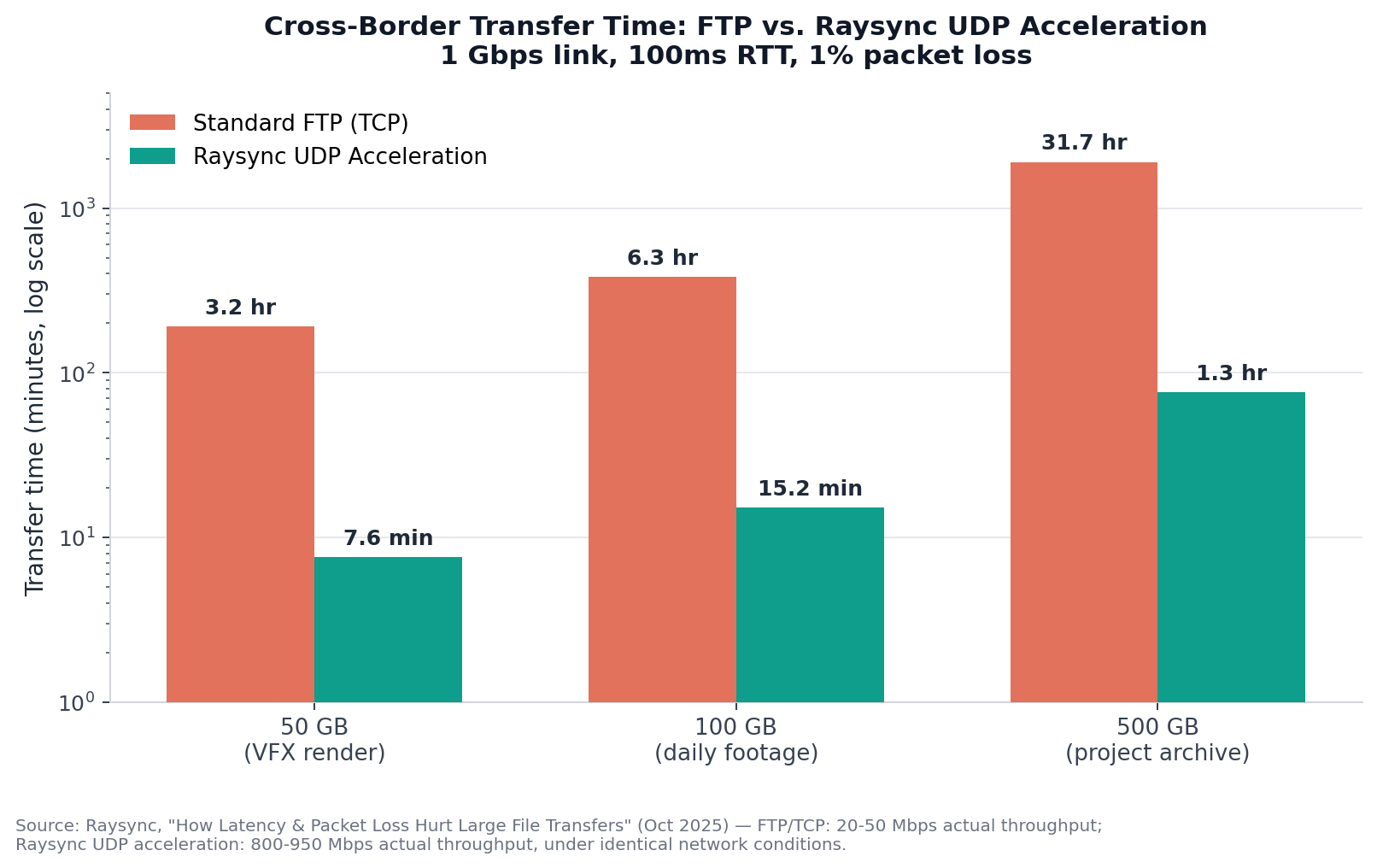
Figure 1: Estimated transfer times for typical media production file sizes over a 1Gbps cross-border link with 100ms RTT and 1% packet loss. FTP estimates use Raysync's published 20-50Mbps real-world range; Raysync UDP estimates use the published 800-950Mbps range. Log scale used due to the magnitude of difference.
And here's what happens as packet loss gets worse — which it does, the further the link travels:
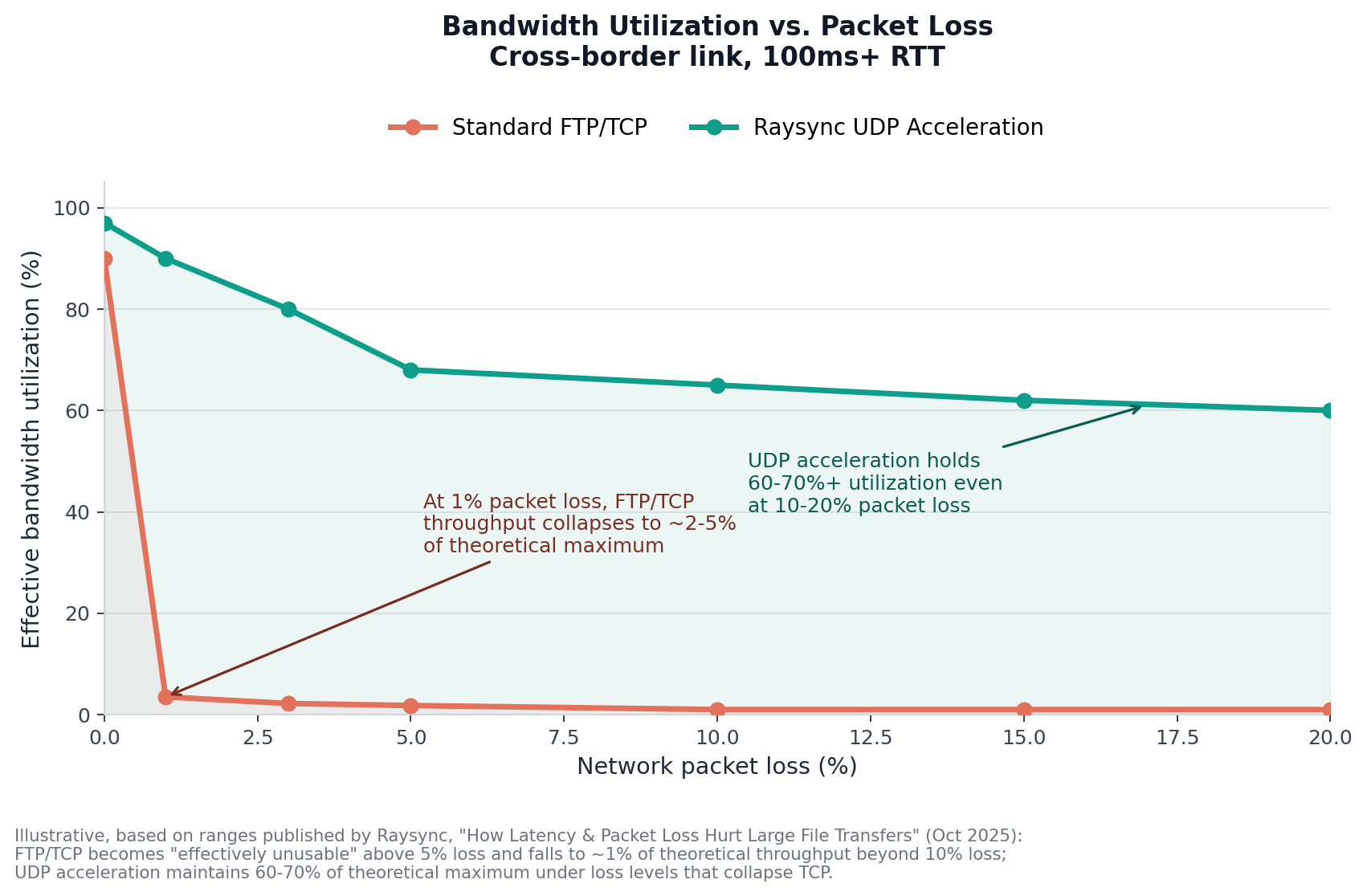
Figure 2: Effective bandwidth utilization as packet loss increases, cross-border link with 100ms+ RTT. FTP/TCP becomes "effectively unusable" above 5% loss and collapses to ~1% of theoretical throughput beyond 10% loss. UDP acceleration maintains 60-70%+ utilization across the same range. Illustrative, based on ranges published by Raysync, Oct 2025.
3. Unencrypted transfer is a copyright liability. If a media asset leaks in transit — a workprint, a VFX breakdown, an unreleased score — the damage is often irreversible and the financial exposure can dwarf the cost of the production itself. Plain FTP sends usernames, passwords, and file contents unencrypted; anyone positioned on the path can intercept or tamper with them. Enterprise file transfer for regulated and high-value media pipelines needs encryption (AES-256 is now the baseline, not a premium feature) and a full audit trail by default — something we cover in more depth in our broader look at AI-driven enterprise file transfer.
Raysync Transfer Skill: Natural-Language Commands for Enterprise File Transfer
Raysync Transfer Skill is a high-speed file transfer capability, built on Raysync's UDP acceleration engine, that plugs directly into an AI agent. Instead of opening an FTP client, building a command string, and watching a progress bar, a user types — or says — what they want:
"Upload today's footage to the server."
The agent handles the rest: authentication, chunked parallel transfer, congestion control, retries, and confirmation.
According to Raysync's engineering team, the underlying protocol re-evaluates round-trip time and packet loss multiple times per second and adjusts its sending rate accordingly — rather than treating a single dropped packet as a reason to halve throughput the way TCP does. That's the mechanism behind the 800-950Mbps figures in the chart above, and it's what lets the Skill maintain stable throughput even when a cross-border link is actively degrading mid-transfer.
| Traditional FTP/CLI | Raysync Transfer Skill | |
|---|---|---|
| How you start a transfer | Open client, set host/port/auth, build path manually | "Upload today's footage to the server" |
| Typical setup time | 5-15 minutes per session, error-prone | One-time connection profile, reused automatically |
| Mid-transfer network drop | Restart from byte zero | Resumes from last checkpoint |
| Who can operate it | Requires CLI/FTP knowledge | Any team member who can describe the task |
| Audit trail | Manual log review | Logged automatically per operation |
Case Study: A Cross-Border Co-Production, From Bangkok Set to Singapore VFX
Background
An international film production company shot principal photography in Bangkok, with post-production split between Beijing and Los Angeles and VFX outsourced to a studio in Singapore. The shoot generated 2-3TB of 4K RAW footage per day, with total project footage reaching roughly 120TB. Before adopting Raysync, the team relied on an FTP server for cross-border exchange — and a 100GB batch of 4K footage took more than six hours to transfer, repeatedly disrupting the next timezone's start of day.
The Workflow, Step by Step
Step 1 — Connect once, reuse everywhere. A production assistant tells the AI agent: "Connect to our transfer server using the production credentials profile." Raysync Transfer Skill authenticates against a stored, encrypted connection profile — no IP addresses or passwords typed into chat, no plaintext config files. Every subsequent command in the project reuses this connection automatically.
Step 2 — On-location backhaul. After wrap in Bangkok, the DIT (Digital Imaging Technician) says:
"Upload all the footage shot today from H:\shoot\2026-03-15\ to the server's /incoming/bangkok/ directory."
The Skill launches Raysync's UDP transfer engine and starts chunked parallel uploads. Even at the high latency (150ms+) and packet loss (5-20%) typical of long-haul cross-border links, the congestion-control layer holds throughput steady. If the connection drops, the resumable-transfer feature picks up from the last checkpoint — not from byte zero.
Step 3 — Receive and redistribute in Beijing. The next morning, the Beijing production coordinator opens the agent and asks:
"Show me what's in /incoming/bangkok/ on the server."
After confirming the footage has landed, the coordinator says:
"Download everything in /incoming/bangkok/ to H:\projects\footage, and share the folder with the VFX team."
The download and the share happen in one step. The Singapore VFX team gets a notification and pulls the files with a single command of their own.
Step 4 — Render assets come home. Once VFX work is done, a single rendered shot can exceed 50GB. The artist says:
"Download everything in /rendered/vfx_final_v3/ to my local desktop."
Per the chart above, a 50GB file at Raysync's published UDP throughput completes in roughly 8 minutes — down from the hours a traditional download would take on the same link.
The Results
| Metric | Before (FTP) | After (Raysync Transfer Skill) |
|---|---|---|
| 100GB daily footage transfer | 6+ hours | As little as 15 minutes |
| 50GB VFX render return | Multiple hours | Under 8 minutes |
| Asset availability each morning | Manual check, often delayed | Automatic sync/scheduled transfer — footage is ready on arrival |
| Transfer audit trail | Manual log review | Logged automatically per operation |
| Who can initiate a transfer | IT/transfer ops only | Any production team member, via natural language |
The production team also reported a 30-40% reduction in overall render-to-delivery time, attributed to faster read/write of source files and render outputs over the accelerated connection. ⚠️ This figure is specific to this production's render pipeline and network topology — treat it as a reported outcome rather than a guaranteed result, since render time is also bound by compute capacity and pipeline architecture.
Why "Skill"? Lowering the Barrier Is the Productivity Gain
Raysync's transfer engine is the foundation, but the value of packaging it as an AI agent Skill is what it removes from a production team's plate. Directors, editors, and VFX artists aren't system administrators — they shouldn't need to memorize CLI flags, configure FTP clients, or read error logs to get their assets.
An AI agent Skill is a pre-packaged capability module: the agent already knows how to construct the transfer command, authenticate, run it, handle errors, and resume on failure. The user's job is to describe the outcome they want. That's the entire interaction model — "transfer this to the server," and the Skill does the rest.
Security and Compliance for Cross-Border Media Pipelines
Speed doesn't have to come at the cost of security. Raysync's transfer layer applies AES-256 encryption end-to-end, combined with role-based permission isolation and a full audit trail for every operation — which matters for media workflows subject to NDA terms, talent agreements, and pre-release content security requirements. For a deeper look at the compliance frameworks (GDPR, HIPAA, MLPS 2.0) relevant to cross-border enterprise transfer more broadly, see our companion article on AI-driven enterprise file transfer.
Frequently Asked Questions
How much data does 8K footage actually generate?
One hour of 8K RedCode RAW 75 footage is approximately 7.29TB, or 121.5GB per minute (Signiant, 2025). REDCODE is a variable-bitrate codec, so actual file sizes shift with image content, but this figure is the standard industry reference point for 8K RAW workflows.
Why do FTP transfers fail or stall for 4K/8K media files across borders?
FTP runs on TCP, which treats packet loss as a sign of network congestion and responds by sharply reducing its sending rate. On cross-border links with 100ms+ round-trip times, even 1% packet loss can drop a 1Gbps connection's real throughput to 20-50Mbps — about 2-5% utilization (Raysync, Oct 2025). For multi-terabyte media files, that's the difference between a transfer finishing overnight and one that never finishes.
How much faster is UDP acceleration than FTP for large media files?
Under the same network conditions where FTP delivers 20-50Mbps, Raysync's UDP acceleration delivers 800-950Mbps — roughly 15-45x faster, and the gap widens as packet loss increases. At 10-20% packet loss, FTP falls to about 1% of theoretical throughput while UDP acceleration maintains 60-70%+.
What is Raysync Transfer Skill?
It's a high-speed file transfer capability built on Raysync's UDP acceleration engine that integrates with AI agents, letting users trigger uploads, downloads, and shares using natural-language commands instead of CLI syntax or FTP clients. It handles authentication, chunked parallel transfer, error recovery, and resumable transfers automatically.
Can non-technical production staff use AI-driven file transfer tools?
Yes — that's the core design goal. A production assistant, DIT, or coordinator can issue a plain-language instruction ("upload today's footage to the server") without needing to know server IPs, ports, authentication methods, or CLI flags. The agent translates the request into the underlying transfer operation.
Is AI-driven file transfer secure enough for unreleased media assets?
When implemented with AES-256 encryption, stored (not chat-typed) credentials, role-based access controls, and full audit logging — as Raysync's architecture provides — it's designed for exactly this use case: pre-release footage, VFX breakdowns, and other assets where a leak carries real financial and legal exposure.
What happens if a transfer is interrupted mid-upload?
Raysync's resumable transfer feature checkpoints progress automatically. If a connection drops — common on long-haul cross-border links — the transfer resumes from the last checkpoint rather than restarting from byte zero, which matters significantly when a single file can exceed 50GB.
The Bottom Line
The film and TV industry is shifting from "shipping hard drives" to real-time, cross-border synchronization — and the math explains why it has to. When one hour of 8K footage is 7.29TB and a single FTP transfer can lose 95%+ of its bandwidth to packet loss, large file transfer for media production stops being an IT footnote and becomes a scheduling dependency that shows up on the call sheet.
Raysync Transfer Skill closes that gap two ways at once: UDP acceleration that holds throughput under the latency and packet loss real cross-border links produce, and a natural-language interface that means any team member — not just IT — can move the assets a production depends on.
See it on your own footage. Request a demo with your file sizes and network conditions, or try Raysync's file transfer calculator to estimate the time difference for your next cross-border delivery.
Sources
- Impact of 8K Media File Sizes on Bandwidth — Signiant, updated November 2025 (8K RedCode RAW 75 = 7.29TB/hour, 121.5GB/minute)
- How Latency & Packet Loss Hurt Large File Transfers — And How to Overcome Them — Raysync, October 2025 (FTP vs. UDP throughput figures, real-world transfer examples, BDP explanation)
- Using the Mathis Model to Estimate TCP Throughput — ThousandEyes (TCP throughput formula under packet loss)
- Impact of Packet Loss and Round-Trip Time on Throughput — NetBeez (packet loss/RTT throughput relationship)
You might also like

Industry news
June 13, 2024Looking beyond Aspera for your enterprise file transfer needs? Explore our curated list of 5 robust Aspera alternatives.

Industry news
September 24, 2025Raysync made a strong impact at IBC 2025 in Amsterdam, showcasing next-gen file transfer and synchronization solutions. From booth connections to a main stage pitch, discover how Raysync is shaping the future of media workflows.
![Best Review of Quick Online FTP [Lasted Update]](http://images.ctfassets.net/iz0mtfla8bmk/67UWys1MyFykvrOMsElYP0/c39b25a00b812d70a1b3b022137fa9a0/quick-online-ftp.png)
Industry news
November 27, 2024Uncover the strengths and weaknesses of Quick Online FTP. Learn about its user interface, security features, and file transfer speeds.