Multi-Channel File Transfer: How to Stop Wasting 90% of Your 10Gbps Bandwidth
May 18, 2026
TL;DR — Key Takeaways
-
- A single TCP connection on a 10Gbps line rarely exceeds 1 Gbps — a well-documented protocol constraint, not a hardware failure.
- Raysync Multi-Channel Transfer splits one task across parallel channels, pushing the same 10G line to 6 Gbps sustained throughput.
- In-house benchmarks: a 500 GB file transferred in under 11 minutes versus ~68 minutes on a single channel — a 6× improvement.
- Deployment requires zero changes to firewalls, switches, or existing network infrastructure.
- Real-world results span film post-production, healthcare imaging, and cross-border manufacturing workflows.
Your 10Gbps Line Is Running at 10% Capacity. Here's Why.
You signed the contract, paid for the dedicated 10G line, and watched the installation crew run new cable through your data center. Three months later, a 500 GB file transfer still takes over an hour.
This is not a billing error. It is a protocol problem — and it affects nearly every enterprise that has upgraded to high-bandwidth infrastructure without rethinking the transmission layer.
Traditional file transfer relies on a single TCP connection per task. TCP's congestion-control algorithm — specifically its slow-start and window-scaling behavior — caps a single stream well below the theoretical line capacity, particularly on long-distance links with any measurable latency. Research on TCP throughput constraints shows that to saturate a high-bandwidth link, you must either tune TCP buffers aggressively or abandon single-stream logic entirely. Most enterprise environments do neither.
The result: a 10 Gbps dedicated line delivering 1 Gbps of real throughput. Bandwidth utilization below 10%. Hardware investment that pays no operational dividend.
Industries that feel this hardest — film and television post-production, healthcare imaging, cross-border manufacturing, R&D file sharing — are also the ones moving the largest files most frequently. For them, a 6× speed gap is not an inconvenience. It translates to missed delivery windows, idle teams, and retransmission costs.
Why Single-Channel Transfer Hits a Hard Ceiling
The bottleneck is not your ISP. It is not your NIC. It is TCP's single-stream behavior under real-world conditions.
TCP throughput on a single connection is bounded by the formula: Throughput = (Window Size) / RTT. On a trans-Pacific link with 120ms RTT, even a perfectly tuned TCP window struggles to sustain more than 1–2 Gbps on a single session. Red Hat's network tuning documentation confirms that buffer sizes must be sized to the bandwidth-delay product — a configuration most enterprise environments never apply.
Standard FTP and SMB protocols compound this with additional handshake overhead and no parallel processing. The protocol stack itself becomes the ceiling.
The fix is architectural: replace one wide channel with many concurrent, independently managed channels that together aggregate toward line speed.
How Raysync Multi-Channel Transfer Works
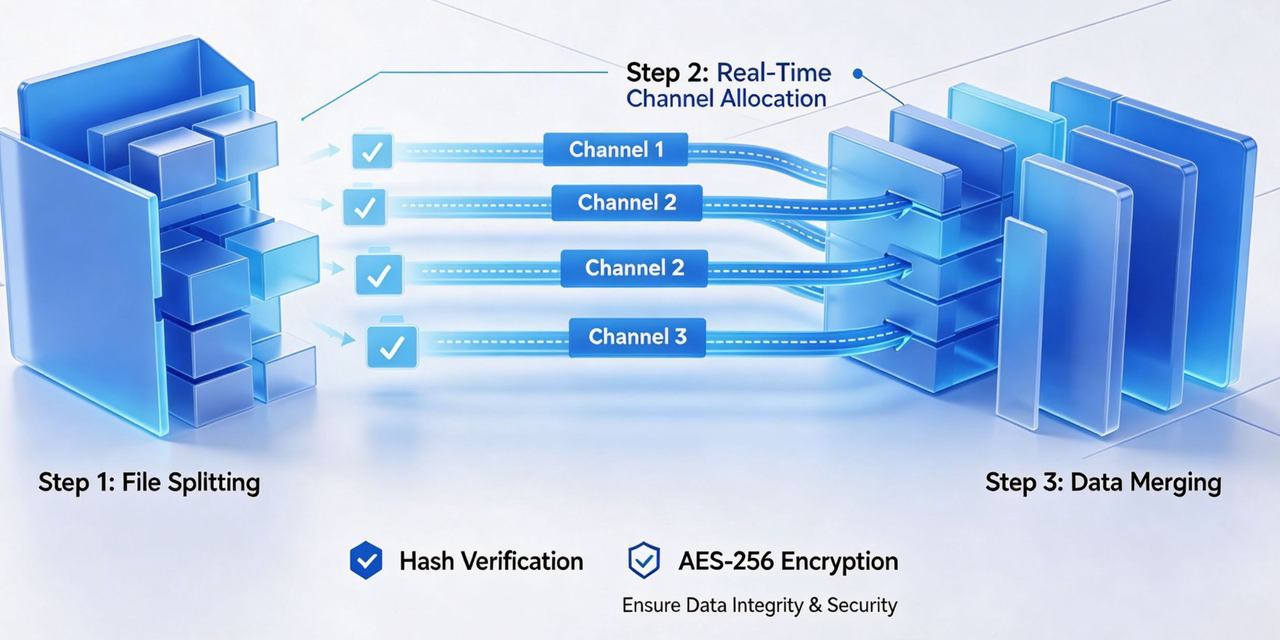
Raysync Multi-Channel Transfer was built on a proprietary protocol specifically designed to exploit high-bandwidth infrastructure. Instead of forcing a single connection to do the work of many, it opens multiple independent transmission channels per task and manages them with a real-time scheduling layer.
Intelligent Task Splitting
When a transfer job is initiated — whether a single 800 GB video file or 100,000 scattered media assets — the system automatically partitions it into segments and assigns each segment to a separate channel. The split logic accounts for both file size and channel count, balancing workload without operator input.
Dynamic Channel Load Balancing
A built-in scheduling algorithm monitors throughput on each active channel in real time. If one channel develops congestion or latency, the scheduler redistributes load to healthy channels before the degradation affects total speed. No single channel becomes a bottleneck — the aggregate throughput stays near peak.
Automatic Data Merge and Integrity Verification
Once all channels complete their segments, the system merges them server-side and runs an automated integrity check. Hash verification confirms the reconstructed file matches the source exactly. AES-256 encryption protects data in transit on every channel independently.
Zero-Touch Deployment
No firewall rules need updating. No switch configuration required. The system installs on endpoints at both sides of the transfer and operates within existing network policies. Compatible with Windows, Linux, and macOS, it is operational within a standard deployment window.
10Gbps Benchmark: Single Channel vs. Multi-Channel
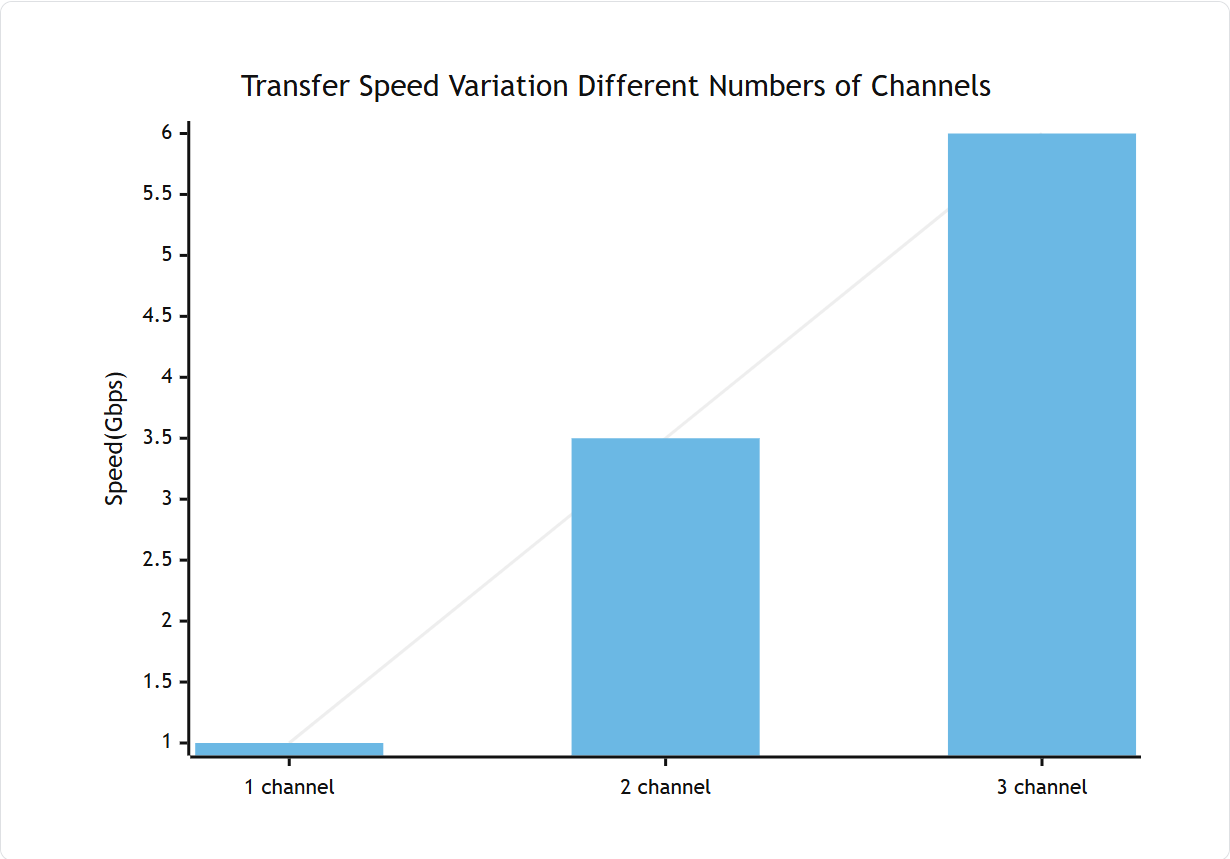
The following test was conducted on a 10Gbps physical dedicated line transferring a single 500 GB file.
| Transfer Mode | Peak Speed | Bandwidth Utilization | Time to Sync 500 GB |
|---|---|---|---|
| Single-channel | 1 Gbps | ~10% | ~68 minutes |
| 2-channel | 3.5 Gbps | ~35% | ~20 minutes |
| 3-channel | 6 Gbps | ~60% | ~11 minutes |
Three channels delivered a sustained 6 Gbps transfer rate — a 6× throughput improvement over single-channel — while using only 60% of available bandwidth. Additional channels can push utilization higher depending on file characteristics and endpoint hardware.
Industry Application Scenarios
Film and Television Post-Production
A video production company managing post-production between US and Singapore operations faced a chronic synchronization problem. Their 10G dedicated line was in place. Their FTP workflow was not.
An 800 GB 4K raw project took two hours to transfer. Interruptions were common — and each one triggered a full retransmission, not a resume. Downstream teams in Singapore regularly sat idle waiting for footage to arrive.
After deploying Raysync Multi-Channel Transfer with no changes to the existing network:
- Synchronization time for 800 GB 4K footage: reduced from 2 hours to under 20 minutes
- Synchronization time for 100,000 scattered assets: cut from 16 hours to 1.5 hours
- Transmission interruption rate: dropped to 0.01%, eliminating retransmission events
- Project delivery cycle: shortened by 3 days, enabling 1–2 additional productions per month
Healthcare Imaging
Hospital networks and diagnostic imaging centers regularly transfer DICOM studies — CT scans, MRI volumes, pathology scans — between facilities for specialist review, second opinions, and archival. A single multi-sequence MRI study can reach 20–50 GB. A full day's imaging volume across a busy radiology department can exceed several terabytes.
Single-channel FTP or SFTP transfers across multi-site hospital networks introduce delays that directly affect clinical workflow. Multi-channel transfer compresses imaging sync windows from hours to minutes, keeping specialist review timelines on schedule without requiring infrastructure changes that trigger compliance review cycles.
AES-256 encryption and hash verification align with HIPAA transmission security requirements, ensuring protected health information remains encrypted end-to-end across all channels.
Cross-Border Manufacturing and R&D
Global manufacturing operations — automotive, aerospace, electronics — move large CAD assemblies, simulation datasets, and quality control scans between design centers and production facilities across regions. A single high-fidelity CAD model can be hundreds of gigabytes. Design iteration cycles require these files to move multiple times per day.
On a conventional single-channel link, cross-border latency alone can reduce TCP throughput to a fraction of line speed — a problem that worsens with distance. Multi-channel parallel transmission sidesteps the RTT penalty by distributing load across channels simultaneously, delivering near-LAN performance on WAN links and keeping design-to-production timelines on track.
Frequently Asked Questions
Does multi-channel transfer require a dedicated 10Gbps line to work? No. Multi-channel transfer improves throughput on any high-bandwidth network — 1Gbps, 10Gbps, or higher. The benefit scales with available bandwidth: a 1Gbps line that is being underutilized by single-channel TCP will see meaningful gains, and a 10Gbps line will see the most dramatic improvement.
Will opening multiple channels interfere with other network traffic? The built-in load-balancing algorithm is designed to use available bandwidth without crowding out other traffic. Channels operate concurrently but not aggressively — the scheduler monitors real-time conditions and avoids saturating links in ways that would degrade other services.
Is there a limit to how many parallel channels can be opened? Channel count is configurable based on available bandwidth, file size, and endpoint hardware. Three channels are sufficient to reach 60% utilization on a 10G line in benchmark conditions. For larger pipelines or higher line speeds, additional channels can be added.
Does the multi-channel approach affect file integrity? No. Each channel transmits its segment independently, and the system merges segments with hash verification before the transfer is marked complete. The received file is byte-for-byte identical to the source. AES-256 encryption is applied per channel.
Can the system resume a transfer if a channel drops mid-transmission? Yes. The breakpoint resume function allows the transfer to pick up from where each affected channel stopped, rather than restarting from the beginning. This is particularly relevant for large files on long-distance links where interruptions are more likely.
What operating systems and environments does Raysync support? Raysync Multi-Channel Transfer is compatible with Windows, Linux, and macOS endpoints, and requires no changes to firewalls, switches, or existing network configuration.
Conclusion
The gap between "high bandwidth" and "high speed" is a protocol gap, not a hardware gap. Enterprises running 10Gbps infrastructure on single-channel transfer logic are paying for a highway and using one lane.
Raysync Multi-Channel Transfer closes that gap without touching the network. Intelligent task splitting, real-time load balancing across channels, and end-to-end AES-256 encryption combine to deliver up to 6× throughput improvement over single-channel transfer — with zero-touch deployment and no changes to existing infrastructure.
For IT teams managing large-file workflows in post-production, healthcare, manufacturing, or any data-intensive operation, the efficiency case is direct: less time waiting for transfers means more time shipping work.
Ready to see what your 10Gbps line actually delivers? Contact the Raysync team for a technical evaluation and benchmark test against your current transfer environment.
Sources
- How to Calculate TCP Throughput from Window Size and RTT — OneUptime, 2026
- Tuning TCP Connections for High Throughput — Red Hat Enterprise Linux 10 — Red Hat Documentation
- MASV Launches World-First 10Gbps Video Transfer Performance — MASV, 2024
- Real-World 10Gbps Transfer Impact — EveZone
- Identifying and Understanding Performance Bottlenecks with Aspera Transfers — IBM Support
- High Performance Bulk Data Transfer — ESnet / Fasterdata
You might also like

Industry news
December 6, 2024Uncover the strengths and weaknesses of Oracle Managed File Transfer. This in-depth review examines its features, performance, and security capabilities to help you make an informed decision.

Industry news
June 28, 2025Discover how TCP works on Linux with this friendly guide. Learn about TCP Linux implementation, congestion control, tuning tips, and best file transfer tools.

Industry news
April 17, 2025Looking for the best large file share options? Explore these 7 popular large file transfer options for personal and enterprise use, including free and paid solutions.