Breaking Data Transfer Barriers: Why Raysync Outperforms Dropbox, FTP & Hard Drive
August 20, 2025.png)
The Bottlenecks of Dropbox, FTP & Physical Data Shipping
Businesses rely on data transfer daily, but traditional methods come with critical limitations:
✖ Dropbox & Cloud Storage
- Slow Uploads/Downloads: Limited by internet speeds and server throttling
- File Size Restrictions: Most platforms cap transfers at 100-250GB
- Security Risks: Shared links can be hacked or leaked
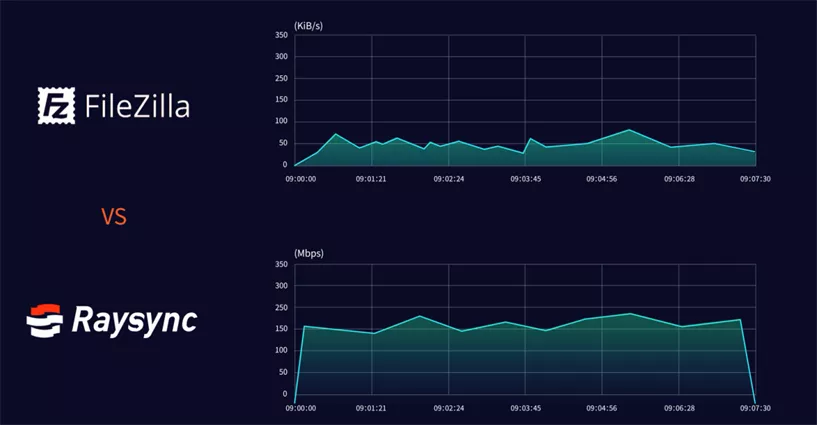
✖ FTP (File Transfer Protocol)
- Aging Technology: Designed in the 1970s, inefficient for modern needs
- Unreliable Transfers: TCP-based, prone to interruptions and slow recovery
- No Built-in Encryption: Requires additional setup for security
✖ Shipping Hard Drives
- Physical Delays: Days or weeks for delivery
- High Costs: $100+ per shipment (drive + logistics)
- Risk of Loss/Theft: No tracking or encryption
Real-World Impact:
- A 500GB design file takes 12+ hours via FTP
- Cloud sync fails at 90% completion, forcing restart
- Overnight shipping costs $200 for urgent 2TB data
Modern File Transfer Options Compared
|
Solution |
Speed |
Security |
Max File Size |
Best For |
|
Raysync |
★★★★★ (50-100x FTP) |
AES-256+TLS |
No Limit |
Enterprises, global teams |
|
Dropbox |
★★☆ (Throttled) |
Basic Encryption |
250GB (Pro) |
Small teams |
|
FTP |
★★☆ (TCP Limits) |
None by Default |
Varies |
Legacy systems |
|
Hard Drives |
★☆☆ (Physical Delay) |
Risk of Loss |
Drive Capacity |
Extreme Emergencies |
Solution for Raysync
✔ Speed That Matches Business Needs
Raysync’s UDP acceleration delivers:
- Our proprietary UDP acceleration protocol is 50-100 times faster than traditional FTP.
- Intelligent packet loss recovery technology ensures 99.9% transmission reliability.
- Bandwidth utilization reaches 96%, far exceeding TCP's 30-40%.
✔ Military-Grade Security
- End-to-End Encryption (AES-256 + TLS)
- Compliance Ready (GDPR, HIPAA, ISO27001)
- Access Controls: IP whitelisting, watermarking
✔ Enterprise Scalability
- Unlimited File Sizes
- Hybrid Deployment: Cloud, on-prem, or hybrid
- API Integration: Works with ERP/NAS systems
✔ Cost Efficiency
- Save 60%+ vs courier costs for large files
- Reduce Bandwidth Bills via smart compression
Raysync isn’t just an upgrade—it’s a complete transformation of enterprise file transfer. Whether you’re moving massive datasets, securing sensitive files, or streamlining global operations, Raysync ensures speed, reliability, and compliance at scale.
Ready to leave slow, unreliable transfers behind?
You might also like

Industry news
March 14, 2025Upload speed very slow? Learn how to diagnose and fix slow upload speeds with these 6 expert steps.
![How to Set Up File Server Backup [For Individual/Business]](http://images.ctfassets.net/iz0mtfla8bmk/4lblhpnllTm23ej2imMkqE/a70125d3f70f112766312bb31ad484e9/file-server-backup.png)
Industry news
October 11, 2024Learn how to set up file server backups for individuals and businesses with top solutions like Google Drive, OneDrive, Raysync Cloud, and Resilio Sync.

Industry news
January 17, 2025Experience the Ultimate Solution for Encrypted File Sharing for Business. Simplify file transfers and protect sensitive information with our secure and reliable platform. Boost productivity and collaboration while ensuring data privacy.