Raysync vs. Signiant Media Shuttle (2026): Features, Pricing and Which to Choose
October 19, 2026
Signiant Media Shuttle is the default way thousands of post houses, broadcasters and agencies send big files. It is also priced like it: the lowest published tier starts at $13,000 a year, and the SDK, automation APIs and single sign-on sit in an Enterprise tier that starts at $25,000 a year.
That is why "Raysync vs Signiant Media Shuttle" has become a real evaluation, not a vendor talking point. Both products accelerate transfers over UDP, resume interrupted jobs and let you keep files on your own storage. They differ in how they license, what they include by default, and where each one runs.
This guide compares the two on speed, features, pricing, security and deployment, using each vendor's own published documentation as of September 2026. Where Media Shuttle is the better fit, we say so.
Key takeaways
• Speed is a draw on paper. Both vendors claim transfers "up to 100 times faster" than FTP. Only a pilot on your own network settles it.
• Licensing is the biggest difference. Media Shuttle is priced by monthly active users; Raysync Enterprise is licensed by bandwidth tier with unlimited users.
• Raysync includes more by default: sync, P2P, antivirus scanning, preview, SSO and API/SDK appear on every Raysync plan. Media Shuttle gates SSO and the SDK to Enterprise.
• Media Shuttle leads on media QC: pre-transfer file validation and custom metadata forms have no documented Raysync equivalent.
• Choose Media Shuttle if your partners already live in its portals; choose Raysync if you need self-hosted, user-unlimited transfer, sync and sharing in one platform.
Raysync vs Signiant Media Shuttle at a glance
Raysync and Signiant Media Shuttle are both UDP-accelerated large-file transfer platforms; Media Shuttle is a hybrid SaaS portal service priced by active users, while Raysync Enterprise is a self-hosted platform licensed by bandwidth with unlimited users.
|
|
Signiant Media Shuttle |
Raysync Enterprise |
|
Product type |
Hybrid SaaS: Signiant-hosted control plane, customer storage |
Self-hosted on-premises, cloud or hybrid |
|
Transfer engine |
Proprietary UDP-based protocol, checkpoint restart |
Proprietary UDP-based protocol, checkpoint resume, up to 10 Gbps |
|
Speed claim |
"Up to 100 times faster than standard methods such as FTP" |
"100× Faster Than FTP" |
|
Licensing model |
Monthly active users |
Bandwidth tier, unlimited users |
|
Lowest published price |
From $13,000/year (Professional; Small Business is quote-only) |
SMB $1,599/year; Enterprise is quote-based |
|
Sync, P2P, antivirus |
Not documented (Auto Delivery only) |
Included |
|
SSO, API and SDK |
Enterprise tier |
Included on every plan |
|
Security attestations |
SOC 2, TPN Gold |
TPN, HIPAA; ISO 27001 (per Raysync MFT page) |
|
Best known for |
M&E ecosystem, Send/Share/Submit portals |
Transfer + sync + sharing in one self-hosted platform |
What is Signiant Media Shuttle?
Signiant Media Shuttle is a SaaS file-transfer service that lets people send, share and receive files of any size through branded web portals, with transfers accelerated by Signiant's proprietary UDP-based protocol.
It offers three portal types: Send (email a file to someone), Share (a browsable shared directory) and Submit (a drop-box that aggregates incoming content). Signiant says Media Shuttle is "used by more than 50,000 media & entertainment companies," and that ubiquity is its strongest asset: in broadcast and post-production, your partners probably already have it installed.
Architecturally, Signiant separates a cloud control plane from the data. Its platform page states that "media assets move directly between endpoints," and content stored on-premises or in AWS, Azure or Google Cloud "always remains under the customer's control." The product keeps evolving: Signiant's October 2025 update added distribution groups, embeddable portals, app-less transfers and optional password-protected encryption at rest for Send deliveries, and at IBC 2026 it showcased Intelligent Transport, which it describes as "multi-threaded and multi-gigabit transfers that adapt to live network conditions."
What is Raysync?
Raysync is an enterprise large file transfer and file sync-and-share platform that combines UDP-accelerated transfer, scheduled sync, peer-to-peer transfer and secure link sharing under one self-hosted deployment.
Raysync Enterprise runs on-premises, in your cloud or hybrid, and is licensed by bandwidth tier rather than per seat, so "unlimited users are included on each license." Beyond point-to-point acceleration, it covers one-way and two-way sync triggered by schedules, directory watches or custom events; encrypted, password-protected, expiry-controlled share links; and REST API, SDK and CLI access. Raysync's operations are based in Singapore, and it serves media, manufacturing, life-sciences and data-centre teams moving data across regions.
Is Raysync faster than Signiant Media Shuttle?
No public, independent benchmark compares Raysync and Media Shuttle head to head, and both vendors make the same "up to 100x faster than FTP" claim, so the honest answer is: test both on your own worst network path.
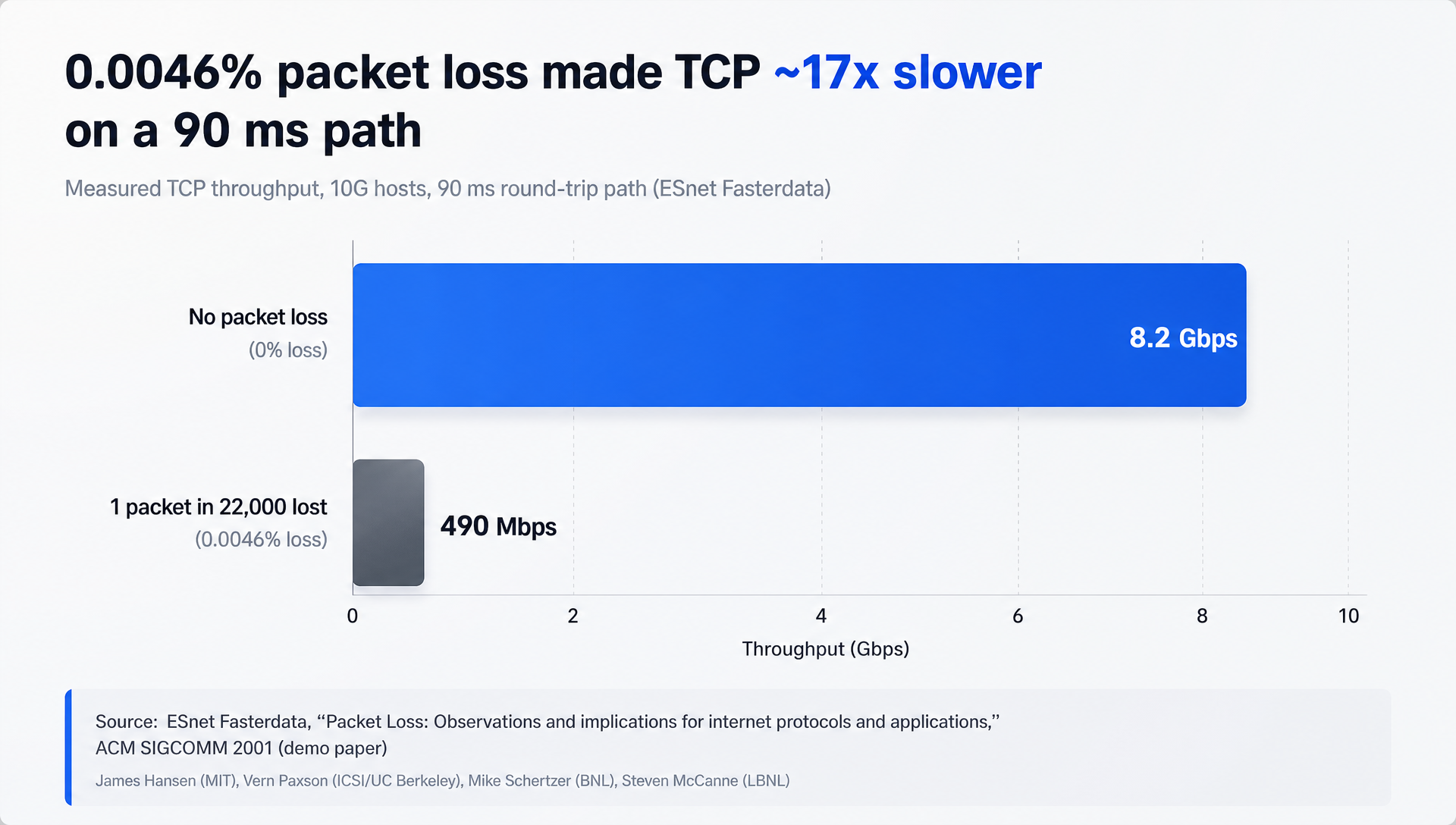
What both products solve is the same physics problem. Standard TCP slows down sharply when latency and packet loss combine, which is exactly the condition on intercontinental links. ESnet, the US Department of Energy's research network, measured this on 10G hosts: losing one packet in 22,000 (0.0046%) cut TCP throughput on a 90 ms path from 8.2 Gbps to 490 Mbps, "almost 17 times slower."
Both Raysync and Media Shuttle replace TCP's data path with their own UDP-based protocol and add checkpoint restart, so an interrupted 2 TB transfer resumes instead of starting over. Raysync documents a ceiling of up to 10 Gbps per the Enterprise page; Signiant says Media Shuttle has "no bandwidth caps." For a deeper look at the mechanics, see Raysync's guide on overcoming latency and packet loss.
How to run a fair speed test: use the same source and destination hosts, the same file set (one large file and a folder of many small files), the same time of day, and your real WAN path rather than a LAN. Record throughput, completion time and whether an interrupted transfer resumes cleanly.
How do Raysync and Media Shuttle compare on features?
Raysync includes sync, peer-to-peer transfer, antivirus scanning, preview, SSO and API/SDK on every plan, while Media Shuttle's strengths are its portal experience and media-specific quality checks, several of which sit in its Enterprise tier.
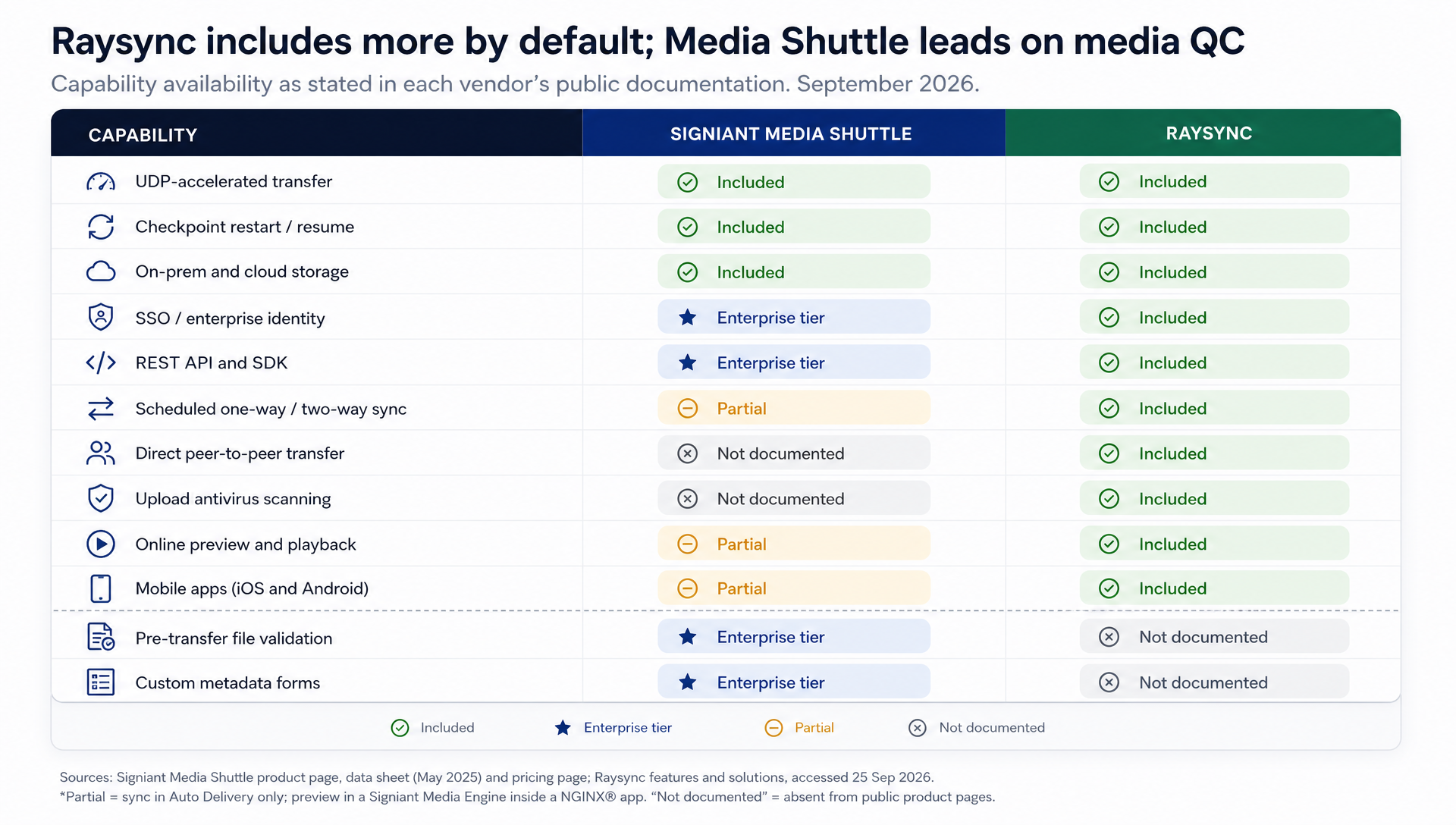
Where Raysync goes further:
• Sync. Raysync runs scheduled or event-triggered one-way and two-way sync between sites. Media Shuttle's closest feature is Auto Delivery for unattended transfers into or out of Share portals, an Enterprise-tier item.
• Peer-to-peer transfer. Raysync supports direct node-to-node transfers. Media Shuttle's documentation describes transfers to and from portal storage, not user-to-user P2P.
• Antivirus scanning. Raysync lists file antivirus on every plan and "upload antivirus scanning" on its managed file transfer page. We found no malware-scanning feature on Media Shuttle's public product pages.
• Identity and automation on every tier. Raysync's pricing page lists SSO integrations, CLI, and SDK & API on Cloud, SMB and Enterprise alike. Media Shuttle's pricing places single sign-on and "access to automation APIs and the Media Shuttle SDK" in Enterprise.
• Preview and mobile. Raysync includes online preview and playback, and lists Windows, Linux, macOS, Android and iOS. Media Shuttle's preview comes through integration with Signiant's separate Media Engine, and its mobile app covers Apple platforms for Submit-portal uploads.
Where Media Shuttle leads:
• Pre-transfer file validation. CloudSpeX checks files against delivery specs before they move, and Signiant's newer Verify product extends this with AI-based quality control. Raysync does not document an equivalent.
• Metadata capture. Submit portals can collect custom metadata and generate JSON sidecar files, which suits broadcast delivery workflows.
• Network effects. If your clients and vendors already run Media Shuttle, deliveries just work, with no onboarding on their side.
How much does Signiant Media Shuttle cost compared with Raysync?
Signiant lists Media Shuttle Professional from $13,000 a year and Enterprise from $25,000 a year, with Small Business quoted individually; Raysync publishes $99 a month for Cloud and $1,599 a year for SMB, with Enterprise quote-based.
|
Plan |
Published price |
Storage |
Users |
Notable inclusions |
|
Raysync Cloud |
$99/month |
1 TB (SaaS) |
10 |
2 TB transfer traffic, 1 Gbps |
|
Raysync SMB |
$1,599/year |
On-premises |
10 |
Unlimited traffic, 1 Gbps |
|
Raysync Enterprise |
Contact sales |
On-premises / hybrid |
Unlimited |
Bandwidth by licence, unlimited traffic |
|
Media Shuttle Small Business |
Quote ("built for very small teams") |
On-prem or cloud |
Active-user based |
Unlimited portals and transfers, no file-size limit, no bandwidth caps |
|
Media Shuttle Professional |
From $13,000/year |
On-prem or cloud |
Active-user based |
+ 25 TB cloud payload, implementation and training |
|
Media Shuttle Enterprise |
From $25,000/year |
On-prem or cloud |
Active-user based |
+ SSO, APIs/SDK, file validation, 100 TB cloud payload |
Every Raysync plan, including the $99 Cloud tier, lists the same feature set: P2P transfer, auto sync, preview and playback, antivirus, SSO integrations, CLI, and SDK & API.
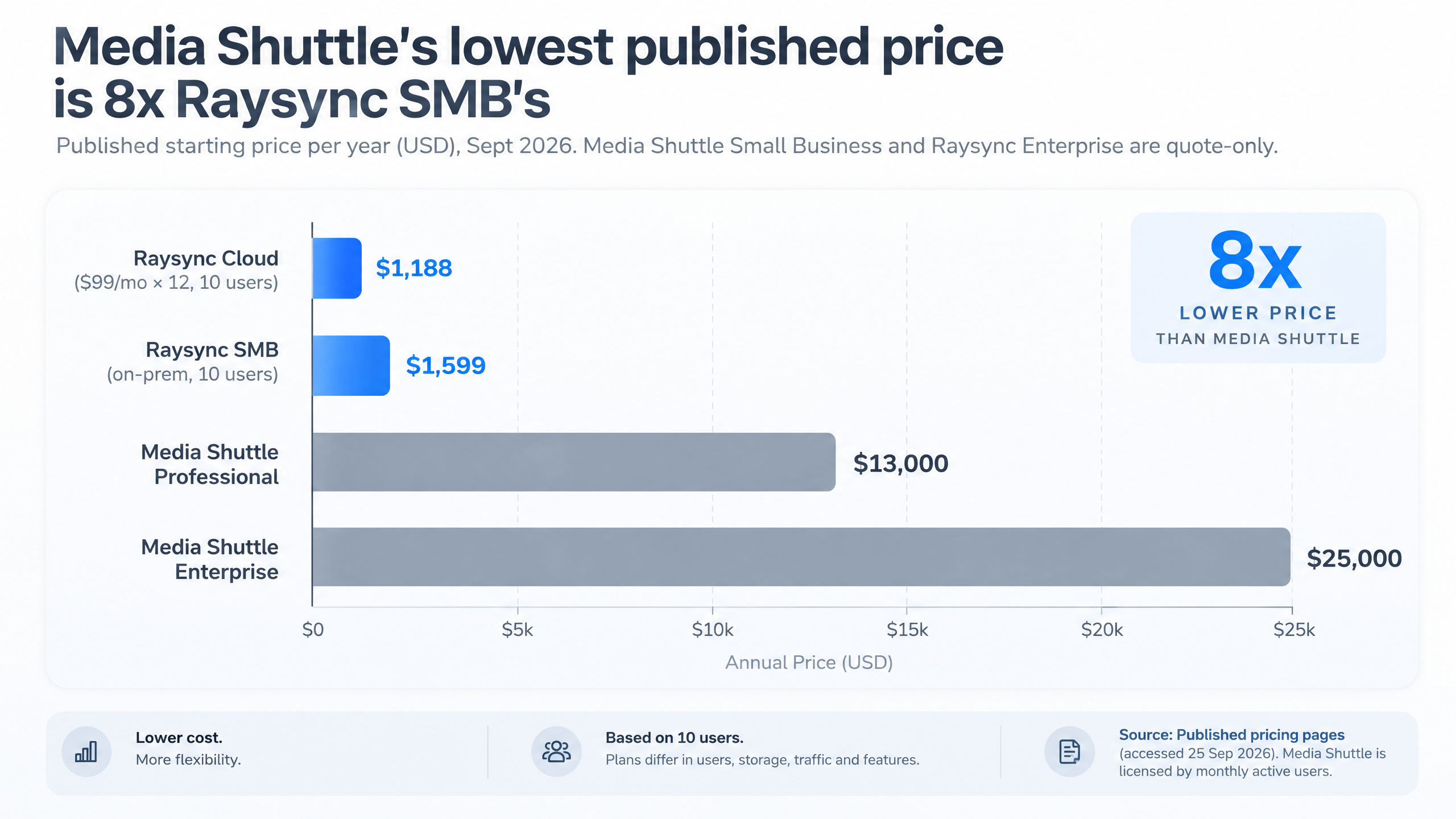
The sticker gap is large, but the licensing model matters more over three years. Signiant states that standard Media Shuttle pricing "is based solely on the number of active users," where an active user is anyone who "sends at least one file, or receives three or more files, in a given month." To be fair to Signiant, that means costs do not rise with bandwidth, file size or number of portals, and the floating licence suits small, steady teams. It gets expensive when a production brings in dozens of freelancers, vendors and reviewers for a few months.
Raysync Enterprise decouples cost from headcount: you buy bandwidth, and every internal user and external partner is covered. For teams whose user count swings more than their bandwidth does, that is the more predictable enterprise large file transfer budget.
How do they compare on security, compliance and deployment?
Both platforms keep files on customer-controlled storage and hold TPN assessments; the practical difference is that Media Shuttle depends on Signiant's SaaS control plane, while Raysync Enterprise can run entirely inside your own infrastructure.
|
|
Signiant Media Shuttle |
Raysync Enterprise |
|
Encryption |
TLS in flight; optional password-protected encryption at rest for Send deliveries |
AES-256 in transit and at rest |
|
Attestations (as stated by vendor) |
SOC 2; TPN Gold (assessed by ISE) |
TPN, HIPAA (Enterprise page); ISO 27001 (MFT page) |
|
Identity |
SAML SSO (Enterprise tier) |
AD, OpenLDAP, Okta, OneLogin, Google Workspace |
|
Audit |
Centralized tracking and reporting |
Immutable audit trails with tamper-proof timestamps |
|
Deployment |
Hybrid SaaS; data moves directly between endpoints |
On-premises, cloud or hybrid, self-hosted |
For sovereign, regulated or air-gapped environments, the self-hosted option narrows the field. If your security team is comfortable with a SaaS control plane and wants SOC 2 on the vendor side, Media Shuttle meets that bar. Either way, ask each vendor for current certificates rather than relying on a comparison page, including this one.
Which should you choose: Media Shuttle or Raysync?
Choose Media Shuttle when your partners already use it and you need media-specific delivery checks; choose Raysync when you want transfer, sync and sharing in one self-hosted platform without per-user licensing.
|
Your situation |
Better fit |
Why |
|
Delivering to broadcasters and post houses that already run Media Shuttle |
Media Shuttle |
Zero onboarding for partners |
|
Deliverables must pass spec checks before they leave |
Media Shuttle |
CloudSpeX / Verify pre-transfer validation |
|
Freelancer and vendor headcount changes by project |
Raysync |
Unlimited users on a bandwidth licence |
|
Data must stay inside your own data centre |
Raysync |
Fully self-hosted deployment |
|
Multi-site sync between studios, plants or labs |
Raysync |
Native one-way and two-way sync |
|
Budget under $5,000/year for a small team |
Raysync |
Cloud and SMB plans with published pricing |
|
Replacing FTP plus a separate sync tool and a file-sharing app |
Raysync |
One platform covers all three |
Media and entertainment is not the only market here. Manufacturing teams moving CAD and simulation files between regional plants, and life-sciences groups moving sequencing data between labs, face the same packet-loss and licensing questions. If sharing and collaboration are the bigger need than raw transfer, compare Raysync's enterprise file sync and share capabilities too. And if you are still weighing the wider market, our Aspera alternative comparison covers IBM's platform.
How Raysync Enterprise replaces Media Shuttle
For teams that have outgrown per-user pricing or need their transfer layer on their own infrastructure, the Raysync Enterprise plan is built as a direct Media Shuttle alternative and a broader enterprise large file transfer platform:
• Acceleration without a seat count: proprietary UDP-based transfer up to 10 Gbps, with intelligent UDP/TCP switching, checkpoint resume and transfer verification.
• Portals, rebuilt as links: "share to download" and "invite to upload" links replace Send and Submit portals; user-group shared folders replace Share portals. Recipients do not need an account.
• Governance built in: role-based access control, immutable audit logs and AES-256 encryption in transit and at rest.
• Automation: REST API, SDK and CLI, plus scheduled or event-triggered sync.
• AI-agent integration: natural-language remote file operations such as upload, download, browse, rename and move.
Frequently asked questions
What is the main difference between Raysync and Signiant Media Shuttle?
The main difference is licensing and scope: Media Shuttle is a portal-based SaaS service priced by monthly active users, while Raysync Enterprise is a self-hosted transfer, sync and sharing platform licensed by bandwidth with unlimited users. Both use proprietary UDP acceleration.
How much does Signiant Media Shuttle cost in 2026?
Signiant lists Media Shuttle Professional from $13,000 per year and Enterprise from $25,000 per year; the Small Business tier is quoted individually. Older figures such as $8,500 a year are out of date.
Is Signiant Media Shuttle priced per user?
Yes. Signiant says standard Media Shuttle deployments are priced by the number of active users each month. An active user is anyone who sends at least one file or receives three or more files in that month.
Does Media Shuttle have an API?
Yes. Media Shuttle offers a Management API and a System-to-Person Automation API, and Signiant's pricing page lists automation APIs and the Media Shuttle SDK in the Enterprise tier. Raysync lists SDK and API access on all its plans.
Can Raysync be deployed on-premises?
Yes. Raysync Enterprise and Raysync SMB are on-premises products, and Raysync Enterprise also supports cloud and hybrid deployment. Raysync Cloud is the SaaS option.
Is Raysync faster than Media Shuttle?
There is no independent head-to-head benchmark, and both vendors claim up to 100x faster than FTP. Run a pilot with the same hosts, files and WAN path to see which performs better on your network.
Conclusion: Raysync vs Signiant Media Shuttle comes down to licensing and scope
On raw acceleration, Raysync vs Signiant Media Shuttle is close: both use UDP-based engines, both resume interrupted transfers, and both keep your files on your own storage. Media Shuttle remains the safer choice when your delivery partners already use it and when pre-transfer media validation is mandatory.
Raysync wins when user counts grow, when data must stay on your own infrastructure, and when you would rather run transfer, sync and secure sharing on one platform than pay for three. Request a free trial of Raysync Enterprise and test it against Media Shuttle on your own longest route before your next renewal.
You might also like

Industry news
November 7, 2024A comprehensive review of Classic FTP File Transfer Software, exploring its features, performance, and user-friendliness. Discover if it's the right tool for your file transfer needs.
Industry news
May 28, 2024In this article, we will be emerging ourselves in the world of enterprise file transfer and will see the best available options that our readers can use and benefit from.

Industry news
September 12, 2024Boost your business operations with a reliable and user-friendly file sharing solution. Click here to learn more about file sharing for business.