Enterprise Large File Transfer Security: How Raysync Builds a Safer, More Controllable Data Flow
September 29, 2026
Enterprise Large File Transfer is now part of the security perimeter. A single transfer may carry source code, financial records, customer data, medical images, CAD files, or unreleased media between employees, partners, and regional offices. If the platform only moves bytes quickly, it leaves the business to solve identity, malware, access, audit, and retention somewhere else.
The better question is: can every file be authenticated, inspected, encrypted, governed, and removed at the right time? Raysync, an international file transfer and data acceleration brand headquartered in Singapore, approaches that question as a control problem across the full data flow.
TL;DR
- Enterprise file transfer security needs layered controls before access, during upload, in transit, during collaboration, and after transfer.
- Raysync’s product documentation describes ClamAV scanning after upload and an Isolation Zone for infected files.
- Login controls, IP restrictions, TLS certificate management, client certificates, permissions, and deletion rules close gaps that encryption alone cannot address.
- The 2025 Verizon DBIR reported credential abuse in 22% of breaches, vulnerability exploitation in 20%, third-party involvement in 30%, and ransomware in 44% of breaches. These indicators use different denominators, but together they show why layered controls matter.
- Raysync Enterprise is the recommended fit when IT needs high-speed transfer plus centralized governance, identity integration, and audit evidence.
Why Enterprise Large File Transfer Security Needs More Than Encryption
Encryption protects data while it travels, but it does not decide who can sign in, whether an uploaded file contains malware, whether a partner can download it again, or when a temporary package should disappear. Those decisions belong to access, content, operational, and lifecycle controls.
Verizon’s 2025 Data Breach Investigations Report analyzed more than 22,000 security incidents and 12,195 confirmed breaches. Its summary reported credential abuse as an initial access vector in 22% of breaches and vulnerability exploitation in 20%; third-party involvement reached 30%, while ransomware appeared in 44% of breaches. The percentages describe different dimensions of risk, so they should be read as signals rather than one ranking. They still point to the same operational lesson: identity, exposed services, partners, and file workflows all need attention.
.png)
A lifecycle model for secure file transfer
A practical security design places a control at every handoff. The model below turns a long feature list into an operating workflow.
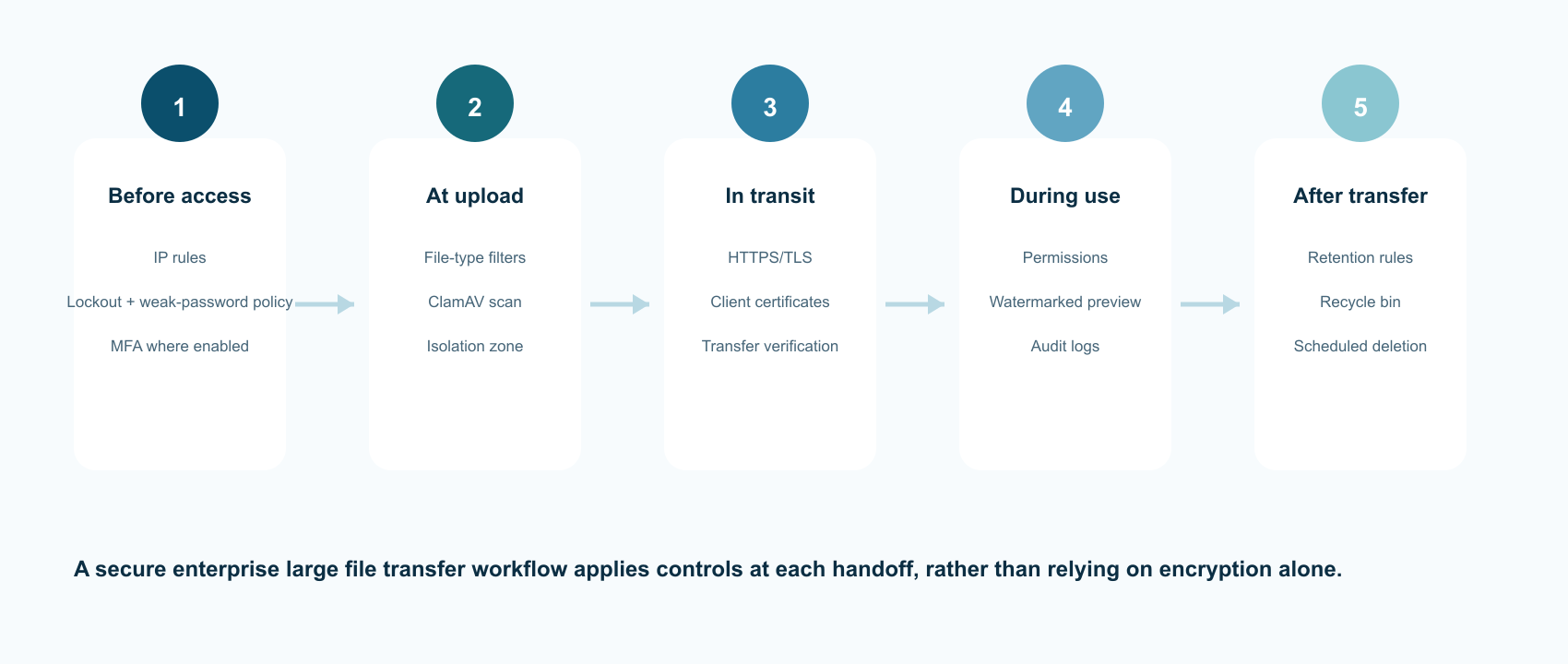
|
Lifecycle stage |
Risk to manage |
Raysync control or configuration |
Evidence for IT and auditors |
|
Before access |
Stolen credentials, password guessing, untrusted networks |
IP allow/deny rules, account lockout, weak-password settings, MFA where enabled |
Login policy, IP policy, authentication logs |
|
At upload |
Malware, prohibited file types, unsafe content |
File filters, ClamAV scan, Isolation Zone |
Scan result, quarantine record, file event log |
|
In transit |
Interception, invalid certificates, incomplete transfer |
HTTPS/TLS, custom certificates, client certificates, transfer verification |
Certificate inventory, transfer status, error history |
|
During use |
Over-sharing, unauthorized preview, content leakage |
Role and permission controls, watermarking, controlled links, audit logs |
Access history, preview event, share-link status |
|
After transfer |
Orphaned copies, accidental deletion, excessive retention |
Scheduled deletion, recycle bin, path-based rules |
Retention rule, deletion event, recovery record |
1. Inspect uploads before they enter the workflow
Upload portals are designed for outside participation, which also makes them a common entry point for unsafe files. A secure platform should inspect files before they are made available to the next user or system.
Raysync’s security documentation states that it can scan uploaded files with ClamAV and move infected files to an Isolation Zone. Administrators can configure scanning by file type and size, which helps security teams apply deeper inspection to office documents, archives, executables, and other higher-risk formats without forcing every low-risk asset through the same policy.
The right operational rule is to make the scan outcome visible. A file that is blocked, isolated, or awaiting inspection should have a clear status and an owner. Security teams should also define how the virus database is updated, how exceptions are reviewed, and how an isolated file is released or deleted.
2. Detect sensitive content before it is shared
Malware scanning answers “is this file infected?” It does not answer “should this file leave the organization?” Sensitive-word detection adds a content-governance layer for filenames and text files when that capability is enabled in the deployment.
Teams can use dictionaries for project codenames, contract labels, regulated identifiers, or other terms that should trigger review. A match should route the file into a review or isolation workflow rather than silently failing. That distinction matters for finance, healthcare, legal, life sciences, manufacturing, and public-sector teams where a false positive needs an explanation and a false negative can become a reporting problem.
Treat keyword detection as a focused control, not a complete data-loss-prevention program. It works best alongside permissions, link expiry, logging, and human review.
3. Make account protection explicit
The security of an enterprise file transfer service is limited by the security of its least-protected account. Raysync’s product documentation describes account lockout rules, weak-password controls, and administrator control over whether users can change passwords. Those settings should be paired with a documented identity policy:
- Lock an account after a defined number of failed attempts and record the event.
- Block known weak or organization-specific passwords.
- Require stronger controls for administrators and external collaborators.
- Review dormant accounts and remove access when a project ends.
- Connect to the organization’s identity provider where supported, so joiner, mover, and leaver processes stay centralized.
NIST’s current digital identity guidance also makes an important distinction: password-only authentication is not phishing-resistant. If a workflow handles privileged administration or high-value data, MFA should be treated as a baseline and phishing-resistant methods should be considered where the deployment supports them.
4. Use MFA and network rules together
MFA reduces the damage from a stolen password, while IP restrictions reduce the number of places from which a portal can be reached. They solve different problems and should be managed together.
Raysync’s documentation describes whitelist and blacklist policies for the user portal. A finance team might allow access only through corporate networks and approved VPN gateways. A global manufacturing team might allow regional offices and named partners while blocking known hostile ranges. These rules should be reviewed when offices, VPN addresses, or partner connections change; an old allow-list can quietly become an outage or a security exception.
For MFA, document which user groups must use it, whether administrators are covered, and whether conditional rules differ for internal and external networks. Do not describe email codes or one-time passwords as phishing-resistant: NIST explicitly distinguishes manual code entry from cryptographic methods that bind authentication to the intended verifier.
5. Encrypt web access and file transfer with managed certificates
TLS protects sessions and data in transit only when certificates are valid, current, and correctly bound to the service. Raysync’s security documentation describes TLS certificate management for web encryption and file transfer encryption, the option to prohibit non-TLS access, and client certificate management for client connections.
- A maintainable certificate process should include:
- A named owner for every certificate and private key.
- A renewal calendar with alerts well before expiry.
- A clear rule for where private keys are stored and who can upload them.
- A test procedure for HTTPS, client connections, and external partner access.
- A record showing that non-TLS access is disabled where policy requires it.
TLS is necessary, but it does not replace endpoint security, least-privilege permissions, malware inspection, or audit logging.
6. Protect files while people preview and collaborate
File risk continues after a transfer completes. A recipient may preview a video, share a link, download a copy, or capture a screen. Raysync’s documentation describes configurable watermarks for online video preview. Watermarking will not stop every capture, but it can discourage casual leakage and make a preview traceable to a project, user, or session when the design includes those identifiers.
The same principle applies to sharing controls: keep permissions narrow, set link expiry, limit downloads where supported, and make the access history searchable. The goal is to make collaboration usable while preserving evidence of who accessed what and when.
7. Apply retention and deletion rules after delivery
A secure file transfer process needs an end state. Temporary upload folders, staging directories, and old partner packages create exposure when they remain accessible long after delivery.
Raysync’s product documentation describes scheduled deletion rules that can delete files or move them to a recycle bin, plus manual deletion policies that can preserve a recovery path. IT teams should define retention by workflow—for example, a short window for temporary exchange folders and a longer period for regulated records—and document exceptions for legal holds, investigations, or customer commitments.
Deletion should produce evidence. A useful record includes the path, file identifier, rule or user that initiated the action, timestamp, and whether the file was recoverable.
8. How Raysync Enterprise fits the security model
The Raysync Enterprise plan is the recommended option for organizations that need enterprise large file transfer and governance in the same operating model. Raysync positions Enterprise for on-premises, cloud, or hybrid deployment with centralized administration, identity integrations, high-speed transfer, AES-256 encryption, and audit-oriented controls. The exact feature set should be confirmed against the edition and deployment architecture before publication.
For a security-conscious IT team, the value is the connection between controls:
- Transfer engine: High-speed, UDP-based acceleration for large and cross-border workloads, with transfer verification and checkpoint-style recovery described on the Enterprise product page.
- Identity and administration: Centralized users, roles, permissions, and integrations with common identity providers where enabled.
- Security controls: TLS certificate management, access restrictions, antivirus scanning, content checks, watermarking, and lifecycle policies.
- Operational evidence: Transfer, login, access, and administration logs that support incident review and compliance reporting.
A sensible evaluation should test a realistic workflow: an external partner uploads a large package, the file is scanned, an administrator reviews the event, the recipient previews it with a watermark, the transfer resumes after a network interruption, and the temporary copy is deleted according to policy. That scenario measures control continuity rather than a single feature checkbox.
FAQ
Is enterprise large file transfer secure by default?
No platform is secure by default for every deployment. Security depends on identity configuration, certificate management, network rules, malware scanning, permissions, logging, patching, and retention. Enterprise large file transfer software provides the control points; the customer still needs a policy and operating process.
Does Raysync scan uploaded files for viruses?
Raysync’s security documentation states that it supports ClamAV scanning after upload and moves infected files to an Isolation Zone. Confirm the scan policy, supported file types, database update process, and operational ownership for your edition.
Does TLS replace antivirus scanning?
No. TLS protects data in transit. Antivirus scanning inspects file content. They address different risks and should be deployed together.
Are one-time codes phishing-resistant MFA?
Not necessarily. NIST states that manually entered one-time passwords are not phishing-resistant because an attacker can relay the code. Consider cryptographic, verifier-bound authenticators for high-risk access where your environment supports them.
How long should transferred files be retained?
Retention should follow the workflow and applicable obligations. Temporary exchange folders usually need a shorter window than regulated records. Document exceptions such as legal holds and customer commitments, then test that scheduled deletion and recovery behave as expected.
Conclusion: Safer, More Controllable Enterprise Large File Transfer
Enterprise Large File Transfer security is a chain of controls. Access rules reduce exposure before login. Malware and content checks inspect files at upload. TLS and certificate management protect data in transit. Permissions, watermarks, and logs govern collaboration. Retention and deletion rules close the lifecycle after delivery.
Raysync’s security documentation covers each of these layers, while the Raysync Enterprise plan packages high-speed transfer and centralized governance for global, cross-border workflows. The next step is to test the platform against one real transfer path and verify that every control produces the evidence your security and compliance teams need.
You might also like
Industry news
October 17, 2024Protect sensitive files with on-premise file sharing. This guide compares top options for businesses, covering speed, security, and ease of use.
![[2022] Only 1 Minute 50 Seconds to Transfer 100,000 Files Cross-border](http://images.ctfassets.net/bg6mjhdcqk2h/NSovzRp4KyMkiyfS7BRVS/aaa2d9b3f6b1d688f7ab6af66ccac523/1.png)
Industry news
April 7, 2022Intelligent compression, breakpoint resume, automatic error retransmission, and other mechanisms ensure stable and reliable transfer in an ultra-remote and weak network environment.
Industry news
January 17, 2025Looking for the best business backup solution? Explore our List of Top 7 Backup Services. Compare features, pricing, and customer reviews to choose the ideal service for your company's data protection needs.