Enterprise File Transfer Software That Stays Fast When the Network Doesn’t
June 24, 2026
Your team bought a 1 Gbps cross-border line. The actual transfer crawls at a few megabits. Nothing is broken — the bottleneck is the protocol.
Most enterprise file transfer software still leans on a single transport protocol with fixed logic. On a LAN that’s fine. Stretch the same transfer across regions, through firewalls, or over a lossy public link, and standard TCP simply cannot fill the pipe. The result: high-bandwidth lines that deliver a fraction of what you paid for, and transfers that fail when network policy blocks the one protocol your tool depends on.
This article breaks down the mechanism behind the slowdown, then shows how UDP/TCP intelligent protocol switching — the approach Raysync uses — keeps large transfers fast and reliable under real-world network conditions.
|
TL;DR — Key takeaways
|
Why enterprise file transfer keeps hitting the same network wall
In a traditional LAN, the only real question was whether you had enough bandwidth. Modern enterprise transfer happens somewhere far messier — across cities, countries, carriers, and security appliances. Four conditions break single-protocol tools:
1. Distance adds latency, and latency throttles TCP
TCP is governed by congestion control, per-segment acknowledgments, and window size. The further the data travels, the longer the sender waits for ACKs before it can send more. This isn’t a tuning problem — it’s the protocol’s design. The Mathis equation estimates the ceiling: throughput ≈ (MSS ÷ RTT) × (1.22 ÷ √loss). Plug in real numbers and the picture is stark.
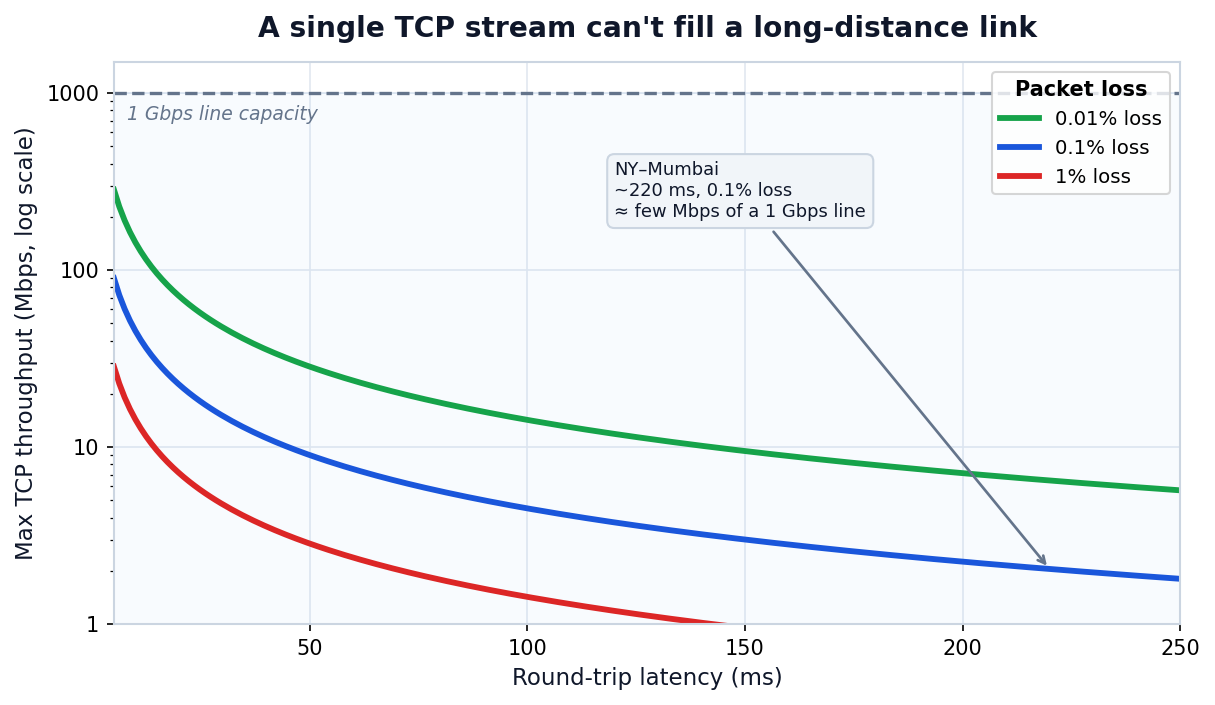
Figure 1: A single TCP stream’s maximum throughput, modeled with the Mathis equation (MSS 1460 bytes). On a 220 ms cross-border link with modest loss, it delivers only a few Mbps of a 1 Gbps line.
A widely cited illustration: a New York–Mumbai transfer at ~220 ms RTT maxes out near 2 Mbps over TCP, while a UDP-based protocol on the same link can reach ~100 Mbps (JSCAPE). The bandwidth was never the problem.
2. Public links lose packets and jitter constantly
On public networks, quality depends on carriers, routing, and congestion you don’t control. Because TCP throughput falls with the square root of loss, even 1% packet loss can cut a long-haul transfer to a fraction of the link rate — and weak or cross-border links routinely exceed that.
3. UDP isn’t always available
Firewalls, NAT, proxies, and security gateways shape what gets through. Some networks permit TCP but block UDP; others allow UDP but degrade it; many vary by time of day. A tool that depends on one protocol will fail or stall whenever the network doesn’t cooperate.
4. Workloads are mixed, not uniform
Enterprise transfer spans TB-scale media and backup packages alongside huge counts of small engineering files with deep directory trees. Different file profiles and link conditions demand different protocol behavior — a single fixed mode can’t serve all of them well.
|
The number that matters ≈ 15 Mbps Maximum throughput of one TCP stream at 100 ms RTT with 1% packet loss — regardless of whether the line is 100 Mbps or 10 Gbps (Mathis model, 1500-byte MSS). |
How UDP/TCP intelligent switching works
Instead of forcing users to pick a protocol, intelligent switching lets the system choose based on live link conditions: prioritize UDP for speed, fall back to TCP for reachability, and adapt as the network changes.
UDP-first: unlock high-bandwidth, high-latency links
UDP carries low protocol overhead and doesn’t gate transmission on per-packet acknowledgment, so it can saturate long-distance links where TCP stalls. This is the same foundation behind IBM Aspera’s FASP, which layers reliability on top of UDP to bypass TCP’s slow start and congestion behavior. Raysync applies a UDP-first strategy for large media, engineering, research, and backup transfers, where “low bandwidth utilization” is the classic complaint.
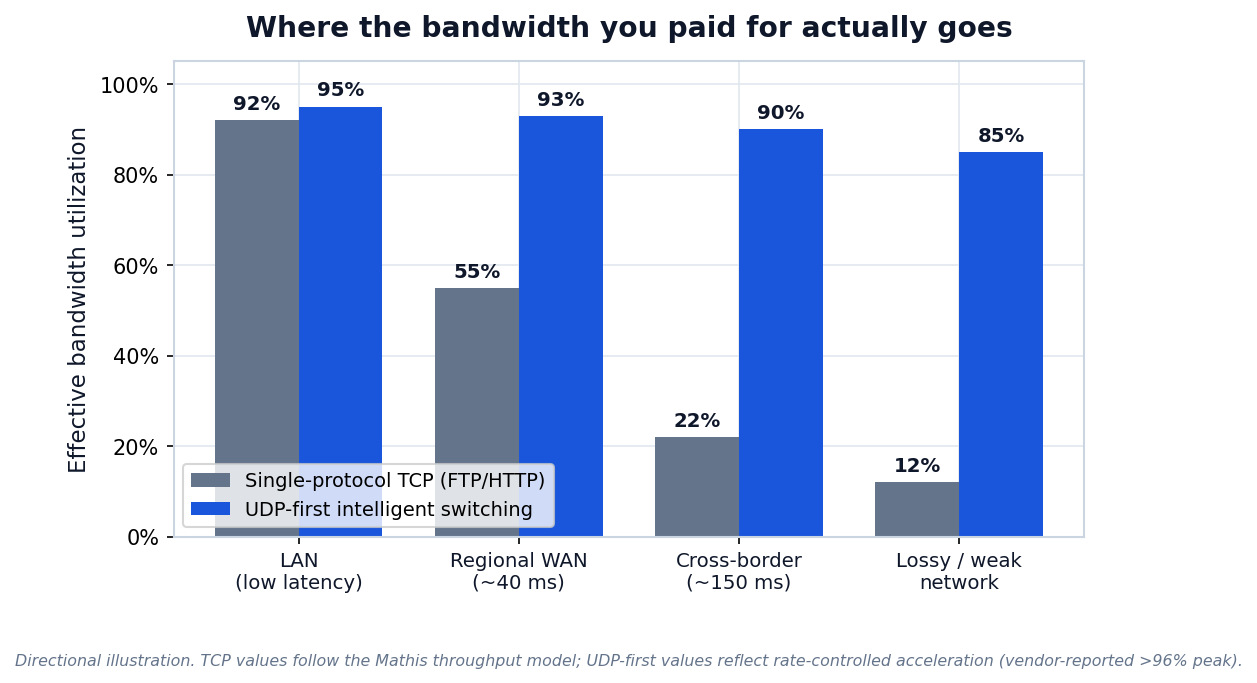
Figure 2: Effective bandwidth utilization across network conditions. TCP values follow the Mathis model; UDP-first values reflect rate-controlled acceleration. Raysync reports >96% peak utilization (vendor-reported).
Automatic fallback to TCP: speed without dead ends
When the system detects that UDP is blocked or failing, it switches to TCP and keeps the task moving. Users stop choosing between “fast” and “reachable” — they get whichever the network allows, automatically, without manual retries or admin tickets.
Latency-based switching: pick the better path, continuously
Link quality isn’t static — the same path performs differently across the day, and branch networks vary widely. Raysync evaluates current latency and routes over UDP when quality is good, switching to the steadier TCP path when jitter or latency makes UDP unsuitable. That turns transfer from a fixed-protocol gamble into dynamic adaptation, cutting manual tuning and troubleshooting.
Adjustable UDP packet size: fit the payload to the path
Packet size is a real lever. Standard Ethernet MTU is 1500 bytes, and after the 28-byte IP + UDP headers, the largest UDP payload that avoids fragmentation is 1472 bytes (Imperva). Oversized packets fragment or get dropped by gateways; undersized ones waste capacity on overhead. Raysync’s client exposes a configurable 600–1442-byte range — deliberately under the 1472-byte ceiling — so teams can tune for MTU, link quality, and security-device policy.
This matters most on cross-carrier public links, VPN / dedicated-line / SD-WAN paths, networks with firewalls, gateways, and NAT, and long-distance jobs that need both stability and throughput.
Raysync vs. traditional single-protocol transfer
Traditional FTP, HTTP, or plain-TCP tools work in simple networks. Once you hit high latency, weak links, cross-border routes, or strict security policy, the gaps show. Here’s the side-by-side:
|
Capability |
Traditional FTP / HTTP / TCP |
Raysync intelligent switching |
|---|---|---|
|
Protocol selection |
Manual or single fixed protocol |
Automatic UDP-first with TCP fallback |
|
Long-distance throughput |
Capped by latency (Mathis limit) |
UDP saturates high-latency links |
|
UDP blocked by firewall/NAT |
Connection fails or stalls |
Auto-falls back to TCP, task continues |
|
Response to changing links |
Manual reconfigure / restart |
Latency-based dynamic switching |
|
Packet-size control |
Typically fixed |
Tunable 600–1442 bytes |
|
Encryption |
Varies (often add-on) |
AES-256 + TLS (vendor-reported) |
Where it pays off: cross-border R&D for manufacturing
A multinational manufacturer moves CAD drawings, simulation data, and production files between its domestic HQ and an overseas R&D center. Files are large, cross-border latency is high, and legacy tools delivered slow, unpredictable transfers.
With UDP-first acceleration and automatic protocol switching, long-distance transfers run closer to line rate and survive link fluctuations without interruption. Design files arrive on schedule, and cross-border R&D collaboration stops waiting on the network.
Frequently asked questions
Is UDP always faster than TCP for file transfer?
No. UDP wins on high-latency, high-bandwidth links because it doesn’t wait for per-packet acknowledgments. On bandwidth-limited or very clean short links, well-tuned TCP can match or beat naive UDP. The advantage of intelligent switching is using each protocol where it’s strongest.
Why does a single TCP connection slow down over long distances?
TCP throughput is bounded by the Mathis relationship: roughly MSS ÷ RTT × (1.22 ÷ √loss). As round-trip time and packet loss rise, that ceiling drops sharply — often to a few Mbps on intercontinental links, no matter the line capacity.
What happens if my firewall blocks UDP?
Intelligent switching detects the failure and automatically continues over TCP. The transfer keeps running rather than erroring out, which removes the manual troubleshooting that single-protocol tools require.
What UDP packet size should I use?
Stay under the ~1472-byte non-fragmenting limit on standard 1500-byte MTU networks. On VPNs, SD-WAN, or tunneled paths with smaller MTUs, a lower value (Raysync supports down to 600 bytes) avoids fragmentation and dropped packets.
Is data encrypted during transfer?
Raysync reports AES-256 encryption with TLS in transit. As with any security claim, confirm the current certification and configuration details against the vendor’s official documentation for your deployment.
How is this different from IBM Aspera or Signiant?
All three use UDP-based acceleration to beat TCP’s latency limits. Raysync’s emphasis is intelligent UDP/TCP switching with automatic fallback and tunable packet size, positioned for complex enterprise networks where UDP availability varies.
The bottom line
“Being able to transfer” is table stakes. Fast and reliable transfer — across regions, through security policy, over links you don’t control — is what actually moves work forward. Single-protocol tools hit a physics-level ceiling; intelligent UDP/TCP switching routes around it.
Sources
-
NetCraftsmen — TCP Performance and the Mathis Equation — accessed Jun 2026
-
NetBeez — Impact of Packet Loss and Round-Trip Time on TCP Throughput — accessed Jun 2026
-
JSCAPE — UDP File Transfer: Up to 100x Faster Than TCP — accessed Jun 2026
-
Imperva — What Is MTU & MSS (fragmentation, 1472-byte UDP payload) — accessed Jun 2026
-
PacGenesis — What is Aspera FASP? (UDP-based acceleration) — accessed Jun 2026
-
Raysync — product overview (AES-256, UDP acceleration, vendor-reported >96% utilization / 100x) — accessed Jun 2026
You might also like

Industry news
December 12, 2024Troubleshooting SFTP slow transfer speed issues? Discover practical fixes for SFTP slow transfer speed and explore Raysync, the ultimate solution for seamless file transfers!
Industry news
May 18, 2026Single-channel TCP wastes 90% of 10Gbps bandwidth. See how Raysync Multi-Channel Transfer delivers 6× throughput with zero infrastructure changes.
Industry news
January 9, 2025Facing challenges transferring large files? This guide provides expert tips and strategies for efficient terabyte file transfers, saving you time and frustration.