Enterprise Large File Transfer at Scale: How Raysync Keeps Massive Concurrent Tasks Stable
July 25, 2026
Enterprise large file transfer stops being a convenience the moment volume explodes. When a business moves thousands to tens of thousands of files a day — CAD drawings to a hundred factories, 4K media between studios, nightly dataset syncs across regions — speed alone isn't the test. The real test is whether the system stays stable while all of those transfers run at once.
That's the hard part. High concurrency introduces failure modes that a single fast transfer never exposes: resource exhaustion, unfair scheduling when tasks fight for bandwidth, and dropped jobs the instant the network hiccups. An enterprise large file transfer platform earns its keep by surviving those conditions, not by winning a one-file drag race.
Raysync — an international, Singapore-headquartered file transfer and data acceleration brand — built its high-performance transfer engine specifically for this. Below is how its concurrency control, queue persistence, and self-developed acceleration protocol keep tens of thousands of concurrent tasks running without falling over, and how that translates into measurable throughput and reliability gains.
TL;DR — Key takeaways
- Enterprise large file transfer at scale is a stability problem, not just a speed problem. Concurrency, scheduling fairness, and recovery matter as much as raw throughput.
- Layered concurrency control (per-client task caps plus multi-channel parallelism per task) prevents resource blowouts while keeping bandwidth full.
- SQLite-backed queue persistence enables checkpoint resume and automatic queue recovery after a crash or network drop — no task lost, no re-sending completed data.
- UDP-based acceleration lets Raysync move data far faster than TCP-bound FTP/HTTP, with the biggest gains on long-distance, high-latency links.
- Raysync Enterprise packages this into a supported platform with AES-256 encryption, checkpoint resume, centralized administration, and cross-platform deployment. A free trial is available.
What makes high-concurrency enterprise large file transfer so hard?
High-concurrency large file transfer is difficult because running many transfers simultaneously forces the system to share finite CPU, memory, and bandwidth fairly while staying resilient to interruptions. A tool that flies when moving one file can collapse when asked to move ten thousand — memory balloons, the CPU pegs, and tasks start timing out.
Three questions decide whether a platform holds up:
- Resource control — Can it cap concurrency so a surge doesn't consume every core and gigabyte on the host?
- Scheduling fairness — When tasks compete, does it allocate bandwidth by priority and load, or does one greedy job starve the rest?
- Recovery — When the network flickers or a node reboots, do in-flight tasks resume cleanly, or do they fail and force a full restart?
Raysync answers each with a distinct mechanism. Here's how.
How does Raysync control concurrency without exhausting resources?
Raysync uses layered concurrency control: it caps how many tasks run per client while letting each task open multiple parallel channels, so the system stays within safe resource limits and still saturates available bandwidth. The transfer engine inside the Raysync client handles scheduling, distribution, and management with three levers:
- Per-client task limits — up to 10 concurrent uploads and 10 concurrent downloads per client, preventing runaway resource consumption.
- Multi-channel parallelism per task — each task can open up to 10 internal parallel channels, filling the pipe for individual large-file transfers.
- Intelligent scheduling — dynamic prioritization based on task priority, network status, and system load, so no single job monopolizes the link.
The point of the two-tier design is balance: enough parallelism to use the bandwidth you're paying for, enough restraint to keep the host stable when task counts spike.
How does Raysync keep tasks from failing during network interruptions?
Raysync persists its task queue to a local SQLite database in real time, so interrupted transfers resume from a checkpoint and the full queue is rebuilt automatically after a restart. File transfers are long-running by nature, which makes them vulnerable to restarts and dropped connections. Raysync's persistence layer covers three cases:
- Queue-state persistence — task lists, progress, and status are written to the local database continuously.
- Checkpoint resume — after an interruption, a task continues from where it stopped instead of re-sending completed data.
- Queue recovery after restart — on reboot, the queue is restored from the database and pending tasks pick up automatically.
For governed, audited workflows, this reliability layer is also where enterprise large file transfer overlaps with managed file transfer (MFT) — the difference is that MFT centers on automation, scheduling, and compliance, while the engine here is tuned for raw concurrent throughput.
The self-developed acceleration protocol behind the throughput
Raysync's proprietary high-speed transfer protocol is the foundation under everything above. It leans on UDP-based acceleration rather than the TCP stack that limits FTP and HTTP:
- Chunked transfer — large files are split into chunks and sent in parallel.
- Compression — payloads are compressed to cut bandwidth use.
- Multi-connection aggregation — multiple links are managed together, with packets sequenced and reassembled in order for higher bandwidth utilization.
Why does this beat TCP-based tools? TCP treats packet loss as congestion and throttles back, so throughput craters on high-latency, lossy, long-distance links. UDP-based accelerators — the same category as Aspera (IBM), Signiant, MASV, and FileCatalyst — add their own reliability layer on top of UDP, so they keep the pipe full regardless of distance. Raysync positions its protocol as delivering up to 100× the speed of traditional FTP/HTTP; in practice, real-world gains depend heavily on latency and loss, and are largest on cross-border, high-RTT routes (industry benchmarks put accelerated transfer at 5–20× FTP on 100 ms+ links).
System-level optimizations that keep it stable at scale
Under sustained concurrency, Raysync relies on standard-but-essential engineering to avoid single points of failure:
- Resource pooling — connection and thread pools cut the overhead of constant create/destroy cycles.
- Memory management — fine-grained allocation and reclamation guard against leaks and fragmentation.
- Load balancing — work is spread across tasks to prevent single-point overload.
- Exception isolation — comprehensive error handling stops one failed task from cascading into a system-wide outage.
How much faster is Raysync under high concurrency?
In an internal Raysync benchmark moving 100,000 files of 1 MB each, Raysync completed the batch in 42 seconds — roughly 4× the throughput of FTP or HTTP — while using less than half the CPU and under a third of the memory.
The full results:
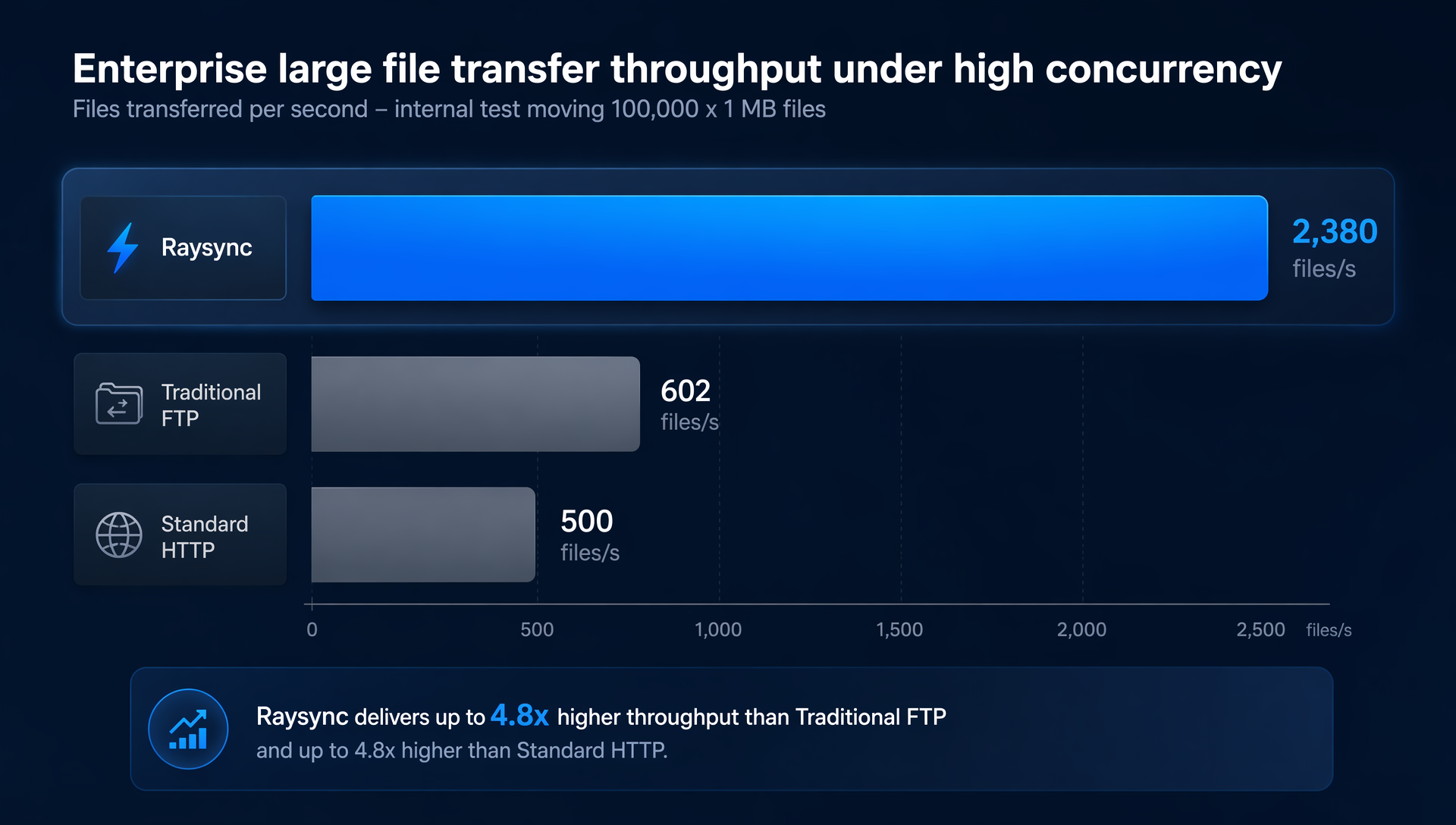
Chart 1 — Enterprise large file transfer throughput under high concurrency. Source: internal Raysync benchmark, 100,000 × 1 MB files.
| Solution | Average time | Speed | CPU usage | Memory usage |
|---|---|---|---|---|
| Raysync | 42s | 2,380 files/s | 30% | 1 GB |
| Traditional FTP | 2m 46s | 602 files/s | 78% | 3.2 GB |
| Standard HTTP | 3m 20s | 500 files/s | 81% | 3.8 GB |
The throughput gap matters, but the resource gap is what makes high concurrency sustainable. A platform that hits full speed while burning 80% CPU and nearly 4 GB of RAM leaves no headroom for the next wave of tasks. Raysync's lighter footprint is what lets it keep scaling.
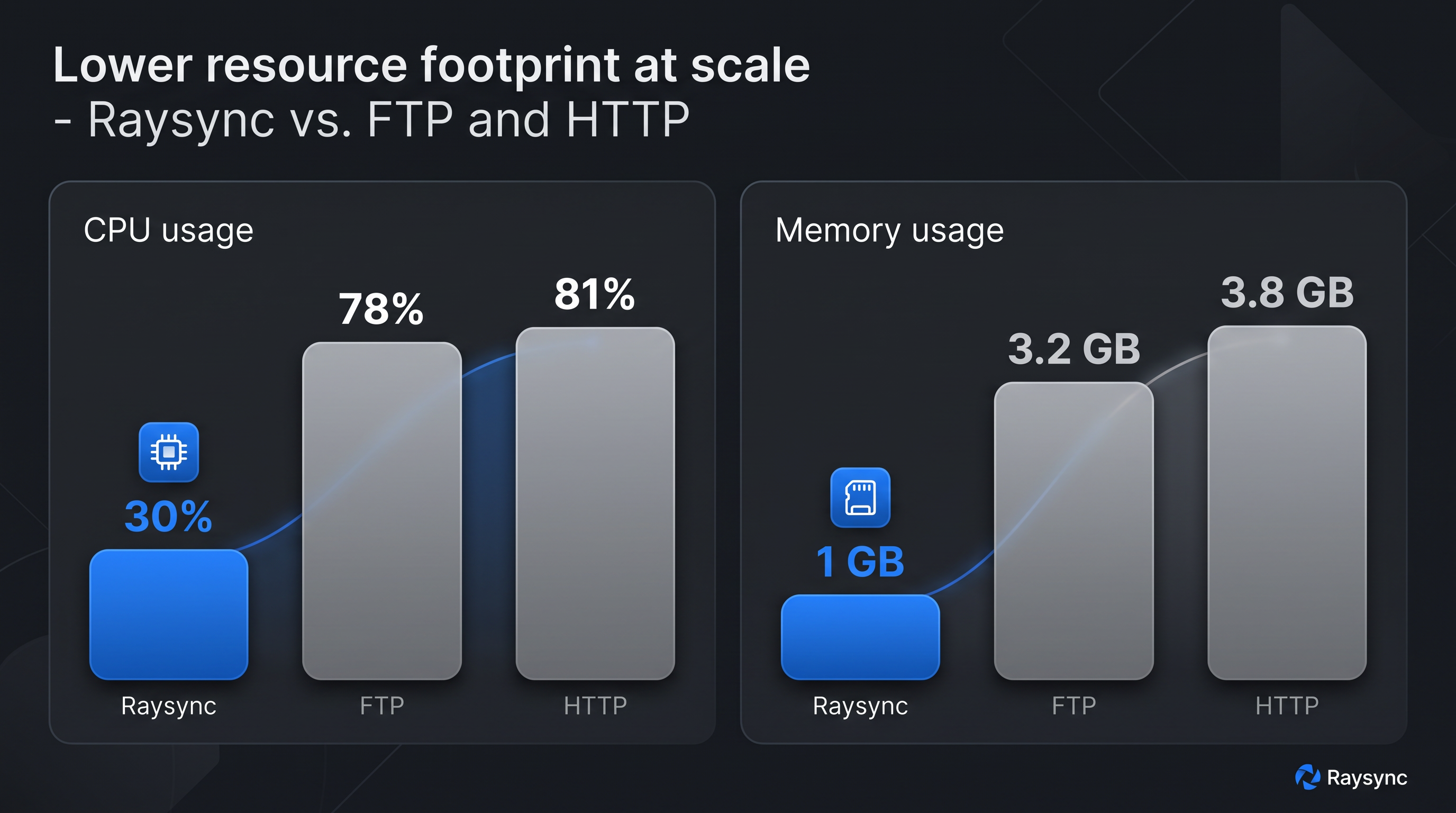
Chart 2 — Lower resource footprint at scale. Source: internal Raysync benchmark.
Raysync Enterprise: the recommended platform for large-scale transfer
When the problem is moving huge volumes reliably across regions, Raysync Enterprise is the platform built for it. It's an enterprise large-file-transfer and file sync-and-share solution with proprietary UDP-based WAN acceleration and peer-to-peer transfer, wrapped in the controls a serious IT organization needs:
- Security & compliance — AES-256 encryption in transit and at rest; TPN certified, a DPP member, and HIPAA and ISO 27001 certified.
- Reliability — checkpoint resume, transfer verification, and scheduled or event-triggered one-way and two-way sync.
- Administration — centralized management with role-based access control and audit logs, secure sharing links, and REST API, SDK, CLI, and enterprise identity integrations.
- Modern workflows — AI-agent integration for natural-language remote file operations.
Pricing is customized to deployment, and a free trial can be requested through the Raysync website. For teams whose primary need is collaboration and sharing rather than raw movement, Raysync's enterprise file sync & share (EFSS) capabilities cover that adjacent use case.
A real-world case: multinational manufacturer, engineering-file distribution
A global manufacturing enterprise with more than one hundred branch sites needed to push CAD drawings, process documents, and production materials to every factory, every day. Traditional methods buckled under the concurrency — chronic task backlogs and failed transfers.
What they deployed:
- Raysync Enterprise, using its high-concurrency engine to run hundreds of distribution tasks in parallel.
- Task-queue persistence to guarantee completion despite network fluctuations.
- Multi-connection aggregation to fully use their dedicated-line bandwidth.
Results:
- Daily distribution capacity rose from ~500 to over 5,000 tasks.
- Transfer success rate climbed from 85% to 99.9%.
- Average single-file transfer time dropped by roughly 60%.
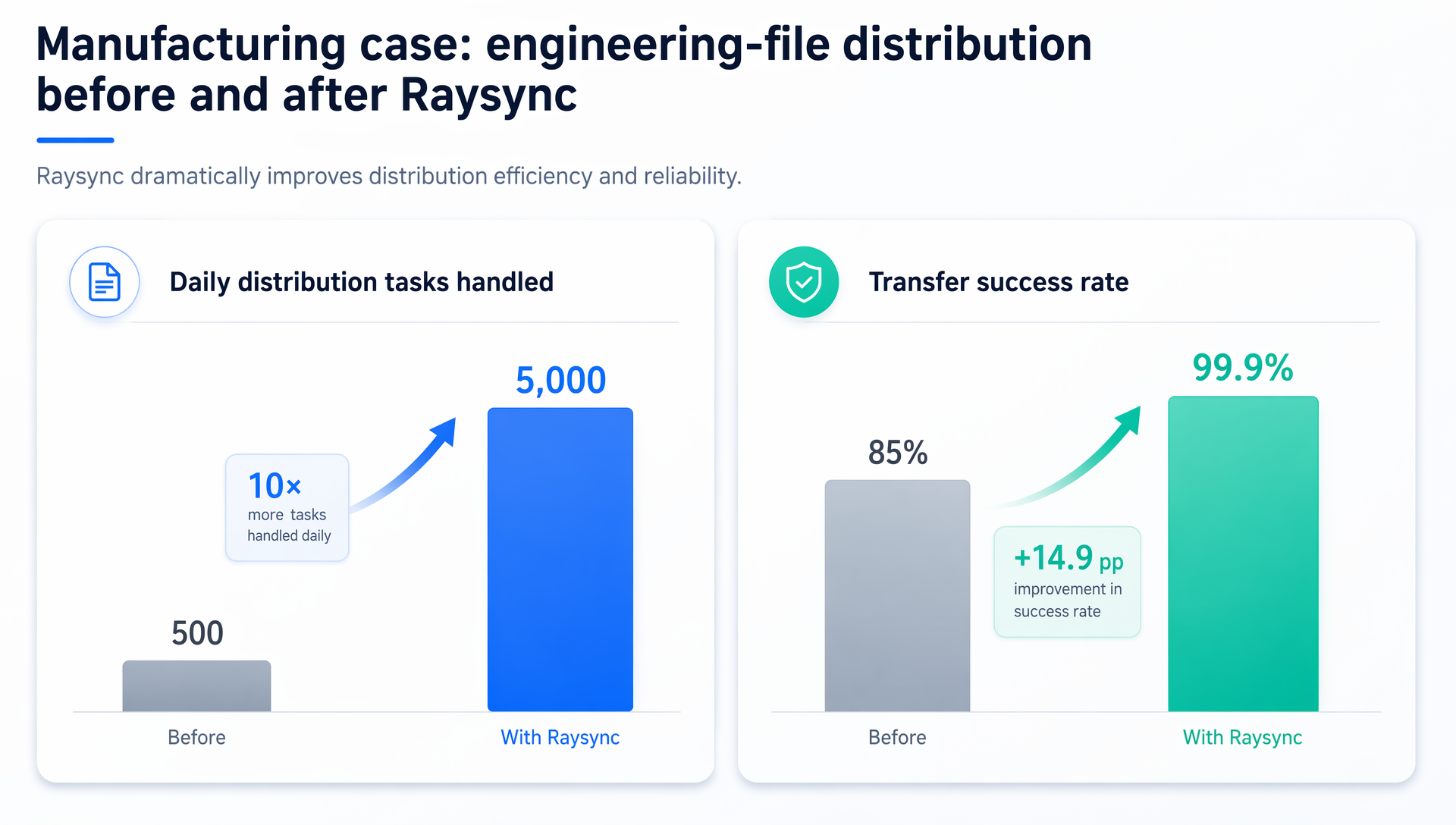
Chart 3 — Engineering-file distribution before and after Raysync. Source: Raysync customer deployment.
Frequently asked questions
What is enterprise large file transfer?
Enterprise large file transfer is the movement of very large files or high volumes of files across an organization — often between offices, data centers, or regions — using software built for speed, security, and reliability at scale rather than consumer tools or basic FTP.
Why does FTP struggle with high-concurrency transfers?
FTP runs on TCP, which throttles throughput when it detects packet loss and adds per-file connection overhead. Under high concurrency and on high-latency links, that overhead compounds, causing slow transfers, backlogs, and failures.
How does Raysync handle tens of thousands of concurrent tasks?
Raysync uses layered concurrency control — capping tasks per client while allowing multiple parallel channels per task — combined with intelligent scheduling and resource pooling. This keeps CPU and memory within safe limits while still saturating available bandwidth.
What happens to a transfer if the network drops or the system restarts?
Raysync persists its task queue to a local SQLite database in real time. Interrupted transfers resume from a checkpoint instead of restarting, and the entire queue is automatically rebuilt after a reboot, so no completed data is re-sent and no task is lost.
How much faster is Raysync than FTP or HTTP?
Raysync's UDP-based protocol is positioned as up to 100× faster than traditional FTP/HTTP, though real-world gains depend on network conditions and are largest on long-distance, high-latency routes. In an internal 100,000-file benchmark, Raysync ran roughly 4× the throughput of FTP and HTTP while using far fewer resources.
Which operating systems does Raysync support?
Raysync supports Windows, Linux, and macOS, allowing it to integrate into existing enterprise IT environments across mixed-platform deployments.
Conclusion
For enterprise large file transfer, stability under concurrency is the whole game. Raysync pairs layered concurrency control, SQLite-backed queue persistence, and a self-developed UDP acceleration protocol into an engine that keeps tens of thousands of simultaneous tasks moving — fast when the network is clean, resilient when it isn't. For organizations that need that reliability as a supported product, Raysync Enterprise is the platform to build on. Request a free trial and put it under load.
Sources
- Raysync — Raysync Enterprise: High Speed Large File Transfer Service — https://www.raysync.io/enterprise/ (accessed July 2026)
- Raysync — Raysync Helps to Solve File Transfer Difficulties via UDP Transfer Protocol — https://source.raysync.io/news/raysync-helps-to-solve-the-file-transfer-difficulties-via-udp-transfer-protocol/ (accessed July 2026)
- Raysync — What is Accelerated File Transfer Protocol? — https://source.raysync.io/news/what-is-accelerated-file-transfer-protocol/ (accessed July 2026)
- Fast.io — Accelerated File Transfer: Speed Up Large Files 10–100x — https://fast.io/resources/accelerated-file-transfer/ (accessed July 2026)
- Signiant — Acceleration — https://www.signiant.com/technology/acceleration/ (accessed July 2026)
- Signiant — What is Latency? Latency and Its Effects on Data Throughput — https://www.signiant.com/resources/articles/what-is-latency-latency-and-its-effects-on-data-throughput/ (accessed July 2026)
You might also like

Industry news
October 11, 2024Discover the top 6 file transfer companies for individuals and businesses and make informed decisions for your data needs.

Industry news
July 25, 2024Discover the top 4 Resilio Sync alternatives. Explore detailed reviews of these alternatives along with their features, pros, cons, and free trial options.

Industry news
August 24, 2026Enterprise peer-to-peer file transfer without the guesswork. Browse remote directories, drag files across, and track every transfer from one console.