Raysync v8.1.8.9 Release: Dark Mode, Global Languages, and Smarter License Management
September 24, 2026
We are excited to announce the official release of Raysync v8.1.8.9. This update brings a refreshed visual experience, expanded language support for global teams, and a more proactive approach to license management — helping enterprises run Raysync more comfortably, more globally, and with fewer operational surprises.
Here's what's new.
I. A Better Experience, Day and Night
Dark Mode
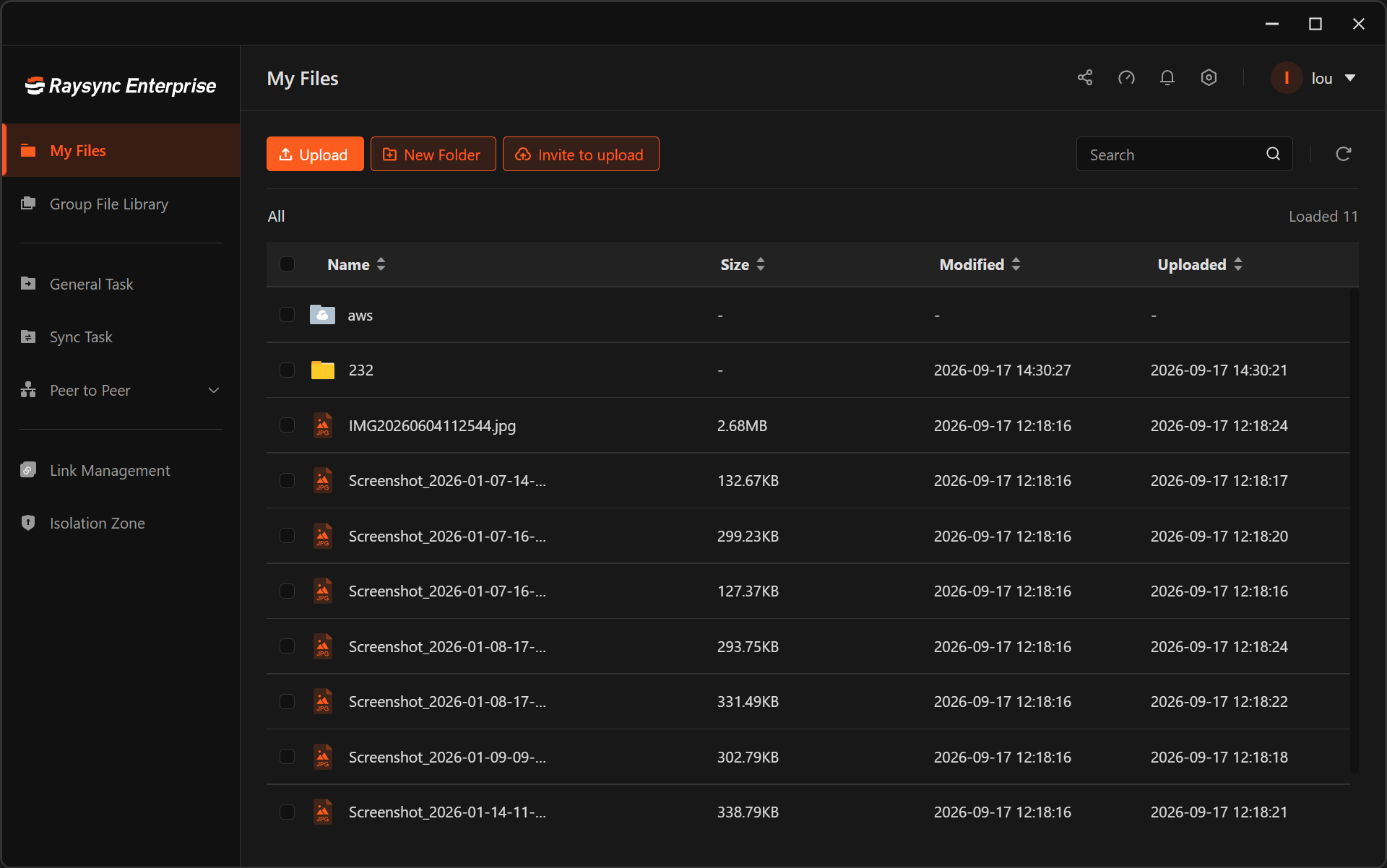
The Raysync admin portal and user portal now support Dark Mode, giving users a comfortable viewing experience in low-light environments and reducing eye strain during long working sessions.
Why it matters:
-
Reduced eye fatigue for users working extended hours
-
Modern, professional look that aligns with today's enterprise software standards
-
User preference respected — switch between light and dark themes based on your environment
Whether you're managing transfers during a late-night maintenance window or simply prefer a darker interface, Raysync now adapts to you.
II. A Management Console Built for Global Teams
Multi-Language Support
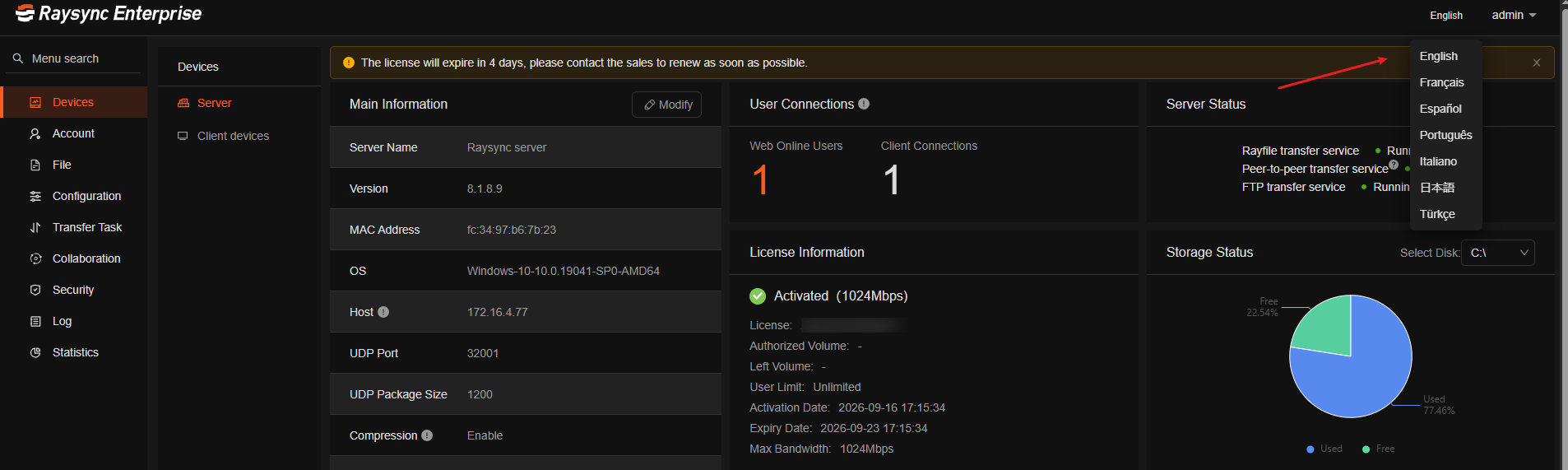
The Raysync admin portal now supports multiple languages, including:
-
Japanese
-
French
-
Turkish
-
Spanish
-
Portuguese
-
Italian
Why it matters:
-
Faster onboarding for regional IT teams and local administrators
-
Reduced training costs across multinational deployments
-
Fewer configuration errors when operators work in their native language
-
A more consistent experience for distributed operations teams managing the same platform
Whether your infrastructure spans Tokyo, Paris, Istanbul, Madrid, São Paulo, or Rome, your admins can now manage Raysync in the language they think in.
III. Never Get Caught Off Guard by License Issues Again
License management should be invisible — until something needs your attention. This release introduces a proactive notification and recovery system that keeps administrators informed and operations running smoothly.
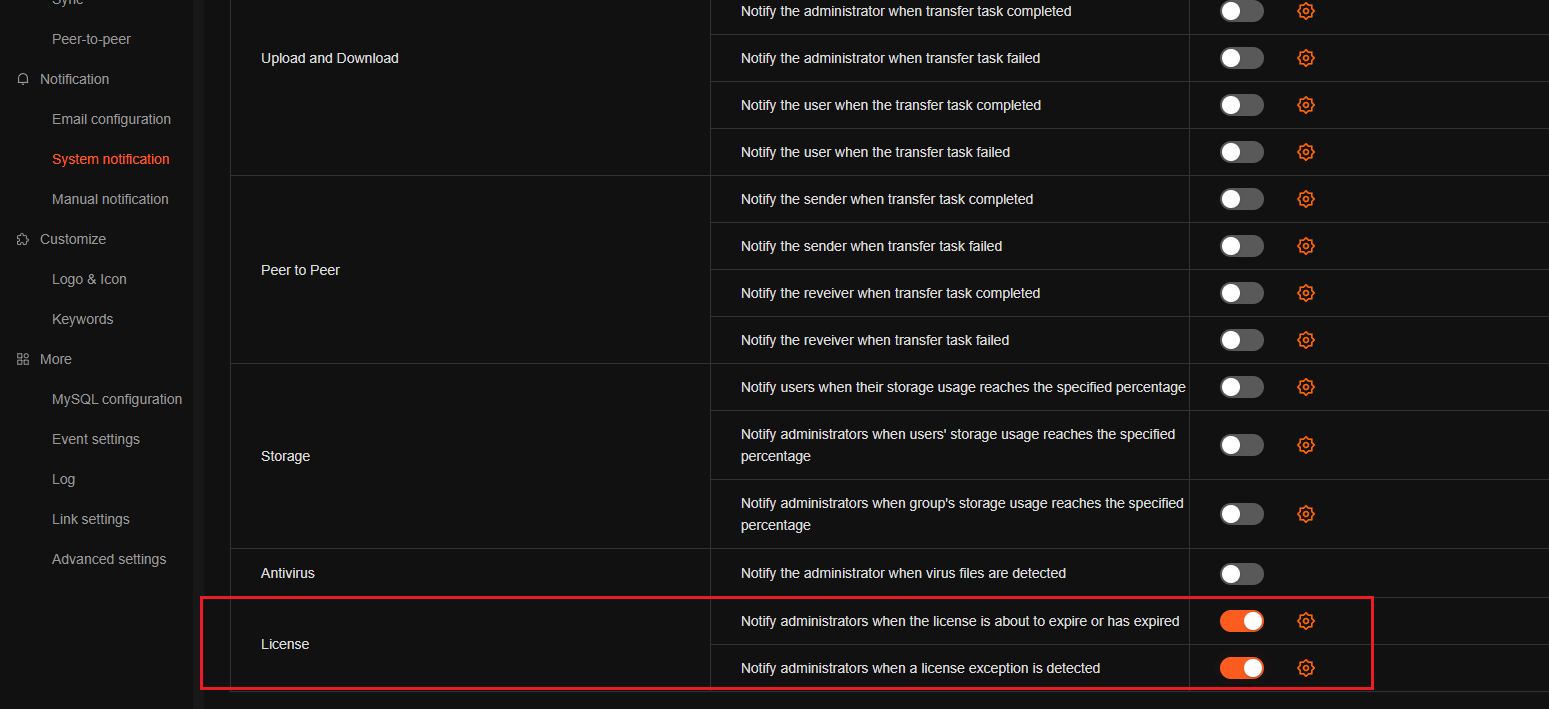
1. Email Notifications Before License Expiration
Administrators now receive automated email reminders before the license expires, giving your team ample time to renew and avoid service interruptions.
Why it matters:
-
No more last-minute scrambles or accidental downtime
-
Predictable renewal planning for procurement and finance teams
-
Continuous file transfer operations with zero surprises
2. Email Alerts for Online License Network Anomalies
If the system detects network anomalies affecting online license validation, administrators are notified immediately by email.
Why it matters:
-
Early warning before connectivity issues escalate into license failures
-
Faster troubleshooting with clear, actionable alerts
-
Reduced risk of unexpected service degradation in distributed environments
3. Automatic Retry for Failed Online License Activations
Online license activation now includes automatic retry logic when network failures occur.
Why it matters:
-
Higher activation success rates, even on unstable networks
-
Less manual intervention required from IT staff
-
Smoother deployment experience for new installations and migrations
4. 1-Hour Keep-Alive During Network Anomalies
When online license validation encounters network issues, the system now maintains a 1-hour keep-alive window to delay service disruption.
Why it matters:
-
Business continuity — transfers keep running during temporary network fluctuations
-
Grace period for recovery — gives administrators time to resolve connectivity issues before the license check fails
-
Fewer false alarms — short-lived network blips no longer trigger unnecessary system alerts or downtime
This is especially valuable for deployments in regions with unstable connectivity or behind restrictive network environments, where transient failures are common.
IV. Why This Release Matters
|
Challenge |
Raysync 8.1.8.9 Solution |
|
Eye strain during long admin sessions |
Dark Mode |
|
Global teams struggling with a single-language console |
Multi-language support (JP, FR, TR, ES, PT, IT) |
|
Unexpected license expiration causing downtime |
Pre-expiration email notifications |
|
Silent network issues disrupting license validation |
Real-time anomaly alerts |
|
Failed activations on unstable networks |
Automatic retry mechanism and 1-Hour keep-alive |
Together, these improvements reduce operational risk, lower administrative overhead, and make Raysync easier to deploy and manage at enterprise scale — wherever your team is and whenever they work.
Get Started with the Latest Update!
Raysync 8.1.8.9 is ready for you. Upgrade today to enjoy a more comfortable interface, native-language management, and licensing that works quietly in the background — so your team can focus on moving data, not managing software.
You might also like

Industry news
August 24, 2022FTP(File Transfer Protocol) is a common protocol in the file transfer process.Here is difference of active and passive mode for file transfer protocol.

Industry news
April 17, 2025Considering OneDrive for Business? Our in-depth purchasing guide offers a human-friendly review, highlighting key features, pricing, and benefits. Make an informed decision before you buy.
Industry news
December 6, 2024Learn how to effortlessly set up a Chrome FTP server. This step-by-step guide will walk you through the entire process.